
1. Introduction
The java.util.Scanner class can read input from System.in, File, InputStream, Path, Readable, String, etc. It implements the Closeable and AutoCloseable interfaces. The scanner close method will close its input source if the input source implements the Closeable interface. In this example, I will demonstrate how Eclipse IDE detects the resource leak and how to close a scanner in a Java project.
2. Setup
In this step, I will create a Java project in the Eclipse IDE with four files.
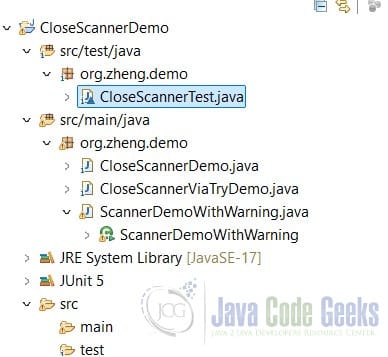
ScannerDemoWithWarning.java– see step 3 for details.CloseScannerViaTryDemo.java– see step 4 for details.CloseScannerDemo.java– see step 5 for details.CloseScannerTest.java– see step 5.1 for details.
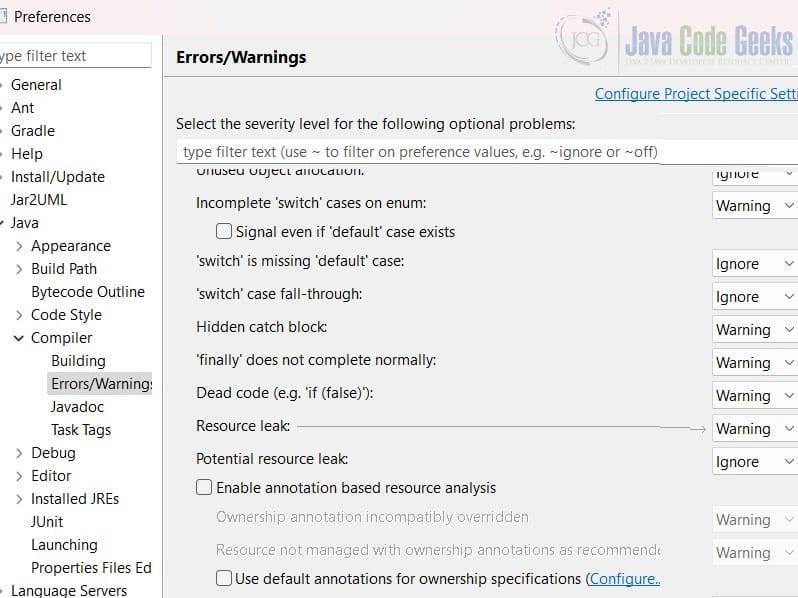
Click the Eclipse IDE “Windows->Preferences” and navigate to “Java->Compiler->Errors/Warnings“. Find the “Resource leak:” and see that Eclipse IDE configures it as “Warning“.
3. ScannerDemoWithWarning
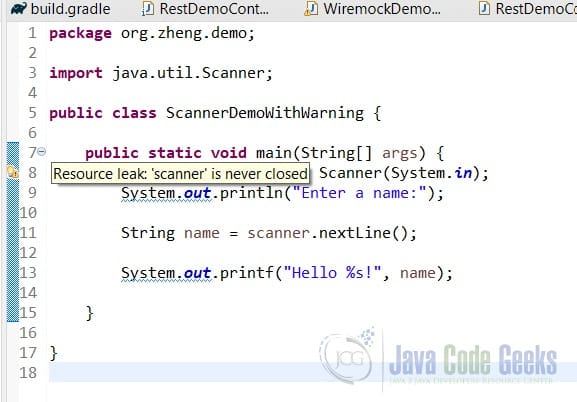
In this step, I will create a ScannerDemoWithWarning.java that creates a scanner from System.in and read a string via the nextLine method. The program exits without closing the scanner.
ScannerDemoWithWarning.java
package org.zheng.demo;

import java.util.Scanner;

public class ScannerDemoWithWarning {

	public static void main(String[] args) {
		Scanner scanner = new Scanner(System.in);
		System.out.println("Enter a name:");

		String name = scanner.nextLine();
		System.out.printf("Hello %s!", name);
	}

}
The Eclipse IDE shows a warning message: “Resource leak: 'scanner' is never closed“.
4. Scanner Close via Try-with-Resource
In this step, I will click the “Surround with try-with-resources” from the Eclipse IDE quick fix button.
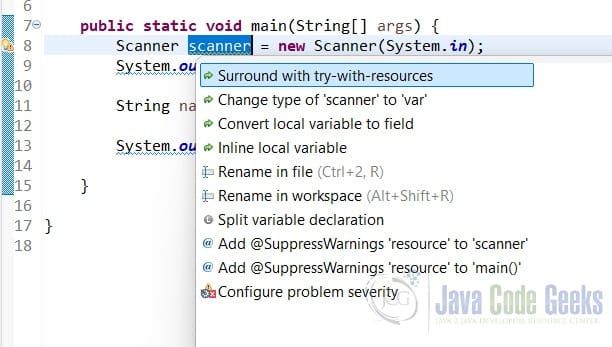
Here is the fixed source code for ScannerDemoWithWarning.java.
Fixed ScannerDemoWithWarning.java
package org.zheng.demo;

import java.util.Scanner;

public class ScannerDemoWithWarning {

	public static void main(String[] args) {
		try (Scanner scanner = new Scanner(System.in)) {
			System.out.println("Enter a name:");

			String name = scanner.nextLine();
			System.out.printf("Hello %s!", name);
		}
	}

}
- Line 8: the
try-with-resourceswill automatically close thescanner.
5. Scanner Close
In this step, I will create a CloseScannerDemo.java class that creates a scanner from a text file and closes the scanner before the program exits.
CloseScannerDemo.java
package org.zheng.demo;

import java.io.File;
import java.io.FileNotFoundException;
import java.util.Scanner;

public class CloseScannerDemo {

	public static void main(String[] args) throws FileNotFoundException {

		File fileO = new File("C:\\MaryTools\\workspace\\CloseScannerDemo\\data.txt");
		Scanner scanner = new Scanner(fileO);

		String name = scanner.nextLine();

		System.out.printf("Hello %s!", name);

		scanner.close();
		// this does not close the File as File is not implements Closeable Interface,
		// so it will cause memory leak
	}

}
- Line 11:
Filedoes not implement theCloseableinterface, so after thescanneris closed, thefileis not released. This will lead to file locking and memory leak issues.
Here is the text data file content.
data.txt content
Mary
Here is the updated CloseScannerDemo.java that will close the scanner and its FileInputStream as FileInputStream implements the Closeable interface.
Proper CloseScannerDemo.java
package org.zheng.demo;

import java.io.File;
import java.io.FileInputStream;
import java.io.FileNotFoundException;
import java.util.Scanner;

public class CloseScannerDemo {

	public static void main(String[] args) throws FileNotFoundException {

		File fileO = new File("C:\\MaryTools\\workspace\\CloseScannerDemo\\data.txt");
		try (Scanner scanner = new Scanner(new FileInputStream(fileO))) {
			String name = scanner.nextLine();

			System.out.printf("Hello %s!", name);
		}

	}

}
- Line 13: try-with-resources with
FileInputStreamis better as it closes its input sources.
5.1 Scanner Close Test
In this step, I will create a CloseScannerTest.java that verifies the System.in is also closed when the scanner is closed. Therefore can not create another new scanner nor use the already closed scanner.
CloseScannerTest.java
package org.zheng.demo;

import static org.junit.jupiter.api.Assertions.assertThrows;

import java.util.NoSuchElementException;
import java.util.Scanner;

import org.junit.jupiter.api.Test;

class CloseScannerTest {

	@Test
	void throwIllegalStateExceptionOnReuseClosedScanner() {
		Scanner scanner = new Scanner(System.in);
		System.out.println("Enter a name:");

		String name = scanner.nextLine();
		System.out.printf("Hello %s!", name);

		// add close at the last statement
		scanner.close();
		// The System.in is InputStream class that implements Closeable
		assertThrows(IllegalStateException.class, scanner::nextInt);

	}

	@Test
	void throwNoSuchElementExceptionOnNewScannerWithClosedSystemIn() {
		Scanner scanner = new Scanner(System.in);
		System.out.println("Enter a name:");

		String name = scanner.nextLine();
		System.out.printf("Hello %s!", name);

		// add close at the last statement
		scanner.close();// this close the System.in as it implements Closeable
		Scanner scanner2 = new Scanner(System.in);
		assertThrows(NoSuchElementException.class, scanner2::nextInt);
		scanner2.close();
	}

}
- Line 23:
IllegalStateExceptionis thrown when accessing the already closed scanner. - Line 38:
NoSuchElementExceptionis thrown when accessing the scanner with closedSystem.in.
6. Conclusion
In this example, I demonstrated how Eclipse IDE detects the scanner-is-not-closed problem and how It provides a fix with try-with-resources. Scanner close via try-with-resources ensures automatic closure even if an exception occurs.
7. Download
This was an example of a Java project that includes scanner close examples.
You can download the full source code of this example here: Closing Scanner Java Example



