
Thymeleaf is a modern server-side Java template engine commonly used with Spring Boot applications. One of its powerful features is the ability to interact directly with Java objects that are placed in the model. This includes calling methods on those objects, invoking static utility methods, and even using Spring-managed beans inside HTML templates. Let us delve into understanding how Thymeleaf calls object methods in a Spring Boot application.
1. Introduction to Thymeleaf
Thymeleaf is a modern server-side Java template engine designed to work seamlessly with Spring-based applications. It allows developers to bind backend data directly to HTML views using natural, readable expressions, making templates easy to understand, maintain, and debug. One of Thymeleaf’s powerful features is its ability to call Java methods—whether they belong to model objects, Spring-managed beans, or static utility classes.
1.1 Why Call Object Methods?
Calling methods from Thymeleaf enables you to move logic out of HTML and into well-structured Java classes, keeping a clean separation between presentation and behavior while still allowing dynamic rendering. Calling methods from Thymeleaf can help you:
- Keep templates expressive and readable by using simple, declarative expressions instead of complex conditional markup
- Encapsulate formatting or business logic inside Java classes where it can be tested, reused, and maintained easily
- Avoid duplicating logic inside templates, reducing errors and inconsistencies across views
- Reuse utility or helper methods such as date formatting, string manipulation, or computed values
- Improve maintainability by centralizing logic changes in Java code rather than updating multiple templates
- Leverage Spring features like dependency injection by calling Spring-managed beans directly from templates
Overall, method calls in Thymeleaf help strike a balance between dynamic view rendering and clean application architecture, allowing templates to remain focused on presentation while Java handles computation and logic.
2. Complete Working Example
2.1 Project Dependencies Configuration (pom.xml)
This Maven configuration sets up a basic Spring Boot project with web and Thymeleaf support.
<project xmlns="http://maven.apache.org/POM/4.0.0"
         xmlns:xsi="http://www.w3.org/2001/XMLSchema-instance"
         xsi:schemaLocation="http://maven.apache.org/POM/4.0.0
         http://maven.apache.org/xsd/maven-4.0.0.xsd">

    <modelVersion>4.0.0</modelVersion>

    <groupId>com.example</groupId>
    <artifactId>demo</artifactId>
    <version>0.0.1-SNAPSHOT</version>
    <packaging>jar</packaging>

    <name>Thymeleaf Method Call Demo</name>

    <parent>
        <groupId>org.springframework.boot</groupId>
        <artifactId>spring-boot-starter-parent</artifactId>
        <version>stable__jar__version</version>
    </parent>

    <dependencies>
        <!-- Spring MVC -->
        <dependency>
            <groupId>org.springframework.boot</groupId>
            <artifactId>spring-boot-starter-web</artifactId>
        </dependency>

        <!-- Thymeleaf -->
        <dependency>
            <groupId>org.springframework.boot</groupId>
            <artifactId>spring-boot-starter-thymeleaf</artifactId>
        </dependency>
    </dependencies>

    <properties>
        <java.version>17</java.version>
    </properties>

</project>
This pom.xml defines a Spring Boot application using the official parent POM for dependency management, configures project metadata, enables Java 17, and includes the Spring Web dependency for building MVC-based web applications along with Thymeleaf for server-side HTML template rendering.
2.2 Spring Boot Application Entry Point
This is the entry point of the Spring Boot application that bootstraps and launches the app.
package com.example.demo;

import org.springframework.boot.SpringApplication;
import org.springframework.boot.autoconfigure.SpringBootApplication;

@SpringBootApplication
public class DemoApplication {

    public static void main(String[] args) {
        SpringApplication.run(DemoApplication.class, args);
    }
}
The @SpringBootApplication annotation enables component scanning, auto-configuration, and configuration support, while the main method delegates to SpringApplication.run() to start the embedded server, initialize the Spring context, and launch the application.
2.3 Domain Model with Instance Method Access
This model class represents a user and exposes instance methods that can be directly invoked from Thymeleaf templates.
package com.example.demo.model;

public class User {

    private String firstName;
    private String lastName;
    private int age;

    public User(String firstName, String lastName, int age) {
        this.firstName = firstName;
        this.lastName = lastName;
        this.age = age;
    }

    public String getFirstName() {
        return firstName;
    }

    public String getLastName() {
        return lastName;
    }

    public int getAge() {
        return age;
    }

    // Method called from Thymeleaf
    public String getFullName() {
        return firstName + " " + lastName;
    }

    public boolean isAdult() {
        return age >= 18;
    }
}
The User class holds basic user data and provides standard getters along with custom instance methods such as getFullName() and isAdult(), which can be called directly in Thymeleaf expressions to compute derived values or apply conditional logic in the view layer.
2.4 Spring Service Bean Method Invocation
This service component provides reusable business logic that can be accessed from controllers and Thymeleaf templates.
package com.example.demo.service;

import org.springframework.stereotype.Service;

@Service
public class GreetingService {

    public String greet(String name) {
        return "Welcome, " + name + "!";
    }
}
The @Service annotation registers GreetingService as a Spring-managed bean, allowing its greet() method to be invoked wherever the bean is available, including Thymeleaf templates using Spring Expression Language to generate dynamic, reusable greeting messages.
2.5 Static Utility Methods in Thymeleaf
This utility class contains static helper methods that can be accessed without creating an instance.
package com.example.demo.util;

import java.time.LocalDate;
import java.time.format.DateTimeFormatter;

public class DateUtil {

    public static String today() {
        return LocalDate.now()
                .format(DateTimeFormatter.ofPattern("dd MMM yyyy"));
    }
}
The DateUtil class defines a static today() method that formats the current date, and in Thymeleaf it can be called directly using the T() syntax to reference the class and invoke static methods for displaying computed values in templates.
2.6 Controller for Preparing View Data
This controller handles incoming web requests and prepares model data for rendering in the Thymeleaf view.
package com.example.demo.controller;

import com.example.demo.model.User;
import org.springframework.stereotype.Controller;
import org.springframework.ui.Model;
import org.springframework.web.bind.annotation.GetMapping;

@Controller
public class UserController {

    @GetMapping("/user")
    public String userPage(Model model) {

        User user = new User("John", "Doe", 25);

        model.addAttribute("user", user);
        return "user";
    }
}
The UserController maps HTTP GET requests to /user, creates a User object, adds it to the model under the name user, and returns the view name so Thymeleaf can access the model data and render the corresponding template.
2.7 Thymeleaf Template Demonstrating Method Calls
This Thymeleaf template demonstrates how to call instance methods, Spring bean methods, and static utility methods while rendering a view.
<!DOCTYPE html>
<html xmlns:th="http://www.thymeleaf.org">
<head>
    <title>Thymeleaf Method Call Example</title>
</head>
<body>

<h2>Calling Object Methods From Thymeleaf</h2>

<!-- Calling instance methods -->
<p>
    Full Name:
    <span th:text="${user.fullName}"></span>
</p>

<p>
    Adult:
    <span th:text="${user.adult}"></span>
</p>

<!-- Calling Spring bean method -->
<p th:text="${@greetingService.greet(user.fullName)}"></p>

<!-- Calling static method -->
<p>
    Today’s Date:
    <span th:text="${T(com.example.demo.util.DateUtil).today()}"></span>
</p>

</body>
</html>
This template accesses the user model attribute to call instance methods via property-style syntax, invokes a Spring-managed bean using the @beanName notation, and calls a static utility method using the T(ClassName) expression, showcasing multiple ways Thymeleaf integrates backend logic into the view layer.
2.8 Running the Application and Output
Start the Spring Boot application using Maven from the project root directory.
mvn spring-boot:run
Once the application starts successfully, open a browser and navigate to:
http://localhost:8080/user
When the /user endpoint is accessed, Thymeleaf renders the template using model data, bean methods, and static methods.
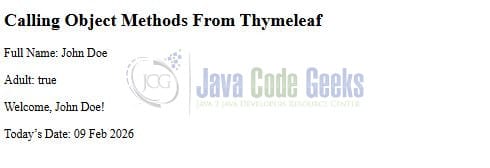
The output confirms that Thymeleaf successfully calls instance methods on the model object, invokes a Spring service bean method, and executes a static utility method to dynamically generate content in the rendered HTML page.
3. Conclusion
Thymeleaf provides flexible and powerful ways to call methods from Java code directly within templates. You can call methods on model objects using property-style expressions, invoke static methods with the T() operator, and use Spring beans via the @beanName syntax. When used responsibly, these features help keep templates clean, expressive, and closely aligned with your domain model while maintaining a clear separation of concerns in your Spring Boot applications.





