REST API documentation provides a structured way to describe endpoints, request/response formats, authentication, and usage examples. Without proper documentation, even well-designed APIs become difficult to use and maintain.
In this article, we will build a Node.js API using Express, define schemas using Zod, generate an OpenAPI specification using zod-to-openapi, and render the documentation using Scalar. This approach ensures type safety, automation, and a clean developer experience.
1. REST API Documentation Tools for Node.js
There are several tools available in the Node.js ecosystem for generating and displaying API documentation. Each tool serves a slightly different purpose, ranging from manual documentation to fully automated solutions.
Popular tools include Swagger (OpenAPI), Redoc, Postman, and Scalar. Swagger UI is widely used but can feel heavy, while Redoc focuses on clean, readable layouts. Postman is excellent for collaboration and testing but not always ideal as a public-facing documentation tool.
Scalar is a modern alternative that delivers fast performance and a beautiful interface. When combined with OpenAPI, it provides interactive documentation where we can explore endpoints and execute requests directly from the browser.
2. Zod and zod-to-openapi
Zod is a TypeScript-first schema validation library that ensures our data structures are consistent and type-safe. Instead of defining schemas separately for validation and documentation, Zod allows us to define them once and reuse them across our application.
The zod-to-openapi library bridges the gap between runtime validation and API documentation. It converts Zod schemas into OpenAPI-compatible definitions automatically, reducing duplication and ensuring our documentation always matches our implementation.
3. Scalar for REST API Documentation
Scalar is a lightweight API documentation renderer designed to work seamlessly with OpenAPI specifications. It provides a modern UI, fast load times, and built-in request testing capabilities.
Scalar requires minimal setup. We simply provide an OpenAPI specification, and it renders a fully interactive documentation interface.
4. Project Setup
To begin, we’ll initialize a Node.js project and install all required dependencies for building the API, validating schemas, and generating documentation.
Initialize the Project
mkdir scalar-node-api
cd scalar-node-api
npm init -y
This initializes a new Node.js project and creates a default package.json file, which will manage dependencies and scripts.
Install Dependencies
npm install express cors zod @asteasolutions/zod-to-openapi@7.3.4
Here, express is used to build the API, CORS enables cross-origin requests, zod handles schema validation, and @asteasolutions/zod-to-openapi generates the OpenAPI specification from Zod schemas.
Project Structure
:scalar-node-api
.
├── package-lock.json
├── package.json
├── public
│   └── scalar.html
└── src
    ├── app.js
    ├── openapi
    │   └── generateOpenApi.js
    ├── routes
    │   └── userRoutes.js
    └── schemas
        └── userSchema.js
This structure separates API logic, schema definitions, and documentation generation, ensuring a clean architecture.
5. Defining Schemas with Zod
We’ll define our data models using Zod, which will later be converted into OpenAPI definitions.
src/schemas/userSchema.js
const {z} = require("zod");

const UserSchema = z.object({
    id: z.number().int(),
    name: z.string().min(1)
});

const CreateUserSchema = z.object({
    name: z.string().min(1)
});

module.exports = {
    UserSchema,
    CreateUserSchema
};
This file defines validation rules for user data. The UserSchema represents a full user object, while CreateUserSchema is used for incoming requests. These schemas ensure data consistency and will later power our API documentation.
6. Generating OpenAPI from Zod
Now we convert Zod schemas into an OpenAPI specification using zod-to-openapi.
src/openapi/generateOpenApi.js
const {OpenAPIRegistry, OpenApiGeneratorV3, extendZodWithOpenApi} = require("@asteasolutions/zod-to-openapi");
const {UserSchema, CreateUserSchema} = require("../schemas/userSchema");
const {z} = require("zod");

extendZodWithOpenApi(z);
const registry = new OpenAPIRegistry();

registry.register("User", UserSchema);

registry.registerPath({
    method: "get",
    path: "/api/users",
    description: "Get all users",
    responses: {
        200: {
            description: "List of users",
            content: {
                "application/json": {
                    schema: {
                        type: "array",
                        items: UserSchema
                    }
                }
            }
        }
    }
});

registry.registerPath({
    method: "post",
    path: "/api/users",
    description: "Create a user",
    request: {
        body: {
            content: {
                "application/json": {
                    schema: CreateUserSchema
                }
            }
        }
    },
    responses: {
        201: {
            description: "User created"
        }
    }
});

const generator = new OpenApiGeneratorV3(registry.definitions);

const document = generator.generateDocument({
    openapi: "3.1.1",
    info: {
        title: "User API",
        version: "1.0.0"
    },
    servers: [{url: "http://localhost:3000"}]
});

module.exports = document;
This file registers schemas and routes, then generates an OpenAPI document programmatically. It ensures that your API documentation is always synchronized with your validation logic.
7. Creating the REST API
Next, we implement the actual API endpoints using Express.
src/routes/userRoutes.js
const express = require("express");
const router = express.Router();

let users = [
    {id: 1, name: "Thomas A"},
    {id: 2, name: "Rumi D"}
];

router.get("/", (req, res) => {
    res.json(users);
});

router.post("/", (req, res) => {
    const newUser = {
        id: users.length + 1,
        name: req.body.name
    };
    users.push(newUser);
    res.status(201).json(newUser);
});

module.exports = router;
This defines two endpoints: one for retrieving users and another for creating new users. The implementation is simple and uses in-memory storage to keep the focus on documentation.
Setting Up the Express Application
Now we integrate everything, including serving the OpenAPI document.
src/app.js
const express = require("express");
const cors = require("cors");
const path = require("path");
const userRoutes = require("./routes/userRoutes");
const openApiDocument = require("./openapi/generateOpenApi");

const app = express();

app.use(cors());
app.use(express.json());

app.use("/api/users", userRoutes);

// Serve OpenAPI JSON
app.get("/openapi.json", (req, res) => {
    res.json(openApiDocument);
});

// Serve Scalar UI
app.use("/docs", express.static(path.join(__dirname, "../public")));

const PORT = 3000;
app.listen(PORT, () => {
    console.log(`Server running at http://localhost:${PORT}`);
});
This file wires together routes, middleware, and documentation. The /openapi.json endpoint serves the generated OpenAPI spec, which Scalar will consume.
Integrating Scalar UI
Finally, we create a simple HTML file to render the documentation using Scalar.
public/scalar.html
<!DOCTYPE html>
<html>
    <head>
        <title>API Documentation</title>
        <script src="/https://cdn.jsdelivr.net/npm/@scalar/api-reference"></script>
    </head>
    <body>
        <div id="app"></div>

        <script>
            Scalar.createApiReference('#app', {
                url: '/openapi.json',
                theme: 'default'
            });
        </script>
    </body>
</html>
This file loads Scalar via CDN and points it to the OpenAPI JSON endpoint. Scalar then renders a fully interactive API documentation interface where users can explore and test endpoints.
To start the server, run:
node src/app.js
This launches the application on port 3000, making both the API and documentation available locally.
Accessing the Documentation
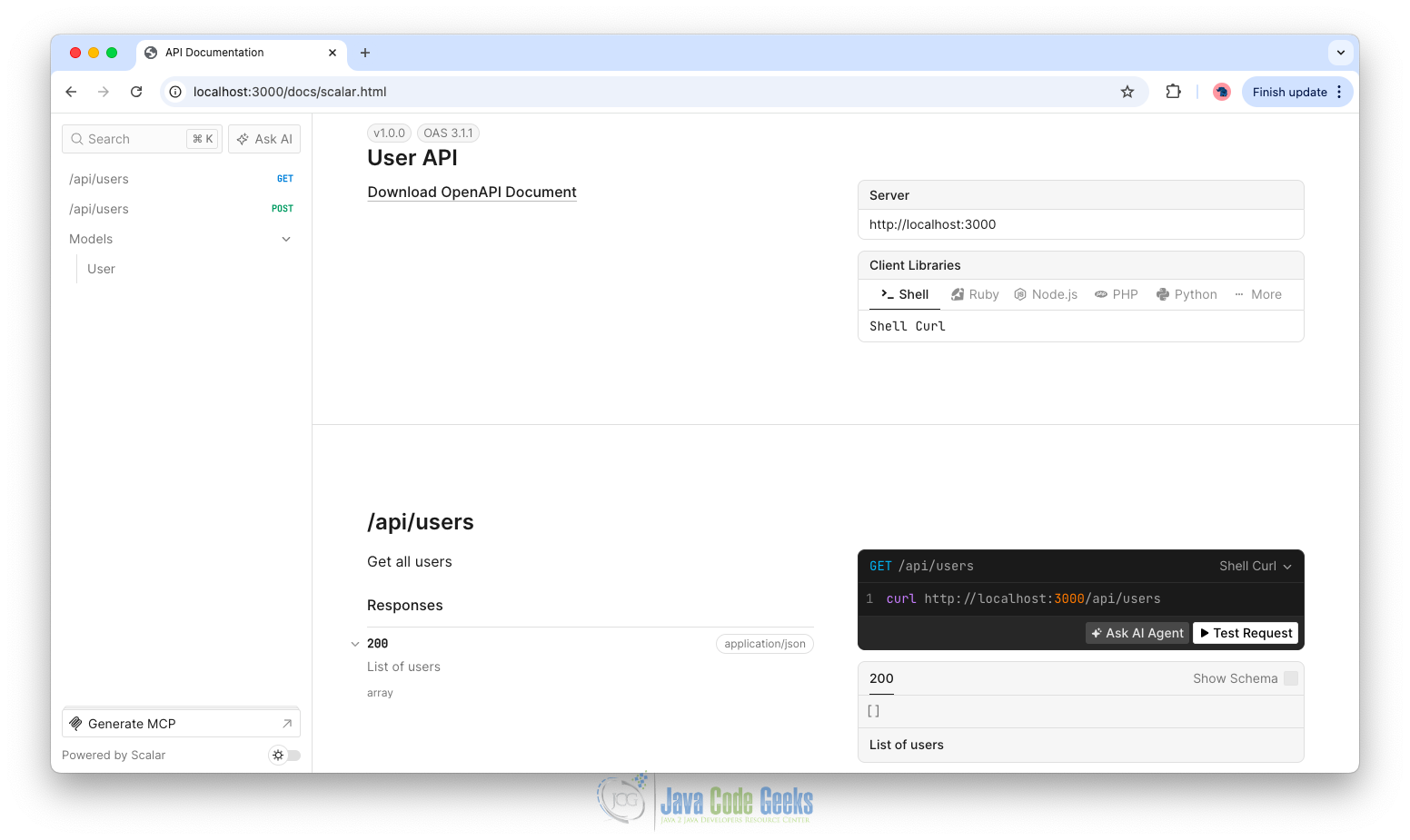
Open your browser and navigate to: http://localhost:3000/docs/scalar.html. You’ll see an interactive API documentation interface powered by Scalar, where you can explore endpoints and test requests in real time.
8. Conclusion
Using zod, zod-to-openapi, and Scalar together creates a powerful workflow for API development and documentation. We define schemas once, generate documentation automatically, and present it using a modern UI.
This approach reduces duplication, improves consistency, and ensures our documentation evolves alongside our API. As our application grows, we can extend schemas, add authentication, and enhance documentation without changing the overall structure.
9. Download the Source Code
This article explored REST Api documentation with scalar.
You can download the full source code of this example here: REST API documentation with scalar