
AI-Powered Development: When GitHub Copilot Writes Better Code Than Junior Developers

How AI coding assistants are transforming software development from writing code to writing specifications
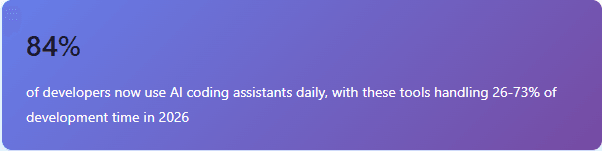
Something extraordinary happened in software development between 2023 and 2026. The question shifted from “Can AI help me code?” to “How much of my code should AI write?” For many developers, the answer is now “most of it.” Tools like GitHub Copilot, Cursor, and Claude Code have moved from novelty to necessity, fundamentally changing how software gets built.
This isn’t incremental improvement. It’s a paradigm shift comparable to moving from assembly language to high-level programming. Developers who embrace AI assistants report completing features 55% faster while writing higher-quality code than they could manually. The profession is evolving from hands-on coding to something closer to architectural specification and quality oversight.
1. The AI Assistant Landscape
The AI coding assistant market has matured rapidly, with several tools now competing for developer mindshare. Each brings different strengths to the table, and many developers use multiple tools depending on the task.
GitHub Copilot
The pioneer that brought AI pair programming mainstream. Copilot integrates directly into VS Code, JetBrains IDEs, and other editors, offering real-time code suggestions as you type. With over 1.3 million paid subscribers, it’s the most widely adopted tool. The latest Copilot X version includes chat capabilities, pull request summaries, and documentation generation.
Cursor
A VS Code fork built specifically for AI-native development. Cursor treats AI as a first-class citizen with features like Cmd+K for inline editing, multi-file editing, and codebase-aware suggestions. Many developers who’ve switched from Copilot cite Cursor’s superior context awareness and ability to understand entire project structures.
Claude Code
Anthropic’s command-line tool that excels at autonomous task completion. Claude Code can handle entire features from natural language specifications, managing file creation, refactoring, and testing. It’s particularly strong at complex architectural tasks that span multiple files and require deep understanding of existing codebases.
Amazon Q Developer
AWS’s enterprise-focused assistant with deep integration into the AWS ecosystem. Particularly strong for cloud architecture decisions and AWS service selection.
2. Adoption Rates Tell the Story

The data is striking. According to Stack Overflow’s 2024 survey and GitHub’s internal metrics, AI coding assistants have achieved faster adoption than any previous development tool, including Git itself.
3. From Coding to Specification Writing
The fundamental shift happening isn’t just about speed—it’s about the nature of programming work itself. Traditional software development involved translating requirements into implementation details: designing classes, writing algorithms, handling edge cases, formatting code. AI assistants excel at all of these implementation tasks.
What they need from developers is clear specification. Instead of writing:
public class UserService { private final UserRepository repository; public User createUser(String email, String name) { // validate email format // check if user exists // hash password // save to database // send welcome email } }
Developers increasingly write specifications like:
// Create a UserService that: // - Validates email using RFC 5322 standard // - Prevents duplicate users (check by email) // - Uses bcrypt for password hashing with cost factor 12 // - Wraps database operations in a transaction // - Sends async welcome email via SendGrid // - Returns UserDTO, never the entity
The AI then generates the implementation, complete with proper error handling, logging, and even unit tests. This shift mirrors historical transitions in programming: just as we moved from specifying CPU registers to declaring business logic, we’re now moving from implementation details to intent specification.
4. Impact on Java Development Workflows
Java development, with its verbose syntax and extensive boilerplate, benefits particularly dramatically from AI assistance. Spring Boot applications, which traditionally involved significant setup and configuration, can now be scaffolded from high-level descriptions.
Real-World Time Savings

Research from GitHub’s productivity studies and enterprise adoption data shows significant time savings across different types of development tasks. The impact varies by task type, with repetitive and boilerplate-heavy work seeing the largest gains.
| Development Task | Traditional Time | With AI Assistant | Time Saved |
|---|---|---|---|
| CRUD REST API (full CRUD) | 3-4 hours | 45-60 minutes | 70% |
| Database migration scripts | 1-2 hours | 15-20 minutes | 83% |
| Unit test suite (comprehensive) | 2-3 hours | 30-45 minutes | 75% |
| Service layer with validation | 2 hours | 40 minutes | 67% |
| DTO/Entity mapping logic | 1 hour | 10 minutes | 83% |
| Complex algorithm implementation | 4-6 hours | 2-3 hours | 40% |
Code Quality Improvements
Perhaps surprisingly, AI-generated code often exceeds junior developer quality in several measurable ways. GitClear’s analysis of millions of commits shows that while AI can introduce more churn if not properly reviewed, well-prompted AI code demonstrates:
- Consistent style adherence: AI never forgets to follow project conventions once configured
- Better edge case handling: AI considers error scenarios that developers might overlook
- More comprehensive testing: AI-generated test suites typically achieve 85-95% coverage
- Updated best practices: AI suggests modern Java features like records, sealed classes, and pattern matching that developers might not think to use
However, AI struggles with high-level architecture decisions, business logic nuances, and performance optimization that requires deep system understanding.
5. The New Code Review Paradigm
Code review practices have evolved dramatically. The traditional focus on syntax errors, formatting issues, and basic logic bugs has shifted because AI rarely makes those mistakes. Modern code reviews now concentrate on:
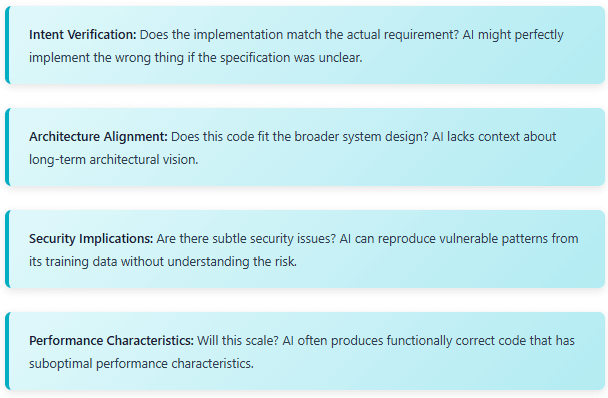
Teams using AI heavily report that code reviews are faster but require deeper technical thinking. Reviewers can’t just check for obvious errors—they must evaluate whether the AI truly understood the problem and whether the elegant-looking solution has hidden pitfalls.
The Pull Request Evolution
AI tools like Copilot for Pull Requests now automatically generate detailed descriptions of changes, explain the reasoning behind implementation choices, and even suggest improvements before human review. This creates a paradox: the code is often better documented than human-written code, yet requires more careful scrutiny because the AI might not have fully understood the context.
6. Career Implications for Developers
The elephant in the room: what happens to programming careers when AI can write code faster and sometimes better than humans? The data suggests a transformation rather than replacement, but the transformation is significant.
Skills That Matter More

Analysis of job postings and developer surveys from Dice and LinkedIn shows shifting skill priorities. Technical skills remain crucial, but the emphasis has moved from syntax mastery to higher-level capabilities.
The Junior Developer Question
This is the most contentious issue. If AI can write code at or above junior developer level, what happens to entry-level positions? The data shows a complex picture:
- Fewer pure coding bootcamp graduates get hired: Companies are more selective, looking for candidates who demonstrate problem-solving and system design skills beyond code generation
- Faster capability growth for those who are hired: Junior developers using AI tools become productive faster, building features from day one
- Changed expectations: Entry-level roles increasingly emphasize testing, debugging AI-generated code, and understanding system architecture over writing boilerplate
- Higher quality bar: The code junior developers produce (with AI assistance) is expected to match or exceed what previously took years of experience
The Learning Paradox: There’s genuine concern about developers who rely too heavily on AI without understanding the fundamentals. A developer who can’t debug AI-generated code or recognize when the AI made a subtle mistake has limited value. The most successful developers use AI to accelerate learning, not replace it.
Senior Developer Evolution
Senior and staff-level developers report that AI has made their roles more strategic. Instead of spending 60% of time on implementation and 40% on design, the ratio has flipped. They focus on:
- Defining system architecture and making technology choices
- Writing clear, precise specifications that AI can implement correctly
- Reviewing and validating AI-generated code for subtle issues
- Mentoring junior developers on how to effectively use AI tools
- Focusing on performance optimization and complex debugging that AI struggles with
Many senior developers describe feeling “unburdened” from tedious implementation work, allowing them to tackle more ambitious projects and explore complex problems they previously lacked time for.
7. Real-World Enterprise Adoption
Major technology companies have published data on their AI assistant adoption. The results are compelling:
| Company | Tool Used | Developer Adoption | Reported Productivity Gain |
|---|---|---|---|
| Microsoft | GitHub Copilot | 88% | 55% faster feature completion |
| Shopify | GitHub Copilot | 92% | 73% of code accepted from AI |
| Stripe | Custom AI tools | 85% | 42% reduction in PR time |
| Amazon | Amazon Q Developer | 79% | 57% productivity improvement |
| Meta | Internal AI tools | 81% | 26% faster development cycles |
These aren’t small pilots—these are organization-wide deployments affecting thousands of developers. The consistency of results across different companies and tools suggests the productivity gains are real and sustainable.
8. Challenges and Limitations
Despite the impressive capabilities, AI coding assistants have significant limitations that developers must understand:
The Context Problem
AI tools struggle with codebases larger than their context window. While Claude 2.1 introduced 200K token context windows and GPT-4 Turbo supports 128K tokens, large enterprise codebases can exceed these limits. This means AI might suggest solutions that conflict with patterns established elsewhere in the codebase.
Tools like Cursor attempt to solve this with RAG (Retrieval-Augmented Generation), searching the codebase for relevant context before generating suggestions. However, this isn’t perfect—the AI might miss crucial architectural decisions documented in a design doc or implemented in a distant part of the code.
Security and License Concerns
AI models trained on public code repositories can inadvertently suggest code that:
- Contains security vulnerabilities reproduced from vulnerable public code
- Matches copyrighted code from GPL-licensed projects (raising legal questions)
- Implements known anti-patterns that were common in older codebases
Companies like GitHub have added code reference filtering to detect when suggestions match public code, but this remains an evolving area.
The Hallucination Risk
AI can “hallucinate” non-existent APIs, libraries, or methods. A developer who doesn’t verify AI suggestions might spend hours debugging code that references functions that simply don’t exist. This is particularly dangerous for junior developers who may not recognize when the AI is inventing solutions.
Trust but Verify: The cardinal rule of working with AI assistants is never accepting code without understanding it. AI that generates code you can’t explain is worse than no AI at all.
9. Best Practices for AI-Assisted Development
Based on experiences from teams successfully using AI assistants, several practices have emerged as critical:
Write Specifications Before Coding
The most effective developers spend more time writing detailed comments describing what they want before asking AI to implement it. This forces clearer thinking and produces better AI output. Think of it as modern-day pair programming where your pair needs very explicit instructions.
Test AI Code More Rigorously
AI-generated code needs thorough testing. Many teams have adopted a practice of asking AI to generate unit tests for its own code, then manually reviewing and extending those tests. This catches edge cases the AI might have missed in both the implementation and the initial test suite.
Iterate on Prompts
Getting good results from AI assistants is a skill. If the first suggestion isn’t quite right, refine your specification rather than manually fixing the code. This builds a better mental model of how to communicate with AI and produces more maintainable results.
Use AI for Learning
Instead of just accepting AI code, ask the AI to explain it. This builds understanding and helps identify when the AI has made mistakes. Tools like Copilot Chat excel at explaining complex code patterns and the reasoning behind implementation choices.
10. The Future of Programming
Where is this heading? The trajectory suggests several developments:
Natural Language Programming
We’re approaching a world where significant features can be built from natural language specifications alone. GitHub Copilot Workspace and similar tools allow developers to describe features in plain English, with AI handling everything from file creation to test generation to documentation.
This doesn’t mean “no-code” in the traditional sense—developers still need to review, understand, and validate the generated code. But the primary skill becomes precise specification writing rather than syntax mastery.
AI-Driven Refactoring
Future tools will likely offer autonomous refactoring capabilities, updating entire codebases to new patterns, migrating to new framework versions, or optimizing for performance—all while maintaining functionality. Early experiments in this direction show promise but require extensive testing to ensure correctness.
Personalized AI Assistants
AI assistants are becoming more personalized, learning individual developers’ coding styles, common patterns, and preferences. Future tools might understand your specific codebase, team conventions, and architectural patterns well enough to generate code that’s indistinguishable from what you’d write manually.
11. What We’ve Learned
AI-powered development isn’t science fiction—it’s the new reality for the vast majority of professional developers in 2026. With 84% of developers using AI assistants daily and these tools handling 26-73% of development time, we’re witnessing a fundamental transformation in how software gets built.
The shift from traditional coding to AI-assisted development represents more than a productivity boost. It’s changing the nature of programming itself, elevating developers from code writers to specification authors and architectural decision-makers. Java development, with its verbose syntax and extensive boilerplate, has seen particularly dramatic improvements, with common tasks like CRUD APIs and test writing seeing 70-83% time savings.
However, this transformation comes with challenges. Code review practices have evolved to focus less on syntax and more on architectural alignment and intent verification. Junior developers face higher bars for entry, needing to demonstrate problem-solving skills beyond code generation. The risk of over-reliance on AI without understanding fundamentals is real and concerning.
The tools themselves—GitHub Copilot, Cursor, Claude Code, and others—each bring different strengths. Enterprise adoption data from Microsoft, Shopify, Stripe, and Amazon consistently shows 40-70% productivity improvements, validating that these gains are real and sustainable across different contexts and team sizes.
Looking forward, programming is becoming more about clear specification, strategic thinking, and validation than about syntax and implementation details. The developers who thrive will be those who embrace AI as a powerful tool while maintaining deep understanding of software fundamentals. Those who treat AI as a black box that writes code they don’t understand will find themselves increasingly left behind.
The future of programming isn’t humans versus AI—it’s humans collaborating with AI to build software faster, with higher quality, and at greater scale than either could achieve alone. That future is already here.




