The Model Context Protocol (MCP) provides a structured way for AI models, tools, and external systems to communicate. Instead of tightly coupling applications to specific model APIs, MCP introduces a standardized interface for tools, resources, and prompts. In this article, we’ll build an MCP server using FastMCP, implement tools, resources and prompts, and test everything using the FastMCP client.
1. How MCP Works
The Model Context Protocol (MCP) is designed to standardize how AI systems interact with external capabilities. Instead of tightly coupling an AI model to specific APIs or services, MCP defines a communication layer that makes tools and structured data dynamically discoverable.
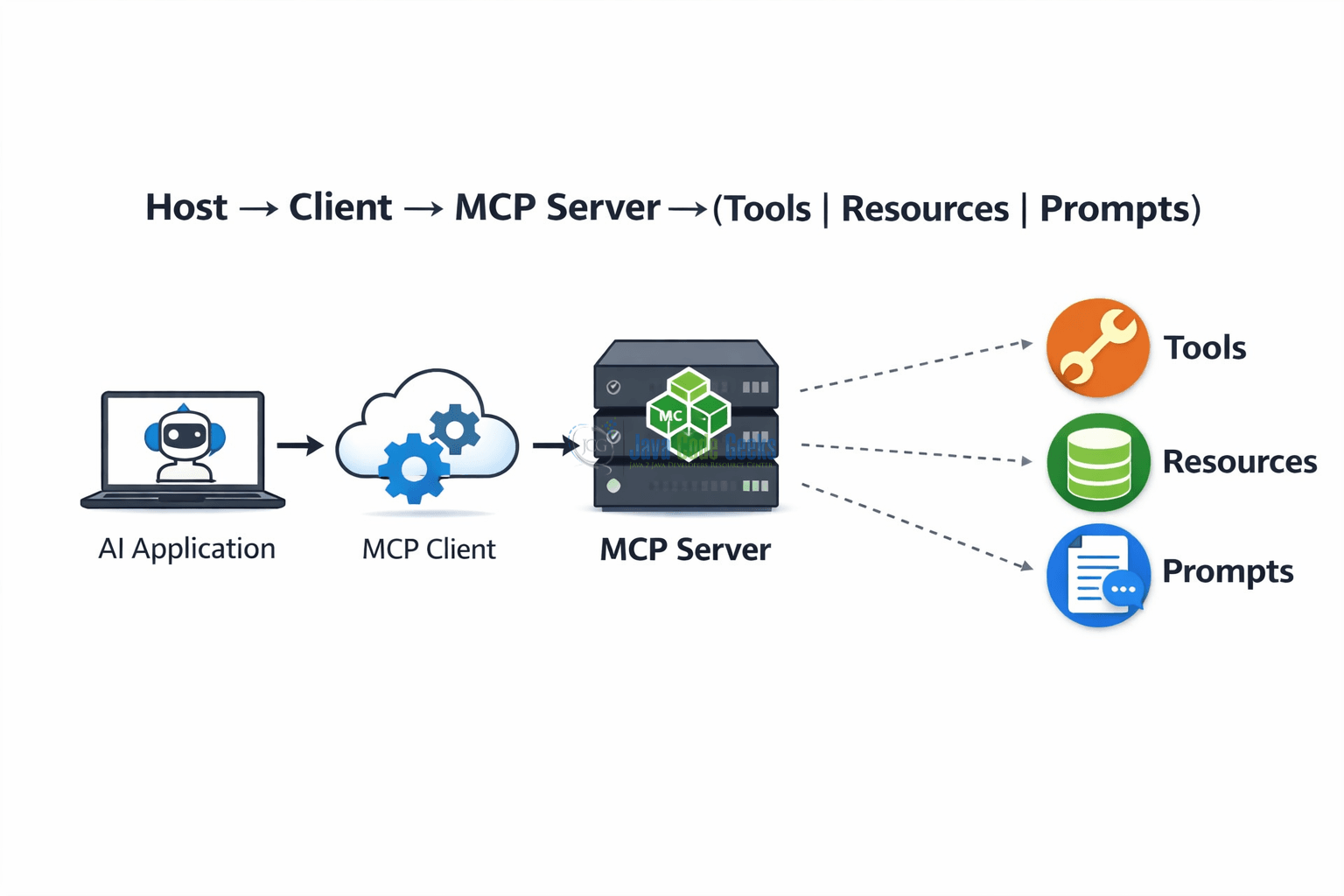
At a high level, MCP introduces three architectural roles:
- Host: The host is the AI-powered application — for example, an IDE assistant, chat interface, or automation system. The host wants to extend its intelligence by using external tools and contextual data.
- Client: The client acts as the communication bridge. It understands the MCP specification and connects the host to one or more MCP servers. The client handles capability discovery, invocation, and response handling.
- Server: The server exposes capabilities to the host via the client. These functionalities are organized around three core components.
The Core Components
MCP standardizes three types of capabilities:
- Tools: Tools are executable functions that enable AI systems to perform actions such as calling external APIs, running calculations, querying databases, and triggering workflows. They can accept input parameters and return structured responses, allowing models to interact reliably and consistently with external systems.
- Resources: Resources provide structured, read-only data such as configuration files, knowledge base entries, system metadata, and documentation. They enable AI systems to retrieve relevant contextual information without executing any business logic, ensuring safe and consistent access to supporting data.
- Prompts: Prompts are reusable prompt templates. They help standardize how models are instructed to behave. Instead of constructing prompts dynamically in every interaction, they can be registered and retrieved consistently.
Communication Flow
The interaction typically follows this pattern:
Host → Client → MCP Server → (Tools | Resources | Prompts)
- The host requests available capabilities.
- The client queries the MCP server.
- The server responds with metadata describing tools, resources, and prompts.
- The host invokes a capability through the client.
- The server executes logic and returns structured output.
This architecture improves modularity and scalability, allowing AI applications to evolve without tightly coupled integrations.
2. Implementing the Server with FastMCP
In this section, we will configure logging, create a FastMCP server instance, and implement tools, resources, and prompts. First, we’ll install FastMCP using pip:
pip install fastmcp
After installing FastMCP, another module required for this project is requests. The requests module is a third-party HTTP client library that allows the server to communicate with external APIs. In this project, it is used inside a tool to fetch data from a public API, demonstrating how MCP tools can integrate with external services and return structured responses.
pip install requests
Logging Configuration
We begin by configuring structured logging to ensure observability.
import logging
import sys

logging.basicConfig(
    level=logging.INFO,
    format="%(asctime)s [%(levelname)s] [%(name)s] %(message)s",
    handlers=[logging.StreamHandler(sys.stdout)],
)

logger = logging.getLogger("mcp-server")
This configuration ensures all logs include timestamps, severity levels, and the logger name. Logging is critical in production MCP servers because it helps trace tool invocations, API calls, and potential errors.
Initialize FastMCP Server
Next, we create the MCP server instance.
from mcp.server.fastmcp import FastMCP

mcp = FastMCP("Demo MCP Server")
FastMCP initializes the MCP server and registers metadata such as the server name. All tools, resources, and prompts will be attached to this instance using decorators.
Tool Example 1: Random Number Generator
import random

@mcp.tool()
def generate_random_number(min_value: int, max_value: int) -> int:
    """
    Generates a random integer between min_value and max_value.
    """
    logger.info(f"Generating random number between {min_value} and {max_value}")
    return random.randint(min_value, max_value)
This tool demonstrates a simple executable capability. It accepts parameters, logs the request, performs computation, and returns a structured response. The @mcp.tool() decorator automatically exposes it to MCP clients.
Tool Example 2: Fetch Public API Data
import requests

@mcp.tool()
def fetch_joke() -> str:
    """
    Fetches a random joke from a public API.
    """
    logger.info("Fetching random joke from external API")
    response = requests.get(
        "https://official-joke-api.appspot.com/random_joke",
        timeout=5
    )
    data = response.json()
    return f"{data['setup']} - {data['punchline']}"
This tool demonstrates integration with an external system. It performs an HTTP request using requests, logs the action, parses JSON, and returns formatted output. This pattern can be extended to integrate databases, internal services, or third-party APIs.
Resource Example
import os

@mcp.resource("config://app-info")
def app_info() -> dict:
    """
    Returns application configuration details.
    """
    logger.info("Providing application configuration resource")
    return {
        "app_name": "Demo MCP Server",
        "environment": os.getenv("ENVIRONMENT", "development"),
        "version": "1.0.0"
    }
This resource exposes structured, read-only data. The URI-style identifier (config://app-info) uniquely identifies the resource. Resources are ideal for exposing configuration, metadata, or documentation.
Prompt Example
@mcp.prompt()
def greeting_prompt(name: str) -> str:
    """
    Returns a structured greeting prompt template.
    """
    logger.info(f"Generating greeting prompt for {name}")
    return f"You are a professional assistant. Greet {name} in a warm and concise manner."
Prompts allow us to register reusable instructions for AI systems. Instead of constructing prompts dynamically, they can be centrally defined and versioned.
Run Server
Finally, we start the MCP server.
if __name__ == "__main__":
    logger.info("Starting MCP server...")
    mcp.run()
mcp.run() starts the MCP server and registers all previously defined tools, resources, and prompts. When the server starts, it becomes discoverable by MCP clients.
3. Running and Testing the Server
First, start the server:
python server.py
You should see logs indicating the server has started.
[02/24/26 11:02:11] INFO Starting MCP server... server.py:6
4. Testing the MCP Server with the FastMCP Client
After implementing your MCP server, the next step is validating that its tools and resources behave correctly. FastMCP provides an asynchronous client that connects to your server, discovers capabilities, and invokes them. Because the client is asynchronous, it must be used with async with inside an async function and executed using asyncio.run().
Below is a client_test.py file that demonstrates how to connect to the server and test each registered primitive.
import asyncio

from fastmcp import Client


async def test_server():
    async with Client("server.py") as client:

        # List Available Tools

        tools = await client.list_tools()
        print("Available tools:", [t.name for t in tools])

        # Call Tool: Random Number Generator

        random_result = await client.call_tool(
            "generate_random_number", {"min_value": 1, "max_value": 20}
        )

        print("\nRandom Number:", random_result.content[0].text)

        # Call Tool: Fetch Joke

        joke_result = await client.call_tool("fetch_joke", {})

        print("\nJoke:", joke_result.content[0].text)

        # List Available Resources

        resources = await client.list_resources()
        print("\nAvailable resources:", [r.uri for r in resources])

        # Read Resource

        config = await client.read_resource("config://app-info")

        print("\nApp Config:\n", config[0].text)

        # Retrieve Prompt

        prompt = await client.get_prompt("greeting_prompt", {"name": "Thomas"})

        print("\nGenerated Prompt:\n", prompt.messages[0].content.text)


asyncio.run(test_server())
The FastMCP Client connects directly to server.py, automatically starting the MCP server process if needed. Once connected, the client:
- Discovers registered tools using
list_tools() - Executes tools via
call_tool() - Retrieves structured resources using
read_resource() - Fetches prompt templates using
get_prompt()
Each operation is logged, allowing us to observe the full interaction cycle. This approach ensures that our MCP server is correctly exposing and executing its capabilities before integrating it into a larger AI host application.
Running the Test
Run the test file:
python client_test.py
You should see log output confirming a successful connection to the server, a list of available tools, the results of tool executions, returned resource data, and the generated prompt.
Example Output
[02/24/26 11:44:30] INFO     Starting MCP server...                 server.py:63
[02/24/26 11:44:31] INFO     Processing request of type            server.py:720
                             ListToolsRequest
Available tools: ['fetch_joke', 'generate_random_number']
                    INFO     Processing request of type            server.py:720
                             CallToolRequest
                    INFO     Generating random number between 1 and server.py:38
                             20

Random Number: 1
                    INFO     Processing request of type            server.py:720
                             CallToolRequest
                    INFO     Fetching random joke from external API server.py:25

Joke: What happens when you anger a brain surgeon? - They will give you a piece of your mind.
[02/24/26 11:44:32] INFO     Processing request of type            server.py:720
                             ListResourcesRequest

Available resources: [AnyUrl('config://app-info')]
                    INFO     Processing request of type            server.py:720
                             ReadResourceRequest
                    INFO     Providing application configuration    server.py:46
                             resource

App Config:
 {
  "app_name": "Demo MCP Server",
  "environment": "development",
  "version": "1.0.0"
}
                    INFO     Processing request of type            server.py:720
                             GetPromptRequest
                    INFO     Generating greeting prompt for Thomas  server.py:59

Generated Prompt:
 You are a professional assistant. Greet Thomas in a warm and concise manner.
This verifies that the MCP server is functioning correctly and working end-to-end.
5. Conclusion
In this article, we built a functional Model Context Protocol server using FastMCP. We explored how MCP works, including hosts, clients, servers, and the three core primitives: tools, resources, and prompts. We implemented multiple tools using decorators, exposed structured resources, registered reusable prompts, configured logging for observability, and tested everything using the FastMCP client.
With this foundation, we can now extend our MCP server with authentication, database-backed resources, streaming tools, or advanced AI integrations.
6. Download the Source Code
This article explored how to build your own MCP server using Python.
You can download the full source code of this example here: how to build your own mcp server with python