
1. Introduction
Deserialization is the process of converting data to Java objects. In this example, I will demonstrate how to deserialize JSON, XML, and byte array into Java Map<String, Object> and ensure that values in the map are converted with correct types via the following libraries
- com.fasterxml.jackson.databind.ObjectMapper: provides functionality for reading and writing JSON.
- com.fasterxml.jackson.dataformat.xml.XmlMapper: is a customized
ObjectMapperthat reads and writes XML. - com.google.gson.Gson: facilitates the conversion between Java objects and JSON.
- org.json: is a lightweight tool for working with JSON in Java.
- jakarta.json: is a standardized Java JSON Processing API.
2. Setup
2.1 Build.gradle
In this step, I will create a Gradle project with GSON, jackson-dataformat-xml, org.json, jakarta.json, and Junit5 libraries.
build.gradle
plugins {
	id 'java'
	id 'org.springframework.boot' version '3.5.6'
	id 'io.spring.dependency-management' version '1.1.7'
}

group = 'org.jcg.zheng.demo'
version = '0.0.1-SNAPSHOT'
description = 'Demo project for deserializing to Map '

java {
	toolchain {
		languageVersion = JavaLanguageVersion.of(21)
	}
}

repositories {
	mavenCentral()
}

dependencies {

	implementation 'org.springframework.boot:spring-boot-starter-web'

	// https://mvnrepository.com/artifact/com.fasterxml.jackson.dataformat/jackson-dataformat-xml
    implementation("com.fasterxml.jackson.dataformat:jackson-dataformat-xml:2.19.1")

    // https://mvnrepository.com/artifact/com.google.code.gson/gson
	implementation("com.google.code.gson:gson:2.13.2")

	// https://mvnrepository.com/artifact/org.json/json
	implementation("org.json:json:20250517")

	// https://mvnrepository.com/artifact/org.glassfish/jakarta.json
	implementation("org.glassfish:jakarta.json:2.0.1")

	testImplementation 'org.springframework.boot:spring-boot-starter-test'
	testRuntimeOnly 'org.junit.platform:junit-platform-launcher'
}

tasks.named('test') {
	useJUnitPlatform()
}
- Line 26: the
XmlMapperreferred in step 3.2 needsjackson-dataformat-xml. - Line 29: the
Gsonreferred in step 3.4 needsgson. - Line 32: the
org.json.JSONArrayreferred in step 3.5 needsorg.json. - Line 35: the
jakarta.json.JsonArrayreferred in step 3.6 needsjakarta.json.
2.2 MapTypeConverter
In this step, I will create a MapTypeConverter that converts the value to its correct type. It will be used at DeserializeMapXmlMapperImpl defined at step 3.2.
MapTypeConverter
package org.jcg.zheng.demo.deserializetomap.service;

import java.util.ArrayList;
import java.util.HashMap;
import java.util.List;
import java.util.Map;

public class MapTypeConverter {
	private static final String INT_REGEX = "-?\\d+";
	private static final String DECIMAL_REGEX = "-?\\d+\\.\\d+";
	private static final List<String> BOOLEAN_TEXTS = List.of("true", "false");

	public static Object coerceValue(Object value) {
		if (value instanceof String s) {
			if (s.matches(INT_REGEX)) {
				try {
					return Integer.parseInt(s);
				} catch (Exception e) {
					return Long.parseLong(s);
				}
			} else if (s.matches(DECIMAL_REGEX)) {
				return Double.parseDouble(s);
			} else if (BOOLEAN_TEXTS.contains(s.toLowerCase())) {
				return Boolean.parseBoolean(s);
			}
		} else if (value instanceof List items) {
			List<Object> coverted = new ArrayList<>();
			for (Object item : items) {
				coverted.add(coerceValue(item));
			}
		}
		return value;
	}

	public static Map<String, Object> convert(Map<String, Object> rawValue) {
		Map<String, Object> newMap = new HashMap<>();
		rawValue.forEach((k, v) -> newMap.put(k, coerceValue(v)));
		return newMap;
	}

}
- Line 13: customized logic to convert to the correct data type. The logic is based on the
matchesmethod with regular expression. - Line 35: convert from the raw map to the correct typed map.
2.3 BaseTest
In this step, I will create a BaseTest that defines test XML, JSON Strings and common asserts for the deserialized mapobj.
BaseTest.java
package org.jcg.zheng.demo.deserializetomap.service;

import static org.junit.jupiter.api.Assertions.assertEquals;
import static org.junit.jupiter.api.Assertions.assertNull;
import static org.junit.jupiter.api.Assertions.assertTrue;

import java.util.List;
import java.util.Map;

public class BaseTest {

	protected DeserializeMapService testClass;

	protected Map<String, Object> mapObj;

	protected String mapXmlStr = """
			<HashMap>
			    <name>Mary</name>
			    <age>50</age>
			    <isValid>true</isValid>
			    <hourlyRate>8.45</hourlyRate>
			    <item>ele1</item>
			    <item>ele2</item>
			</HashMap>
						""";

	protected String mapJsonStr = """
			{
			  "textV": "hello",
			  "booleanV":false,
			  "intv": 1,
			  "doublev": 99.78,
			  "nullv":null,
			  "stringList":["ele1","ele2"],
			  "objMap": {
			    "textE": "Mary"
			  }
			}
									""";

	protected void assertJsonCommon() {
		assertEquals(7, mapObj.size());

		assertTrue(mapObj.get("textV") instanceof String);
		assertTrue(mapObj.get("booleanV") instanceof Boolean);
		assertTrue(mapObj.get("objMap") instanceof Map);
		assertTrue(mapObj.get("stringList") instanceof List);

		assertNull(mapObj.get("nullv"));
		assertEquals("hello", mapObj.get("textV"));
		assertEquals(Boolean.FALSE, mapObj.get("booleanV"));
	}

	protected void assertXml() {
		assertEquals("Mary", mapObj.get("name"));

		assertTrue(mapObj.get("item") instanceof List);
		assertTrue(mapObj.get("isValid") instanceof Boolean);
		assertTrue(mapObj.get("age") instanceof Integer);
		assertTrue(mapObj.get("hourlyRate") instanceof Double);
	}

}- Line 12: the
testClassinstance will be initialized at each test class. - Line 14: the
mapObjthat deserialized by the implementation class ofDeserializeMapService. - Line 16: the test XML includes whole number, decimal, text, Boolean, list of elements.
- Line 27: the test JSON includes number, decimal, text, Boolean, array, and nested object.
- Line 41: assert the
mapObjfrom JSON has correct data types. - Line 54: assert the
mapObjfrom XML has correct data types.
3. Map with Correct Type
3.1 Map with Correct Type Interface
In this step, I will create a DeserializeMapService.java interface that has two methods:
Map– deserializes JSON or XML string into a<String, Object>deserializeString(String mapString)Map <String, Object>with correct data types.default Map<String, Object> deserializeByteArray(byte[] mapBytes) { return deserializeString(new String(mapBytes, StandardCharsets.UTF_8)); }
DeserializeMapService.java
package org.jcg.zheng.demo.deserializetomap.service;

import java.nio.charset.StandardCharsets;
import java.util.Map;

public interface DeserializeMapService {

	Map<String, Object> deserializeString(String mapString);

	default Map<String, Object> deserializeByteArray(byte[] mapBytes) {
		return deserializeString(new String(mapBytes, StandardCharsets.UTF_8));
	}

}
- Line 11: the
deserializeByteArrayreusesdeserializeStringafter convertingbyte[]toString.
3.2 XML String to Map with Correct Type via XmlMapper
In this step, I will create a DeserializeMapXmlMapperImpl class that implements DeserializeMapService interface defined at step 3.1 via com.fasterxml.jackson.dataformat.xml.XmlMapper. Because XML doesn’t have native number, boolean types, we have to create a customized XmlMapTypeConverter class to convert to the correct type when using XmlMapper.
DeserializeMapXmlMapperImpl.java
package org.jcg.zheng.demo.deserializetomap.service;

import java.util.Map;

import com.fasterxml.jackson.core.JsonProcessingException;
import com.fasterxml.jackson.core.type.TypeReference;
import com.fasterxml.jackson.dataformat.xml.XmlMapper;

public class DeserializeMapXmlMapperImpl implements DeserializeMapService {

	private XmlMapper xmlMapper;
	private TypeReference<Map<String, Object>> mapTypeRef = new TypeReference<Map<String, Object>>() {
	};

	public DeserializeMapXmlMapperImpl(XmlMapper xmlMapper) {
		super();
		this.xmlMapper = xmlMapper;
	}

	@Override
	public Map<String, Object> deserializeString(String mapString) {
		Map<String, Object> mObj = null;
		try {
			mObj = xmlMapper.readValue(mapString, mapTypeRef);

			Map<String, Object> coerced = MapTypeConverter.convert(mObj);
			return coerced;
		} catch (JsonProcessingException e) {
			e.printStackTrace();
		}

		return mObj;
	}

}
- Line 12: defines
mapTypeRefforMap<String,Object>. - Line 21,24,26: implements
deserializeStringby callingxmlMapper.readValueto get the Map. But theMap'svalue is type ofStringas XML stores everything asString, callingMapTypeConvertercreated at step 2.2 to convert to the correct data type.
3.3 JSON String to Map with Correct Type via ObjectMapper
In this step, I will create a DeserializeMapObjectMapperImpl class that implements DeserializeMapService interface defined at step 3.1 via com.fasterxml.jackson.databind.ObjectMapper.
DeserializeMapObjectMapperImpl.java
package org.jcg.zheng.demo.deserializetomap.service;

import java.io.IOException;
import java.util.Map;

import com.fasterxml.jackson.core.JsonProcessingException;
import com.fasterxml.jackson.core.type.TypeReference;
import com.fasterxml.jackson.databind.ObjectMapper;

public class DeserializeMapObjectMapperImpl implements DeserializeMapService {

	private ObjectMapper ob;
	private TypeReference<Map<String, Object>> mapTypeRef = new TypeReference<Map<String, Object>>() {
	};

	public DeserializeMapObjectMapperImpl(ObjectMapper ob) {
		super();
		this.ob = ob;
	}

	@Override
	public Map<String, Object> deserializeString(String mapString) {
		Map<String, Object> ret = null;
		try {
			ret = ob.readValue(mapString, mapTypeRef);
		} catch (JsonProcessingException e) {
			e.printStackTrace();
		}
		return ret;
	}

	@Override
	public Map<String, Object> deserializeByteArray(byte[] mapBytes) {
		Map<String, Object> ret = null;
		try {
			ret = ob.readValue(mapBytes, mapTypeRef);
		} catch (IOException e) {
			e.printStackTrace();
		}
		return ret;
	}

}
- Line 13:
mapTypeRefasMap<String,Object>. - Line 22: no customized logic is needed when using the
ObjectMapper.readValuemethod. - Line 33: override the default
deserializeByteArrayasObjectMappercan deserializebyte[]directly.
3.4 JSON String to Map with Correct Type via Gson
In this step, I will create a DeserializeMapGsonImpl class that implements DeserializeMapService interface defined at step 3.1 via com.google.gson.Gson.
DeserializeMapGsonImpl.java
package org.jcg.zheng.demo.deserializetomap.service;

import java.lang.reflect.Type;
import java.util.Map;

import com.google.gson.Gson;
import com.google.gson.reflect.TypeToken;

public class DeserializeMapGsonImpl implements DeserializeMapService {

	private Gson gson;

	private Type mapType = new TypeToken<Map<String, Object>>() {
	}.getType();

	public DeserializeMapGsonImpl(Gson gson) {
		super();
		this.gson = gson;
	}

	@Override
	public Map<String, Object> deserializeString(String mapString) {
		return gson.fromJson(mapString, mapType);
	}

}
- Line 13:
mapTypedefines forMap<String, Object> - Line 22: no customized logic is needed when using
Gson.fromJsonmethod.
3.5 JSON String to Map with Correct Type via org.gson
In this step, I will create a DeserializeMapOrgJsonImpl class that implements DeserializeMapService interface defined at step 3.1 via org.json.JSONArray & org.json.JSONObject.
DeserializeMapOrgJsonImpl.java
package org.jcg.zheng.demo.deserializetomap.service;

import java.util.HashMap;
import java.util.Iterator;
import java.util.Map;

import org.json.JSONArray;
import org.json.JSONObject;

public class DeserializeMapOrgJsonImpl implements DeserializeMapService {

	@Override
	public Map<String, Object> deserializeString(String mapString) {
		return convert(new JSONObject(mapString));
	}

	private Map<String, Object> convert(final JSONObject jsonObj) {
		Map<String, Object> ret = new HashMap<>();
		Iterator<String> keys = jsonObj.keys();
		while (keys.hasNext()) {
			String k = keys.next();
			Object value = jsonObj.get(k);
			if (value instanceof JSONObject) {
				value = convert((JSONObject) value);
			} else if (value instanceof JSONArray) {
				value = ((JSONArray) value).toList();
			} else if (value.equals(JSONObject.NULL)) {
				value = null;
			}

			ret.put(k, value);
		}

		return ret;
	}

}
- Line 13:
deserializeStringis implemented. - Line 23,25,27: customized logic is added for
JSONObject,JSONArray, andJSONObject.NULL.
3.6 JSON String to Map with Correct Type via JSON-API
In this step, I will create a DeserializeMapJSONPImpl class that implements DeserializeMapService interface defined at step 3.1 via jakarta.json.
DeserializeMapJSONPImpl.java
package org.jcg.zheng.demo.deserializetomap.service;

import java.io.StringReader;
import java.util.ArrayList;
import java.util.HashMap;
import java.util.List;
import java.util.Map;

import jakarta.json.Json;
import jakarta.json.JsonArray;
import jakarta.json.JsonObject;
import jakarta.json.JsonReader;
import jakarta.json.JsonValue;

public class DeserializeMapJSONPImpl implements DeserializeMapService {

	@Override
	public Map<String, Object> deserializeString(String mapString) {
		try (JsonReader reader = Json.createReader(new StringReader(mapString))) {
			JsonObject jsonObj = reader.readObject();
			return toMap(jsonObj);
		}
	}

	private static Object convert(JsonValue value) {
		switch (value.getValueType()) {
		case STRING:
			return jsonObjString(value);
		case NUMBER:
			return jsonObjNumber(value);
		case TRUE:
			return Boolean.TRUE;
		case FALSE:
			return Boolean.FALSE;
		case OBJECT:
			return toMap((JsonObject) value);
		case ARRAY:
			return toList((JsonArray) value);
		default:
			return null;
		}
	}

	private static Map<String, Object> toMap(JsonObject value) {
		Map<String, Object> ret = new HashMap<>();
		for (String key : value.keySet()) {
			JsonValue v = value.get(key);
			ret.put(key, convert(v));
		}
		return ret;
	}

	private static List<Object> toList(JsonArray jsonArray) {
		List<Object> items = new ArrayList<>();
		for (JsonValue v : jsonArray) {
			items.add(convert(v));
		}
		return items;
	}

	private static String jsonObjString(JsonValue val) {
		return ((jakarta.json.JsonString) val).getString();
	}

	private static Number jsonObjNumber(JsonValue val) {
		return ((jakarta.json.JsonNumber) val).numberValue();
	}

}
- Line 18:
deserializeStringis implemented. - Line 25: customized logic is added to convert
JsonValueto the correct type.
4. Map with Correct Type Tests
In this step, I will create five Junit test classes that extend from BaseTest and set up the testClass variable, and test deserializing from String and byte[] into Map objects with correct data types.
4.1 Test Deserialize to Map via XmlMapper
In this step, I will create a DeserializeMapXmlMapperImplTest that verifies the XML string is deserialized to a Map object with correct data types.
DeserializeMapXmlMapperImplTest.java
package org.jcg.zheng.demo.deserializetomap.service;

import org.junit.jupiter.api.BeforeEach;
import org.junit.jupiter.api.Test;

import com.fasterxml.jackson.dataformat.xml.XmlMapper;

class DeserializeMapXmlMapperImplTest extends BaseTest {

	private XmlMapper xmapper = new XmlMapper();

	@BeforeEach
	public void setup() {
		testClass = new DeserializeMapXmlMapperImpl(xmapper);
	}

	@Test
	void test_deserializeString() {
		mapObj = testClass.deserializeString(mapXmlStr);
		assertXml();
	}

	@Test
	void test_deserializeByteArray() {
		mapObj = testClass.deserializeByteArray(mapXmlStr.getBytes());
		assertXml();
	}

}
- Line 10:
XmlMapperis created vianew XmlMapper(). - Line 14:
testClassis created via constructor for each test method. - Line 18: the
deserializeStringis tested with XML. - Line 24: the
deserializeByteArrayis tested withbyte[]formed from XML.
4.2 Test Deserialize to Map via ObjectMapper
In this step, I will create a DeserializeMapObjectMapperImplTest that verifies the JSON string is deserialized to a Map object with correct data type.
DeserializeMapXmlMapperImplTest.java
package org.jcg.zheng.demo.deserializetomap.service;

import static org.junit.jupiter.api.Assertions.assertTrue;

import org.junit.jupiter.api.BeforeEach;
import org.junit.jupiter.api.Test;

import com.fasterxml.jackson.databind.ObjectMapper;

class DeserializeMapObjectMapperImplTest extends BaseTest {

	private ObjectMapper ob = new ObjectMapper();

	@BeforeEach
	public void setup() {
		testClass = new DeserializeMapObjectMapperImpl(ob);
	}

	@Test
	void test_deserializeString() {
		mapObj = testClass.deserializeString(mapJsonStr);

		assertJsonCommon();
		assertTrue(mapObj.get("intv") instanceof Integer);
		assertTrue(mapObj.get("doublev") instanceof Double);
	}

	@Test
	void test_deserializeByteArray() {
		mapObj = testClass.deserializeByteArray(mapJsonStr.getBytes());

		assertJsonCommon();
		assertTrue(mapObj.get("intv") instanceof Integer);
		assertTrue(mapObj.get("doublev") instanceof Double);
	}
}
- Line 12:
ObjectMapperis created vianew ObjectMapper(). - Line 15:
testClassis created via constructor for each test method. - Line 24,33: the whole number is mapped to the
Integertype. - Line 25,34: the decimal is mapped to the
Doubletype.
4.3 Test Deserialize to Map via Gson
In this step, I will create a DeserializeMapGsonImplTest that verifies the JSON string is deserialized to a Map object with correct data type.
DeserializeMapGsonImplTest.java
package org.jcg.zheng.demo.deserializetomap.service;

import static org.junit.jupiter.api.Assertions.assertTrue;

import org.junit.jupiter.api.BeforeEach;
import org.junit.jupiter.api.Test;

import com.google.gson.Gson;

class DeserializeMapGsonImplTest extends BaseTest {

	private Gson gson = new Gson();

	@BeforeEach
	public void setup() {
		testClass = new DeserializeMapGsonImpl(gson);
	}

	@Test
	void test_deserializeString() {
		mapObj = testClass.deserializeString(mapJsonStr);

		assertJsonCommon();

		assertTrue(mapObj.get("intv") instanceof Double); // different from ObjectMapper's Integer
		assertTrue(mapObj.get("doublev") instanceof Double);
	}

	@Test
	void test_deserializeByteArray() {
		mapObj = testClass.deserializeByteArray(mapJsonStr.getBytes());

		assertJsonCommon();

		assertTrue(mapObj.get("intv") instanceof Double); // different from ObjectMapper's Integer
		assertTrue(mapObj.get("doublev") instanceof Double);
	}

}
- Line 12:
Gsonis created vianew Gson(). - Line 16:
testClassis created via constructor for each test method. - Line 25,26,35,36:
Gsonmaps toDoubleregardless of whole number or not.
4.4 Test Deserialize to Map via Org.json
In this step, I will create a DeserializeMapOrgJsonImplTest that verifies the JSON string is deserialized to a Map object with correct data type.
DeserializeMapOrgJsonImplTest.java
package org.jcg.zheng.demo.deserializetomap.service;

import static org.junit.jupiter.api.Assertions.assertTrue;

import java.math.BigDecimal;

import org.junit.jupiter.api.BeforeEach;
import org.junit.jupiter.api.Test;

class DeserializeMapOrgJsonImplTest extends BaseTest {

	@BeforeEach
	public void setup() {
		testClass = new DeserializeMapOrgJsonImpl();
	}

	@Test
	void test_deserializeString() {
		mapObj = testClass.deserializeString(mapJsonStr);

		assertJsonCommon();
		assertTrue(mapObj.get("intv") instanceof Integer);
		assertTrue(mapObj.get("doublev") instanceof BigDecimal);
	}

	@Test
	void test_deserializeByteArray() {
		mapObj = testClass.deserializeByteArray(mapJsonStr.getBytes());

		assertJsonCommon();
		assertTrue(mapObj.get("intv") instanceof Integer);
		assertTrue(mapObj.get("doublev") instanceof BigDecimal);
	}

}
- Line 22,31: map the whole number to the
Integertype - Line 23,32: map the decimal to the
BigDecimaltype.
4.5 Test Deserialize to Map via JSON-API
In this step, I will create a DeserializeMapJSONPImplTest that verifies the JSON string is deserialized to a Map object with correct data type.
DeserializeMapJSONPImplTest.java
package org.jcg.zheng.demo.deserializetomap.service;

import static org.junit.jupiter.api.Assertions.assertTrue;

import java.math.BigDecimal;

import org.junit.jupiter.api.BeforeEach;
import org.junit.jupiter.api.Test;

class DeserializeMapJSONPImplTest extends BaseTest {

	@BeforeEach
	public void setup() {
		testClass = new DeserializeMapJSONPImpl();
	}

	@Test
	void test_deserializeString() {
		mapObj = testClass.deserializeString(mapJsonStr);

		assertJsonCommon();

		assertTrue(mapObj.get("intv") instanceof Integer);
		assertTrue(mapObj.get("doublev") instanceof BigDecimal);
	}

	@Test
	void test_deserializeByteArray() {
		mapObj = testClass.deserializeByteArray(mapJsonStr.getBytes());

		assertJsonCommon();
		assertTrue(mapObj.get("intv") instanceof Integer);
		assertTrue(mapObj.get("doublev") instanceof BigDecimal);
	}

}
- Line 14:
testClassis created via constructor for each test method. - Line 23,32: map the whole number to the
Integertype - Line 24,33: map the decimal to the
BigDecimaltype.
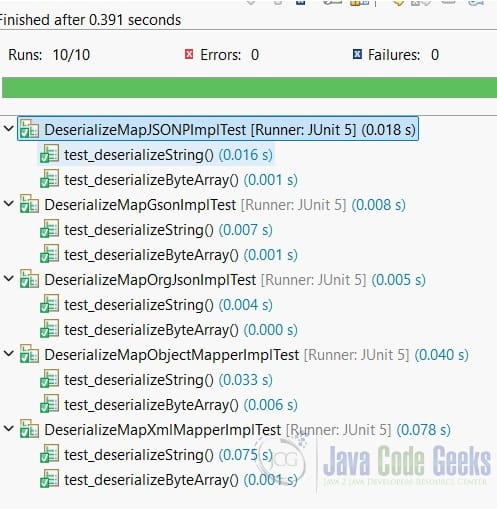
5. Test Results
In this step, I will run the Junit tests and capture the results here.
6. Conclusion
In this example, I defined the DeserializeMapService interface that deserializes both String and byte[] to Map<String, Object>. I also created five implementations via ObjectMapper, XmlMapper, Gson, org.json, and JSON API libraries. Both ObjectMapper and Gson deserialize to a Map with correct data types without any customized logic for whole or decimal numbers, Boolean, String, List, and nested objects. Both JSON-P and org.json require customized logic to convert to the correct data type. Here is the summary table.
| Data Format | Library Dependency | Default Number Type | Customized Logic | |
Jackson ObjectMapper | JSON, bytes[] | Yes | whole number maps to Integer, decimal maps to Double | No |
Jackson XmlMapper | XML, byte[] | Yes | whole number maps to Integer, decimal maps to Double | Yes |
Google Gson | JSON, byte[] | Yes | both whole number and decimal map to Double | No |
org.json | JSON, byte[] | Yes | whole number maps to Integer, decimal maps to BigDecimal | Yes |
| JSON-P | JSON, byte[] | No, Part of Java standard | whole number maps to Integer, decimal maps to BigDecimal | Yes |
- for whole number,
Gsonmaps toDouble, others map toInteger. - for decimal,
ObjectMapper,XmlMapper, andGsonmap toDouble, JSON-P andorg.jsonmap toBigDecimal.
7. Download
This was an example of a Gradle project that deserialized XML, JSON, and byte[] into Map<String, Object> objects with correct data types.
You can download the full source code of this example here: Deserialize to a Map with Correct Type Example



