1. What Is Scrum?
In software development, Scrum is a lightweight Agile framework used for developing, delivering, and sustaining complex products by employing various processes and techniques. Scrum is grounded in empirical process control theory. It employs an iterative, incremental approach to optimize predictability and control risk. There are three pillars upholding every implementation of empirical process control: transparency, inspection, and adaptation. This beginner developer’s guide to Scrum will guide you to work together with others and improve yourself during the process by starting with the three pillars of Scrum: artifacts, roles, and events.
| Scrum Pillar | Description | Developer’s Tasks |
| Transparency | No one has any hidden agenda. | Inspects work based on the Definition of Done. |
| Inspection | The product, processes, people, practices, and continuous improvements must be inspected so that unacceptable variances in the process can be detected. | Demonstrate the work to the team. Contribute during Scrum Events |
| Adaptation | If the inspector determines from the inspection that one or more aspects of the process are outside acceptable limits, then the inspector must adjust the process or the material being processed. | Adjust the implementation based on the change as quickly as possible to minimize further deviation. Am I better than yesterday? |
2. Scrum Framework Content
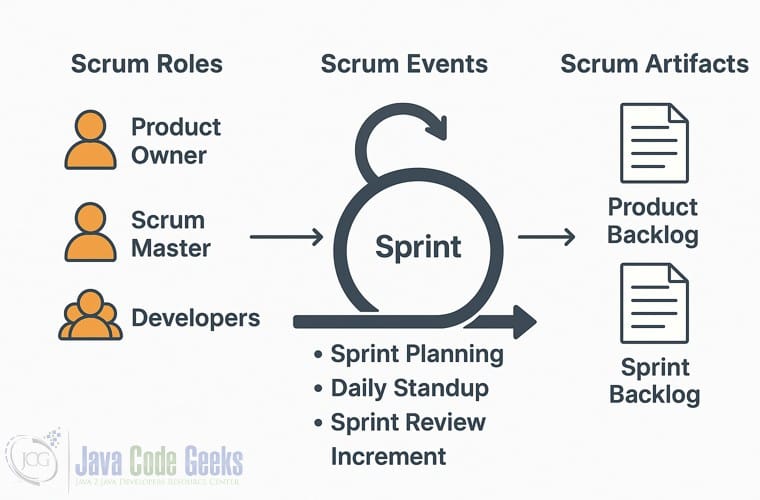
Figure 1 shows that the Scrum framework consists of a set of Scrum teams and their associated roles, time-boxed events, and artifacts.
2.1 Scrum Artifacts & Scrum Goal
Agile scrum artifacts are information that a scrum team and stakeholders use to detail the product being developed, actions to produce it, and the actions performed during the project. These artifacts provide metadata points that give insight into the performance of a sprint. They are essential tools for every scrum team since they enable core scrum attributes of transparency, inspection, and adaptation. Here are the main Scrum artifacts: Product Backlog, Sprint Backlog, and Increment.
| Scrum Artifact | Scrum Goal | Description | Scrum Events | Developer’s Task |
| Product Backlog | Product Goal | A prioritized list of all tasks needed for the product: new features, changes to existing features, bug fixes, infrastructure changes, etc. | During the Sprint Planning, prioritize, estimate, and move the top items into the Sprint Backlog | Understand the story’s acceptance criteria (AC). If the AC is not clear, then ask questions via “Given-When-Then” format(Gherkin). |
| Sprint Backlog | Sprint Goal | a subset of the Product Backlog that a team is committed to delivering in the current Sprint | Created during Sprint Planning, owned by Developers, and updated daily as work progresses. | Estimate the story point during the Scrum refinement meeting. |
| Increment | Definition of Done | a timeboxed period ( 1-4 weeks) in which a Scrum team works to deliver a usable, working product | Once Sprint starts, Daily Scrum conducts a quick daily check-in. At the end of the Sprint, Sprint Review shows the completed work, and Sprint Retrospective discusses how to improve next. | Complete development tasks based on the “Definition of Done“ |
The Increment’s goal is Definition of Done(DoD). DoD is a clear, shared understanding of the criteria that must be met for work to be considered complete. Here is an example DoD for a software team:
- No critical bugs.
- Code reviewed.
- Unit tests passed.
- Sonar report passed.
- Code coverage passed.
- Integrated into the “development” branch
- Documentation updated.
2.2 Scrum Roles
Three Scrum roles: the Product Owner(PO), Scrum Master (SM), and Developers.
| Scrum Role | Main Responsibilities | Scrum Events Participation |
|---|---|---|
| Product Owner | Aligns product vision, maximizes product value, prioritizes tasks, and manages the Product Backlog | Sprint Planning, Sprint Review to provide insights and receive feedback. |
| Scrum Master | Facilitates Scrum practices, coaches the team, and removes impediments | Facilitates and attends all Scrum Events |
| Developers | Deliver potentially shippable product increments, self-manage to meet the Sprint Goal | Sprint Planning, Daily Scrum, Sprint Review, Sprint Retrospective |
2.3 Time-boxed Scrum Events
Four time-boxed Scrum Events: Sprint Planning, Review, Retrospective, and Daily Scrum,
| Scrum Events | Event Goal | Description | Developer’s Task |
| Sprint Planning | The team decides what to build in this sprint. | based on the Product Backlog, team velocity, and team capacity | Understand the story’s requirements, the effort to complete. |
| Daily Scrum | Transparency, inspection, and accountability | 15-minute meeting to answer: what did I do yesterday? what will I do today? any blockers? | Report the story status |
| Sprint Review | Demonstrates the increment and gets feedback on what we delivered. | Demonstrate the stories and document feedback. | |
| Sprint Retrospective | Reflect and improve | discuss three topics: what went well? what didn’t go well? what can be improved? | Learn from the mistake and get better. |
It helps teams deliver value quickly and iteratively, while continuously improving. Scrum helps teams with the following benefits:
- Work in short cycles (called sprints)
- Deliver small, usable chunks of the product regularly
- Adapt quickly to changes
- Collaborate often and improve constantly
3. Scrum Artifacts
Scrum artifacts are information that a scrum team and stakeholders use to detail the product being developed, actions to produce it, and the actions performed during the project. There are three kinds of artifacts that a scrum team works with: Product backlog, Sprint backlog, and Product increment (Sprint). As a developer, here are the activities you should be aware of.
- The Product Backlog lists all the ideas and features. Developers should review them ahead of the Sprint Planning and refinement meeting so they can contribute by asking the right questions.
- The Sprint Backlog lists current sprint tasks and is created during Sprint Planning.
- The Increment is the working product we built. Developers commit in this Sprint.
4. Scrum Roles
In a Scrum team, there aren’t any central decision points, and all members contribute equally. However, there are three kinds of roles.
- The Product Owner decides what to build and why.
- Scrum Master keeps the team on track and removes blockers.
- Developers build the product together.
4.1 Product Owner
The Product Owner represents the customer/business and owns and prioritizes the features in the Product Backlog. As a developer, here is how you should engage with the Product Owner.
- Get clarification on the product if there is confusion or conflict among stories.
- Demonstrate the working product and gather feedback from the Product Owner.
- Ask for prioritization if there are conflicting stories in the same Sprint.
4.2 Scrum Master
The Scrum Master keeps the team on track and removes blockers. Here are the SM’s main responsibilities:
- Conduct meetings to maximize the team’s productivity.
- Maintain transparency by reporting both “Burn down” and “Team status”.
- Facilitates the Scrum process.
- Removes impediments.
- Coaches the team on Agile/Scrum best practices.
As a developer, you should report any blockers and learn the Scrum best practices to become a part of a self-organized team.
4.3 Developers
Developers are responsible for delivering the Increment based on the definition of done. Developers participate in all Scrum events and build the product. Here are the main activities:
- Estimate effort, e.g. story points or hours.
- Collaborate closely with team members.
- Keep work visible (e.g. via task boards or Jira)
- Deliver working software by sprint end.
- Continuously improve through retrospectives.
5. Scrum Events
5.1 Sprint (1–4 weeks cycle where work happens.)
A timeboxed iteration to deliver a working product increment. Developers are fully committed to the Sprint based on the definition of done.
- Scrum Master ensures that no changes are made that would affect the Sprint goal.
- If the team senses that it has overcommitted, then it meets with the Product Owner to remove or reduce the scope of the Sprint.
- If the team has extra time, then it can work with the Product Owner to bring additional items from the Product Backlog.
- Each Sprint contains planning, development work, review, and retrospective.
- A Scrum Sprint should not exceed one month long. The predictability of the project has to be controlled each month.
5.2 Sprint Planning (8 hours for each month)
A time-boxed meeting(8 hours for each month) to discuss what is the content of the Sprint backlog and how to deliver the Sprint. Inputs: Product Backlog, velocity, team capacity. Output: Sprint BackLog and Story Decomposition. Developers need to ask questions to fully understand what to be built from the product owner and decompose the story into tasks so developers know how to build the product.
- Make sure the story
acceptance criteriaare clear. - Make sure the test cases are outlined
- Design and outline the tasks within the story.
5.3 Daily Scrum/Standup ( 15 minutes Daily)
Team meets daily at the same time for a 15-minute meeting to answer the same three questions:
- What did I do yesterday?
- What will I do today?
- Any blockers?
Daily Scrums improve communications, eliminate other meetings, identify and remove impediments to development, highlight and promote quick decision-making, and improve everyone’s level of project knowledge. The intent is to optimize the probability that the team will meet its goal. It’s the inspection of the progress towards the Sprint goal.
5.4 Sprint Review (4 hours for each month)
A time-boxed meeting(4 hours for each month) to collaborate about what was just done. Based on that and changes to the Product Backlog. It has two parts:
- The Product Owner identifies what has been done and what hasn’t been done.
- Showcase
Incrementto stakeholders and answer questions. - Get feedback on what was delivered.
5.5 Sprint Retrospective (3 hours for each month)
A time-boxed meeting(3 hours for each month) to reflect on the sprint:
- What went well?
- What can be improved?
- Action items for improvement.
The purpose of the Retrospective is to inspect how the last Sprint went in regards to people, relationships, process, and tools. The inspection should identify and prioritize the major items that went well and went wrong. These include team composition, meeting arrangements, tools, definition of done, methods of communication, and process for marking Product Backlog items to the “done” status.
As a developer, participating in retrospective meetings leads you to naturally spot problems, propose solutions, and adjust your workflow. So, in the end, become self-motivated.
6. Tips for a Beginner Developer
Here are tips for a developer in a Scrum framework.
- Ask questions during planning and standups.
- Don’t overcommit – learn your pace.
- Communicate early when blocked.
- Focus on team’s goals, not just individual tasks.
- Stay engaged during reviews and retros.
- Keep the tone blameless and constructive.
- Inspect the work based on the
Definition of Done.
7. Common Tools
Here are some common tools used in the Scrum Framework:
- Jira, Trello – Backlog and task tracking.
- Confluence, Notion – Documentation.
- Slack, Teams – Communication.
- GitHub, GitLab – Source control and CI/CD.
8. Conclusion
In the developer’s guide to Scrum, it outlined the Scrum framework and the three Scrum roles: Product Owner, Scrum Master, and Developers. It summarized the following responsibilities for developers:
- Participate in all Scrum events.
- Break down backlog items into tasks.
- Estimate effort (e.g., in story points or hours).
- Collaborate closely with team members.
- Keep work visible (e.g., via task boards or Jira).
- Deliver working software by sprint end.
- Continuously improve through retrospectives.