
1. Introduction
ISO 8859 is an eight-bit extension to ASCII developed by the International Organization for Standardization (ISO). ISO 8859 includes the 128 ASCII characters and additional 128 characters. ISO-8859-1 (Latin-1) is the first version of ISO-8859 which supports most Western-European languages including Afrikaans, Basque, Catalan, Danish, Dutch, English, Faeroese, Finnish, French, Galician, German, Icelandic, Irish, Italian, Norwegian, Portuguese, Spanish, and Swedish. Unicode Transformation-8-bit (UTF-8) is a variable-length character encoding standard and each character is encoded as 1 to 4 bytes. The first 128 Unicode code points are encoded as 1 byte and they are the same as those in ASCII. Therefore, both ISO-8859-1 and UTF-8 are backwards compatible with ASCII. ISO-8859-1 is more memory-efficient than UTF-8 since it uses a single-byte for each character. If the applications support only Western-European languages and don’t require characters from other languages or special symbols, then ISO 8859-1 is a better choice. In this example, I will demonstrate UTF-8 to ISO-8859-1 conversion with Java applications.
2. Set up Java Project
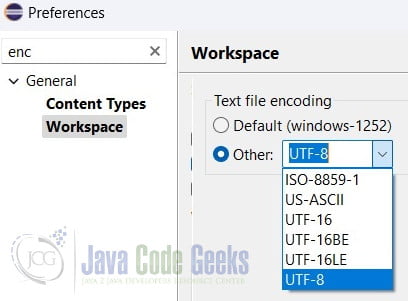
In this step, I will create a simple Java project in an Eclipse IDE. In order to display the UTF-8 character in the console window, please select the “UTF-8” from with the “Other:” options under the “text file encoding” section as the screenshot shown here.
3. UTF-8 to ISO-8859-1 Conversion via getBytes
In this step, I will create a ConvertViaBytes class which converts the bytes of the original UTF-8 string to a sequence of characters using UTF-8 encoding, and then encoding those characters into bytes using ISO-8859-1 encoding.
ConvertViaBytes.java
package org.zheng.demo;

import java.io.UnsupportedEncodingException;
import java.nio.charset.Charset;

public class ConvertViaBytes {

	private static final String ISO_8859_1 = "ISO-8859-1";
	private static final String UTF_8 = "UTF-8";

	public static void main(String[] args) {
		System.out.println("Java default Charset: " + Charset.defaultCharset());

		Charset.availableCharsets().entrySet().stream()
				.filter(c -> c.getKey().startsWith(UTF_8) || c.getKey().startsWith(ISO_8859_1))
				.forEach(c -> System.out.println("Found Charset: " + c.getKey()));

		try {
			String utf8String = "UTF-8 Text: MaryZhengäöüß测试";

			// Convert UTF-8 string to byte array using UTF-8 encoding
			byte[] utf8Bytes = utf8String.getBytes(UTF_8);

			// Convert byte array to string using ISO-8859-1 encoding
			String iso88591String = new String(utf8Bytes, ISO_8859_1);

			System.out.println("Original UTF-8 string: " + utf8String);
			System.out.println("Converted ISO-8859-1 string: " + iso88591String);
		} catch (UnsupportedEncodingException e) {
			System.out.println("Unsupported encoding: " + e.getMessage());
		}
	}

}
- line 12: prints out the default character setting. For this example, it should print out as “UTF-8”.
- line 15, 16: prints out the supported character setting whose name starts with “UTF-8” and “ISO-8859-1”. You will see that there are several supported versions of ISO-8859-1.
- line 19: defines a UTF-8 string which includes ASCII characters and two Chinese characters.
- line 22: returns a byte array of the UTF-8 string.
- line 25: creates a new string with the above byte array and encodes it with ISO-8859-1.
- line 27, 28: prints the original UTF-8 string and converted string.
Execute the main program and capture the output.
ConvertViaBytes output
Java default Charset: UTF-8 Found Charset: ISO-8859-1 Found Charset: ISO-8859-13 Found Charset: ISO-8859-15 Found Charset: ISO-8859-16 Found Charset: UTF-8 Original UTF-8 string: UTF-8 Text: MaryZhengäöüß测试 Converted ISO-8859-1 string: UTF-8 Text: MaryZhengäöüÃæµè¯
Note: as you saw at the last line, the converted string didn’t display the Chinese characters correctly.
4. UTF-8 to ISO-8859-1 Conversion via charArray
In this step, I will create a ConvertViaCharArrayclass which converts the original UTF-8 string to a char array and then create a string from byte[] with ISO-8859-1 encoding.
ConvertViaCharArray.java
package org.zheng.demo;

import java.nio.charset.Charset;

public class ConvertViaCharArray {

	private static final int LAST_CHAR = 0xFF;
	private static final String ISO_8859_1 = "ISO-8859-1";

	public static void main(String[] args) {

		String utf8String = "UTF-8 Text: MaryZhengäöüß测试";

		// Decode UTF-8 string to characters
		char[] utf8Chars = utf8String.toCharArray();

		// Encode characters to ISO-8859-1 bytes
		byte[] iso88591Bytes = new byte[utf8Chars.length];
		for (int i = 0; i < utf8Chars.length; i++) {
			char c = utf8Chars[i];

			if (c <= LAST_CHAR) {
				iso88591Bytes[i] = (byte) c;
			} else {
				iso88591Bytes[i] = '?'; // Replace characters not representable in ISO-8859-1
			}
		}

		// Create ISO-8859-1 string from bytes
		String iso88591String = new String(iso88591Bytes, Charset.forName(ISO_8859_1));

		System.out.println("Original UTF-8 string: " + utf8String);
		System.out.println("Converted ISO-8859-1 string: " + iso88591String);
	}

}
- line 12: defines a UTF-8 string with some Chinese characters.
- line 15: returns a charArray from the above UTF-8 string.
- line 18: creates a new byte array with the same length as the original string.
- line 22,23: reuses the same bytes if the character is less than the last ASCII
0xFF. - line 25: changes the character to ? for these non-represtable UTF-8 characters.
- line 30: creates a new string with ISO-8859-1 encoding.
- line 32, 33: prints out the original UTF-8 and converted string.
Execute the main program and capture the output:
ConvertViaCharArray output
Original UTF-8 string: UTF-8 Text: MaryZhengäöüß测试
Converted ISO-8859-1 string: UTF-8 Text: MaryZhengäöüß??
Note: as you see from the outline, the Chinese characters changed to the ? symbol.
5. Conclusion
Different operating systems choose a different default character encoding. For example, Microsoft Windows system default character encoding is set as UTF-16 while Linux and MasOS set UTF-8 as the default. Sometimes, character encoding conversion is necessary to ensure that text data is properly interpreted and processed. In this example, I demonstrated UTF-8 to ISO-8859-1 conversion with two java applications. The ConvertViaCharArray class converts a UTF-8 String to ISO-8859-1 and masks the not-supported characters with the question mark(?). The ConvertViaBytes class converts a UTF-8 string into ISO-8859-1 with the getBytes method.
6. Download
This was a Java example of converting UTF-8 to ISO-8859-1.
You can download the full source code of this example here: Converting UTF-8 to ISO-8859-1



