
Right-sizing JVM workloads, migrating to Graviton, and running spot instances aren’t manager problems. They’re engineering decisions — and they’re yours to make.
Somewhere in your organization right now, a FinOps team is staring at a dashboard that shows your service consuming twice the memory it actually needs. They’ll file a ticket, it’ll bounce through the backlog, and three sprints from now somebody will “look into it.” Meanwhile, the bill compounds.
This is the classic FinOps failure mode: cost optimization is treated as a finance problem rather than an engineering one. The numbers are stark. According to Harness’s 2025 FinOps in Focus report, an estimated $44.5 billion in enterprise cloud spend was wasted in 2025 — roughly 21 cents of every dollar — with 52% of engineering leaders pointing directly to the disconnect between FinOps teams and developers as the root cause. And yet, 62% of developers say they want more ownership over cloud costs.
So let’s talk practically. Below are the three highest-leverage levers a Java developer can pull today — not in a cost meeting, but in their IDE, their Dockerfile, and their Helm chart.

1. Right-Sizing JVM Workloads: Stop Paying for Memory You Don’t Use
The JVM was designed for a different era. On a shared server in 2005, it made sense for the runtime to be conservative — defaulting to 25–50% of available RAM for the heap, leaving plenty of room for other processes. In 2026, you’re probably running a container that is the only process on its allocated memory budget. You’re paying for every megabyte, and the JVM’s cautious defaults mean a significant slice of that budget sits idle.
Research published in early 2026 by Akamas, analyzing thousands of production Java workloads on Kubernetes, found that 60% of JVMs had no garbage collector explicitly set, leaving the runtime to pick a default that may be completely wrong for the container size. Most containers were running with an unset heap maximum, too — meaning the JVM has no idea how much memory is actually available, and will quite happily request more than the container limit, triggering an OOMKill that looks like a crash rather than a configuration problem.
1.1 The heap sizing trap
There are two ways to get heap sizing wrong, and both cost you money. Set it too small and you get frequent garbage collection pauses, CPU spikes, and — eventually — cascading restarts under load. Set it too large and you waste memory, inflate your node bill, and force longer GC pause times when a collection does occur. The sweet spot for cloud workloads is to allocate 80–85% of the container’s memory limit to the heap, leaving the remaining ~15–20% for metaspace, thread stacks, the code cache, and OS overhead.
Additionally, it’s critical to tell the JVM exactly how many CPU cores it’s working with. If your container has a CPU limit of 1 vCPU but sits on a 16-core host, the JVM will detect 16 cores and spin up 16 garbage collection threads — consuming far more CPU than your pod is actually allocated, throttling the container, and raising latency across the board.
JVM flags — production container configuration (Java 17+)
# Set heap to 80% of container memory limit
# Set GC threads to match actual CPU allocation
# G1GC is the right default for most microservices

JAVA_OPTS="\
  -XX:+UseG1GC \
  -XX:MaxRAMPercentage=80.0 \
  -XX:InitialRAMPercentage=50.0 \
  -XX:ActiveProcessorCount=2 \
  -XX:+UseStringDeduplication \
  -XX:+ExitOnOutOfMemoryError"
Without this flag, a JVM that exhausts memory will try to limp along — GC thrashing, dropping requests, filling logs with stack traces — for minutes before it finally dies. With it, the pod exits immediately, Kubernetes restarts it cleanly, and your load balancer routes traffic away during the restart. It’s faster and far easier to diagnose.
1.2 Choosing the right garbage collector
The collector you pick is a direct cost decision. Modern JVM research is clear on the tradeoffs: G1GC is the right general-purpose choice for most microservices above 2 GiB of heap; ZGC and Shenandoah suit latency-sensitive services where sub-millisecond pause times matter more than raw throughput; and Parallel GC wins for batch jobs and CPU-intensive pipelines where pause time is acceptable in exchange for 10–15% higher throughput.
| Collector | Best for | Pause profile | Memory overhead | Cloud sweet spot |
|---|---|---|---|---|
| G1GC | General-purpose microservices | Low (configurable) | Moderate | 2 GiB+ heap |
| ZGC (Generational) | Latency-critical APIs | Sub-millisecond | Higher | Any heap, Java 21+ |
| Shenandoah | Low-latency, large heap | Sub-millisecond | Higher | 100 GiB+ possible |
| Parallel GC | Batch / data processing | Higher pauses | Low | Throughput priority |
| Serial GC | Tiny sidecars, CLIs | High pauses | Minimal | < 256 MiB containers |
One more thing worth knowing: Project Lilliput (arriving in mainstream JDK releases) reduces object header size, cutting heap requirements by 10–20% in object-heavy applications with zero code changes. If you’re on Java 24+, it’s worth enabling and measuring.
Memory Cost Reduction: Default JVM vs. Tuned Configuration

Always set both
requestsandlimitsfor memory in your pod spec and make surelimitsmatches the container memory your JVM flags assume. IfMaxRAMPercentagecalculates against a different number than what Kubernetes actually enforces, you’ll get OOMKills that are nearly impossible to trace without checking both places at once.
2. Graviton ARM Savings: The Easiest Win Most Teams Are Still Skipping
Here’s the bluntest way to frame this: if you’re running Java workloads on x86 EC2 instances in 2026 and you haven’t at least evaluated Graviton, you’re probably leaving 20–40% of your compute bill on the table. That’s not a rough estimate — it’s the documented price-performance range that over 90,000 AWS customers have validated.
The key architectural reason is physical cores. Intel Xeon processors use hyperthreading: one physical core becomes two vCPUs, which share execution units and contend with each other under load. Graviton instances map one vCPU directly to one physical Arm Neoverse core. For Java workloads — which are inherently multi-threaded and use thread-level parallelism for GC, JIT compilation, and request handling — this means more consistent throughput without the “noisy neighbor” problem at the silicon level.
2.1 Graviton4 and Java — the numbers that matter
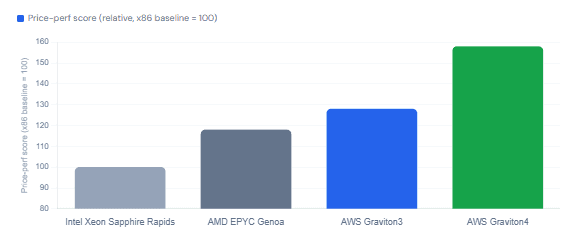
AWS’s Graviton4 processor (powering R8g, C8g, and M8g instance families) is built on 96 Arm Neoverse-V2 cores with DDR5-5600 memory and claims up to 40% better performance for Java workloads compared to x86 equivalents. Independent benchmarks by Phoronix confirmed Graviton4 matching or exceeding Intel Sapphire Rapids and AMD EPYC Genoa across a wide range of workloads, while generally coming in cheaper per vCPU-hour. Java microservices migrated to Graviton4 typically see 15–30% more throughput, and power consumption can drop by as much as 60% — relevant if your organization tracks ESG metrics.
For the JVM specifically, the migration is smoother than it sounds. AWS recommends Java 17 or newer for Graviton, with Amazon Corretto as the preferred distribution — Corretto 11 and above support LSE (Large System Extensions), a set of atomic memory operations that improve performance for lock-contended workloads and reduce GC pause time on Arm hardware. TLS handshakes, in particular, can be up to 13× faster using Amazon’s Corretto Crypto Provider 2 on Graviton 3 and later.
Price-Performance: Graviton4 vs. x86 (Java Workloads)
2.2 How to migrate — a practical checklist
The path to Graviton is genuinely straightforward for most Java services. The main work is verifying that your container images are built for linux/arm64 and that any native dependencies (JNI libraries, agents, custom serializers) have an Arm64 build available.
- Build a multi-arch Docker image:
docker buildx build --platform linux/amd64,linux/arm64 - Switch to Amazon Corretto 17 or 21 as your base image (already Arm64-native)
- Audit native dependencies: check
mvn dependency:treefor anything with aclassifiercontaininglinux-x86 - Launch a Graviton instance (
m8g.largemirrorsm5.large) with an AL2023 arm64 AMI - Run your full integration test suite — most pure-Java services pass without a single code change
- Load test side-by-side and compare throughput and p99 latency before cutting traffic over
- Use AWS’sGraviton Savings Dashboardto model projected savings before committing
Dockerfile — multi-arch Corretto 21 base image
# Corretto 21 supports linux/amd64 and linux/arm64 natively
FROM amazoncorretto:21-al2023-headless

# Set JVM flags for container-aware memory and GC
ENV JAVA_OPTS="\
  -XX:+UseG1GC \
  -XX:MaxRAMPercentage=80.0 \
  -XX:InitialRAMPercentage=50.0 \
  -XX:ActiveProcessorCount=2 \
  -XX:+ExitOnOutOfMemoryError"

COPY target/app.jar /app/app.jar
ENTRYPOINT ["sh", "-c", "java $JAVA_OPTS -jar /app/app.jar"]
AWS uses the
gsuffix for Graviton instances. Graviton3 =m7g,c7g,r7g. Graviton4 =m8g,c8g,r8g. The shape mirrors the equivalent x86 family directly, making lift-and-shift straightforward.
3. Spot Instance Strategies: Running Interruptible Java Without the Drama
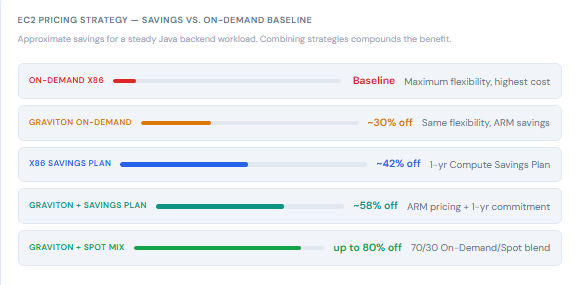
Spot instances offer up to 90% off on-demand pricing. The catch, as every developer knows, is the two-minute termination notice when AWS needs capacity back. For stateful, session-heavy services, that’s a hard constraint. For a significant slice of the average Java backend — stateless APIs, workers, batch jobs, CI/CD pipelines — it’s a completely manageable constraint, if you engineer for it deliberately.
According to Cast.ai’s 2025 Kubernetes Cost Benchmark Report, clusters running a mixed On-Demand and Spot strategy saved an average of 59%, while all-Spot clusters averaged 77% savings. In practice, most production services run a blended approach: a stable baseline of On-Demand or Reserved capacity for the core pods, and a spot-backed autoscaling group that absorbs traffic spikes.
3.1 Which Java workloads are good spot candidates?
| Workload type | Spot suitability | Reasoning |
|---|---|---|
| Stateless REST / gRPC APIs | Excellent | Load balancer redirects in-flight requests; restart is fast |
| Kafka consumers / workers | Excellent | Uncommitted offsets are re-processed after restart |
| Batch / ETL jobs | Excellent | Checkpointing handles interruption; restart from last checkpoint |
| CI/CD build agents | Excellent | Each build is ephemeral; failure just re-queues |
| Scheduled Spring Batch jobs | Good (with retry) | Spring Batch’s JobRepository handles restarts natively |
| WebSocket / long-poll servers | Caution | Active connections are dropped; clients must reconnect |
| Distributed cache nodes | Avoid | Data loss on interruption unless replication is bulletproof |
3.2 Making your Java service interruption-tolerant
AWS sends a two-minute warning before reclaiming a spot instance — either via the instance metadata endpoint or via EventBridge. On Kubernetes, the AWS Node Termination Handler (NTH) or Karpenter intercepts this signal, cordons the node, and drains pods gracefully before the instance disappears. The key on the Java side is that your JVM needs to actually shut down cleanly within that window.
Spring Boot handles SIGTERM well out of the box since 2.3, but there are still two common failure modes: a shutdown hook that hangs waiting for a thread pool to drain, and a pod that doesn’t finish in-flight requests before Kubernetes removes it from the load balancer. Both are fixable with a few configuration
lines.application.yml — graceful shutdown for spot-tolerant Spring Boot
server:
  shutdown: graceful          # Finish in-flight HTTP requests

spring:
  lifecycle:
    timeout-per-shutdown-phase: 30s  # Max time to wait for in-flight requests
Kubernetes pod spec — prestop hook ensures load balancer drains before SIGTERM
lifecycle:
  preStop:
    exec:
      command: ["/bin/sh", "-c", "sleep 5"]
terminationGracePeriodSeconds: 60   # Must exceed Spring's shutdown timeout
The sleep 5 preStop hook gives the load balancer a moment to stop routing traffic to the pod before Spring’s graceful shutdown begins. Without it, there’s a race between Kubernetes removing the pod from the endpoints list and the Spring context beginning to refuse new connections — a race you will lose at scale.
3.3 Diversify instance types to reduce interruption risk
AWS recommends using the capacity-optimized allocation strategy and targeting instance types with a less than 5% interruption frequency (available via the Spot Instance Advisor). More practically: specify three to five similar instance types in your Auto Scaling Group or Karpenter NodePool, rather than a single type. If one pool gets reclaimed, your cluster autoscaler immediately provisions capacity from the next pool. On Graviton, the combination of m7g.large, m8g.large, and c7g.large gives you three physically different pools with similar vCPU/memory ratios.
Test before you need toAWS integrates spot interruption simulation directly into the Fault Injection Simulator (FIS), accessible from the EC2 console. Run a simulated interruption in staging before relying on spot in production. Two minutes is longer than you think if your JVM is hung on a slow database connection — and shorter than you think if your pod spec has a termination grace period of 600 seconds.
4. Pulling It Together: The Developer’s FinOps Priority Stack
Knowing which of these to tackle first matters. The three optimisations described above are not equally urgent for every team, and the right sequence depends on your spend profile. As a general heuristic, though, the order below maximizes return on engineering time — the first item costs almost nothing to implement, and the last requires the most upfront work to do safely.
| Priority | Action | Typical savings | Engineering effort | Risk |
|---|---|---|---|---|
| 1 — Now | Tune JVM flags (MaxRAMPercentage, ActiveProcessorCount, GC selection) | 15–25% memory bill | 1–2 hours | Low (test in staging) |
| 2 — Sprint | Migrate to Graviton4 instances with Corretto 21 | 20–40% compute bill | 0.5–2 days | Low (pure Java services) |
| 3 — Sprint | Add Compute Savings Plan or Reserved Instances for baseline capacity | 30–45% vs. on-demand | 1 day (planning + purchasing) | Low (commitment flexibility) |
| 4 — Milestone | Enable graceful shutdown and move stateless services to spot | 50–80% spot workload cost | 3–5 days | Medium (test interruption handling) |
One final thing worth naming: the biggest obstacle to all of the above isn’t technical. It’s visibility. Only 33% of developers have access to data on over-provisioned workloads in their own teams. If cost data lives in a separate FinOps dashboard that you don’t have access to, push for it to surface in your CI/CD pipeline, your deployment tooling, or at minimum in a shared Slack channel. You can’t optimize what you can’t see, and the decisions that drive cloud cost are made by engineers — not analysts.
5. What We’ve Learned
Cloud cost optimization is not a finance team responsibility with developer-shaped tickets at the end. It is an engineering discipline, and the highest-leverage decisions happen at the JVM flags level, the instance type selector, and the Kubernetes pod spec — not in a quarterly review meeting.
We’ve seen that tuning MaxRAMPercentage and ActiveProcessorCount alone can meaningfully reduce the container footprint of any Java service, because the JVM’s defaults were designed for shared servers, not dedicated cloud containers. Migrating to Graviton4 with Amazon Corretto is the single highest-return architectural change available to most Java teams right now — 20–40% compute savings with minimal migration risk for stateless services. And Spot instances, when paired with graceful Spring Boot shutdown and a properly configured Kubernetes preStop hook, can slash the cost of stateless workloads by 50–80%.
Taken together, a team that applies all three in sequence — JVM tuning, Graviton migration, spot blending — can reasonably expect to cut their service’s cloud bill by more than half without touching a single line of business logic. That’s the kind of impact that used to require a dedicated platform engineering team. In 2026, it’s a few days of work for any developer willing to look at the bill.
Further Reading & References
- AWS Graviton Technical Guide — Java — aws.github.io
- Java on ARM in 2025: Speed, Savings & Sustainability — VirtusLab
- The State of Java on Kubernetes 2026 — Akamas
- Optimizing Java Applications for Arm64 in the Cloud — Ampere Computing
- Make Your Kubernetes Applications Spot Interruption-Tolerant — Zesty
- FinOps in Focus 2025 Report — Harness / PR Newswire
- Speed Up Existing Deployments With the Right JVM Features — JAVAPRO





