
Why hbm2ddl.auto=update is still in production codebases — and what to do about it
Somewhere in a production codebase right now, Hibernate is quietly rewriting a database schema based on whatever Java classes it finds at startup. No migration file. No review. No record of what changed. Just a property set during a weekend hackathon three years ago that nobody has touched since.
The property is hbm2ddl.auto=update, and it is one of the most subtly dangerous defaults in enterprise Java. It feels helpful — your schema stays in sync with your entities automatically, and local development just works. In production, however, it creates a category of schema drift that is invisible until it causes data loss, a failed deployment, or an incident that takes hours to diagnose because no migration log exists to explain what changed.
This article is not a tutorial on Flyway or Liquibase. There are plenty of those. Instead, it is a direct argument: hbm2ddl.auto=update should not be in any production configuration, the risks it creates are poorly understood even by experienced teams, and the migration path away from it is simpler than most teams fear.
1. What the Setting Actually Does
Hibernate’s hbm2ddl.auto property controls how Hibernate interacts with the database schema at application startup. The official Hibernate documentation defines five possible values, each with a very different risk profile:
| Value | What It Does at Startup | Safe in Production? |
|---|---|---|
none | Does nothing — schema management is entirely external | Yes — recommended |
validate | Checks that the schema matches the entity model; fails if not | Yes — useful as a safety net |
update | Adds missing columns and tables; never drops anything (usually) | No — do not use |
create | Drops and recreates the entire schema on every startup | No — destroys all data |
create-drop | Creates schema on startup, drops it on shutdown | No — destroys all data |
The update value is the dangerous middle ground. It is clearly not as catastrophic as create, and that apparent safety is precisely what makes it so persistent. Teams see that it does not delete data and conclude it is acceptable. What they miss is everything it does silently — and the categories of damage that silence creates over time.
2. The Four Categories of Silent Risk
The risks of update do not typically announce themselves. Instead, they accumulate quietly across deployments until a combination of circumstances brings them to the surface at the worst possible moment. There are four distinct categories worth understanding in detail.
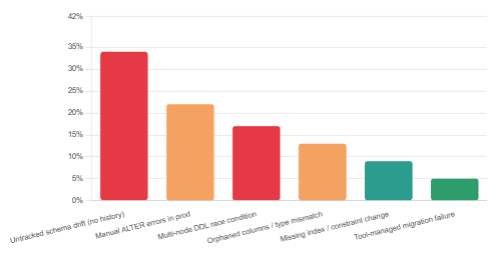
Category 1: Orphaned Columns and Silent Data Retention
When you rename or remove a field from a Hibernate entity, update mode does not drop the corresponding database column. The old column stays in the table indefinitely, accumulating stale data from older application versions that are still writing to it. Over time, this creates a graveyard of columns that no running code reads — but which may contain customer data, PII, or financial records that compliance teams have no visibility into.
Furthermore, if you later add a new entity field with the same name as one of these orphaned columns but a different type, Hibernate will fail to start with a cryptic error, and the team will spend hours diagnosing a schema state that has no migration log to explain it.
Category 2: Index and Constraint Drift
Hibernate’s update mode adds missing indexes and constraints — but it does not remove them when you delete @Index or @UniqueConstraint annotations from your entities. Conversely, if a constraint exists in the database but not in the entity model, validate mode would catch this; update mode simply ignores it. The result is a growing divergence between what the entity model implies and what the database actually enforces, with no record of how the divergence developed.
In practice, this means unique constraints that should have been removed are still silently rejecting inserts, or indexes that were added for a feature that shipped three years ago are still slowing writes to a high-traffic table — and nobody knows why, because the index has no migration record.
Category 3: The Multi-Node Deployment Race Condition
This is the most acute risk, and it surfaces specifically during rolling deployments. When two nodes start simultaneously — which happens routinely in Kubernetes or any auto-scaling environment — both attempt to run schema updates at startup. There is no coordination mechanism. Both nodes read the current schema state, both decide to apply changes, and both attempt to execute DDL simultaneously.
The results range from harmless duplicate operations that succeed idempotently, to ALTER TABLE conflicts that cause one node to fail, to partial schema updates where one node applies half of a multi-step change before the other node runs queries against an inconsistent state. None of this is logged in a way that makes the cause obvious.
Why this is worse than it sounds: A failed migration tool like Flyway will throw an exception with a clear message, refuse to start the application, and leave the schema in a known state. A failed hbm2ddl.auto=update race condition may partially apply changes, leave the schema in an unknown intermediate state, and allow the application to start anyway — serving requests against a schema that is neither the old state nor the new one.
Category 4: No Audit Trail
Perhaps the most underappreciated risk is simply the absence of history. With a migration tool, every schema change has a timestamp, a version number, an author (via version control), and a description. When something goes wrong — a query starts timing out, a column that should be NOT NULL is accepting nulls, a foreign key is missing — you can look at the migration log and understand exactly when the schema reached its current state.
With update mode, that history does not exist. The schema is whatever Hibernate decided it should be across every deployment since the application was first created. When something goes wrong, you are debugging a schema whose history is unknowable.
Where Schema-Related Incidents Come From
3. Why It Is Still Everywhere
Given all of the above, the obvious question is: why does this setting persist in production? The answer is a combination of momentum, tutorial culture, and a genuine asymmetry between the risks and the feedback.
First, tutorial momentum. Almost every Spring Boot getting-started guide, every JPA tutorial, and every Hibernate quickstart sets hbm2ddl.auto=update to make the example work without any setup overhead. The setting that makes a tutorial easy is the setting that gets copy-pasted into production configuration files, where it stays because removing it requires effort and the application keeps working in the meantime.
Second, the feedback asymmetry. The risks described above are largely silent until they are not. A team running update mode in production for two years may never experience a visible incident. The orphaned columns accumulate silently. The constraint drift is invisible. The absence of an audit trail is only felt when something goes wrong. Consequently, the setting never produces a failure that prompts a team to revisit it — until it does, by which point the schema history is unrecoverable.
Third, migration tool anxiety. Many developers have heard that Flyway or Liquibase are complex, heavyweight, or difficult to introduce into an existing project. This is a reasonable concern based on older versions of both tools. It is, however, no longer accurate. The barrier to entry has fallen substantially, and the migration path from update mode is more straightforward than most teams expect.
Adoption of Schema Migration Tools Among Java Teams

4. The Migration Path to Flyway
Moving from hbm2ddl.auto=update to Flyway does not require a rewrite or a downtime window. The process for an existing Spring Boot application is well-defined and can be completed in a few hours for most projects. The steps below address the most common objections directly.
Step 1 — Capture the Baseline
Before touching any configuration, generate a SQL dump of your current production schema. This becomes your baseline migration — the starting point that Flyway will use to understand the current state of the database.
# PostgreSQL: dump schema only (no data)
pg_dump --schema-only --no-owner --no-acl \
  -d your_database_name \
  -f src/main/resources/db/migration/V1__baseline_schema.sql

# MySQL / MariaDB equivalent
mysqldump --no-data --routines --triggers \
  your_database_name \
  > src/main/resources/db/migration/V1__baseline_schema.sql
This file becomes V1__baseline_schema.sql — the V1__ prefix is Flyway’s versioning convention. The double underscore separates the version from the description. Flyway will mark this migration as already applied on existing databases using the baseline command, which you will run once during rollout.
Step 2 — Add Flyway to Your Project
In a Spring Boot project, adding Flyway requires one dependency. Spring Boot’s auto-configuration does the rest.
<!-- Maven: add to pom.xml -->
<dependency>
  <groupId>org.flywaydb</groupId>
  <artifactId>flyway-core</artifactId>
</dependency>

# Gradle: add to build.gradle
implementation 'org.flywaydb:flyway-core'
If you are using MySQL or MariaDB, you will also need the flyway-mysql dependency. For SQL Server, flyway-sqlserver. The Flyway supported databases page lists the full set of dialect-specific modules.
Step 3 — Update application.properties
Now comes the critical change: disable Hibernate’s schema management entirely, and configure Flyway.
# application.properties

# Disable Hibernate auto-DDL completely
spring.jpa.hibernate.ddl-auto=none

# Flyway configuration
spring.flyway.enabled=true
spring.flyway.locations=classpath:db/migration
spring.flyway.baseline-on-migrate=true
spring.flyway.baseline-version=1
The baseline-on-migrate=true flag tells Flyway to treat the current schema as the baseline on its first run, rather than attempting to apply V1__baseline_schema.sql to a database that already matches it. This is what makes the transition non-destructive on existing databases.
Step 4 — Write Future Migrations as SQL Files
From this point forward, every schema change is a versioned SQL file in src/main/resources/db/migration/. The naming convention is strict: V{version}__{description}.sql. Flyway applies migrations in version order and records each one in a flyway_schema_history table that it creates automatically.
-- V2__add_user_phone_column.sql
ALTER TABLE users
  ADD COLUMN phone_number VARCHAR(20);

-- V3__add_index_on_email.sql
CREATE INDEX idx_users_email
  ON users (email);
Flyway will refuse to start the application if any previously applied migration file has been modified, which prevents the class of errors where a developer edits a migration that has already run in production. This is by design — and it is the right behaviour.
5. Addressing the Liquibase Alternative
Liquibase solves the same problem as Flyway and is the right choice for teams that need database-agnostic migrations, rollback support, or prefer defining changes in XML, YAML, or JSON rather than raw SQL. The tradeoffs are real but not dramatic.
| Consideration | Flyway | Liquibase |
|---|---|---|
| Migration format | SQL (plain and versioned) | XML, YAML, JSON, or SQL |
| Rollback support | Manual (write rollback scripts) | Built-in (via rollback changesets) |
| Learning curve | Low — SQL is familiar | Moderate — changeset format to learn |
| Database portability | Good (with dialect abstractions) | Excellent (abstracted DDL) |
| Spring Boot integration | Native auto-configuration | Native auto-configuration |
| Best for | Teams that want simplicity and SQL control | Teams needing rollbacks or multi-DB support |
For most teams migrating away from hbm2ddl.auto=update, Flyway is the lower-friction starting point. The SQL-first approach means existing database engineers can contribute migrations without learning a new format, and the version ordering is explicit and human-readable in the file system. Liquibase is the better choice if you are supporting multiple databases or if automated rollback is a hard requirement for your deployment process.
6. The Objection That Remains
The most common genuine objection to this migration — distinct from vague anxiety about complexity — is this: “We are a small team. Flyway adds overhead to every schema change. For a five-person startup, is the safety worth the friction?”
It is a fair question, and it deserves a direct answer. The overhead of a migration tool on a small team is roughly one additional SQL file per schema change, committed alongside the code that requires it. That is minutes of work per deployment. The cost of a schema incident caused by update mode — diagnosing a race condition, reconstructing a schema history that does not exist, recovering from a partial update on a production database — is measured in hours or days, and may involve data that cannot be recovered at all.
The correct unit of comparison is not “migration file overhead per deployment” versus “zero overhead.” It is “migration file overhead per deployment” versus “incident recovery time, once, when things go wrong.” The latter is not a question of if — it is a question of when.— Synthesis from Flyway documentation and community incident reports
Furthermore, small teams benefit disproportionately from the audit trail that migration files create. In a five-person team with high turnover or part-time contributors, the migration history is often the only reliable record of why the schema looks the way it does. That institutional memory has real value even when no incident ever occurs.
7. What We Have Learned
Throughout this article, we have examined why hbm2ddl.auto=update is a production risk that persists far longer than it should — and why the risks it creates are so easy to miss until they are not. We started with what the setting actually does and how it compares to the safer alternatives. We then traced four distinct categories of silent harm it creates: orphaned columns that accumulate stale data, index and constraint drift between the entity model and the actual schema, multi-node race conditions during rolling deployments, and the fundamental absence of an audit trail that makes any schema incident dramatically harder to diagnose.
We explored why the setting persists despite these risks — tutorial momentum, feedback asymmetry, and migration tool anxiety — and then walked through a practical, non-destructive migration path to Flyway that any team can execute without a downtime window. The core steps are: capture a SQL baseline, add Flyway as a dependency, set spring.jpa.hibernate.ddl-auto=none, and write future changes as versioned SQL files. The friction is minutes per deployment. The alternative is a category of silent, accumulating risk that typically surfaces at the worst possible time.
The honest summary: the setting that makes local development convenient is the setting that makes production databases unpredictable. The migration path away from it is far simpler than it was five years ago. There is no longer a good argument for leaving it in place.






