
The Model Context Protocol is quickly becoming the de-facto standard for AI tool integration — and the official Java SDK is already here. Here is what every backend developer needs to know to get started.
Imagine writing a handful of annotated Java methods and having any AI assistant — Cursor, VS Code Copilot, JetBrains AI Assistant, you name it — instantly able to call them. No custom API adapters. No vendor lock-in. No glue code written three times for three different clients. That is precisely the promise of the Model Context Protocol (MCP), and as of today, it is no longer a promise. It is already in production at hundreds of companies.
JCG has covered Spring AI extensively — but MCP server development in Java has received almost no dedicated attention, despite the fact that the official Java SDK was co-created by the Spring team and donated to Anthropic in early 2025. That gap ends here. By the time you finish reading, you will understand how MCP works, why it matters for backend developers specifically, and how to build and test your first server using Spring Boot.
Prerequisites
You will need Java 17 or later, Maven or Gradle, and a basic familiarity with Spring Boot. That is genuinely all. To call an LLM from a client you would additionally need an API key, but all server-side steps in this article work without one.
What Exactly Is MCP?
Model Context Protocol is an open standard introduced by Anthropic in November 2024. At its core, it standardizes the way AI models communicate with external tools and data sources. Think of it as a universal adapter — similar in spirit to how USB-C unified charging connectors across devices.
Before MCP, connecting an AI assistant to your internal services meant writing a bespoke integration for each client. With MCP, you write your server once, expose it over a well-defined protocol, and any compliant AI client can discover and call your capabilities immediately. That, consequently, is why the ecosystem has exploded so quickly.
MCP Server Registry Growth

Furthermore, MCP has received industry-wide backing that most new standards only dream of. OpenAI, Google (via Gemini), Microsoft (via Copilot Studio), and every major IDE — Cursor, Windsurf, JetBrains AI Assistant, VS Code Copilot — all support MCP natively. In short, when your service speaks MCP, you are speaking a language the entire AI tooling ecosystem already understands.
The Architecture in Plain English
MCP follows a straightforward client-server model with three distinct roles. Understanding these roles upfront will save you from the most common source of confusion: who does what.

The host is the AI application the user directly interacts with — Cursor, VS Code Copilot, JetBrains AI Assistant, or your own Spring AI application. The MCP client lives inside the host and handles the protocol-level details: capability negotiation, message routing, and transport. Crucially, a single host can maintain many MCP clients simultaneously, meaning it can talk to a database server, a weather API server, and your order management server all at once. The MCP server — the thing you are building — exposes your functionality through a well-defined set of primitives.
This architecture also creates a natural team boundary, which is one of its underappreciated benefits. Server developers focus entirely on wrapping services and exposing capabilities. Client and AI developers handle orchestration and model interaction. These can be entirely separate teams, in separate organizations, with no need to coordinate on anything beyond the protocol contract.
The Three Primitives Every Server Exposes
MCP defines exactly three types of capabilities that a server can offer a client. Therefore, before writing a single line of code, it is worth internalizing what each one is for.
Tools
Callable functions the AI can invoke to take action or retrieve data. Think of these as your service’s API surface — the things the model can do.
Resources
Readable data sources — similar to files or database rows — that the AI can pull into its context. Resources describe what the model can read.
Prompts
Reusable, parameterized prompt templates stored on the server. These act like stored procedures for natural-language queries — consistent phrasing, guaranteed every time.
In practice, most Spring Boot integrations start with Tools — they are the most immediately practical and the most commonly used primitive. Resources and Prompts add real value once your server matures, but they are not required to ship something useful. The important thing to note is that the tool’s description field is not just documentation. It is the signal the LLM uses to decide whether and when to invoke your tool. Vague descriptions lead to missed calls or inappropriate calls. Specific, action-oriented descriptions lead to accurate routing.
Choosing the Right Transport
Transport is the part where many developers get confused first, so it is worth being precise. MCP defines three transport mechanisms, and the right choice depends entirely on your deployment scenario.
| Transport | Best for | Notes |
|---|---|---|
| STDIO | Local CLI tools, desktop integrations | Client launches the server as a subprocess. Simple, zero network config. Preferred by Claude Desktop for local servers. |
| Streamable HTTP | Network-deployed servers, multiple clients | Introduced in MCP spec 2025-03-26. Replaces the older SSE transport. Use this for any server that lives on a network. |
| SSE (deprecated) | Legacy deployments only | Phased out as of spec 2025-03-26. Avoid for new projects; Spring AI 1.0.x defaults here so check your config. |
The key practical guidance is this: if you are building a server that will be deployed over a network and accessed by multiple clients, use Streamable HTTP. If you are building something that runs locally alongside Claude Desktop or a similar host, STDIO is the simplest path. Either way, Spring AI abstracts the transport away from your business logic entirely — you switch between them with a single configuration property.
Building Your First MCP Server with Spring Boot
Enough theory. Let us build a concrete example: a simple product catalogue server that exposes two tools — one to look up a product by ID, and one to search products by category. This pattern applies to almost any domain.
Step 1 — Bootstrap the project
Head to start.spring.io and create a Maven project with Java 17+ and Spring Boot 3.3+ (Spring Boot 3.5+ and Java 21 are recommended for new projects). Add the dependency called “Model Context Protocol Server”. Once you have downloaded and extracted the project, open pom.xml and verify the dependency is present:
<!-- pom.xml -->
<dependencyManagement>
  <dependencies>
    <dependency>
      <groupId>org.springframework.ai</groupId>
      <artifactId>spring-ai-bom</artifactId>
      <version>1.0.0</version>
      <type>pom</type>
      <scope>import</scope>
    </dependency>
  </dependencies>
</dependencyManagement>

<dependencies>
  <!-- For STDIO (local/desktop) transport -->
  <dependency>
    <groupId>org.springframework.ai</groupId>
    <artifactId>spring-ai-starter-mcp-server</artifactId>
  </dependency>
</dependencies>
The MCP Java SDK evolves quickly. Always check Maven Central for the latest
spring-ai-bomversion. Using the BOM ensures all Spring AI starters stay in sync and avoids the most common classpath conflicts.
If you prefer Streamable HTTP instead of STDIO — for example, because you want to deploy this server as a regular Spring Boot application on the network — swap the starter for spring-ai-starter-mcp-server-webmvc and add spring.ai.mcp.server.protocol=STREAMABLE to your application.properties. Everything else stays the same.
Step 2 — Write your service with @Tool
This is the most satisfying part. You write a perfectly ordinary Spring service and annotate the methods you want to expose. Spring AI then handles everything else — JSON schema generation, capability registration, and protocol wiring.
import org.springframework.stereotype.Service;
import org.springframework.ai.tool.annotation.Tool;
import java.util.*;

@Service
public class ProductCatalogueService {

    // Lightweight in-memory store — swap for a real repository in production
    private final Map<String, String> catalogue = Map.of(
        "P001", "Mechanical Keyboard - Cherry MX Blue",
        "P002", "USB-C Monitor 27in 4K",
        "P003", "Ergonomic Mouse - Silent Click"
    );

    @Tool(description = "Looks up a product by its ID and returns the product name. "
                       + "Use this when the user provides a specific product identifier.")
    public String getProductById(String productId) {
        return catalogue.getOrDefault(productId, "Product not found: " + productId);
    }

    @Tool(description = "Searches the product catalogue by keyword and returns "
                       + "matching product IDs and names. Use for open-ended browsing.")
    public List<String> searchProducts(String keyword) {
        return catalogue.entrySet().stream()
            .filter(e -> e.getValue().toLowerCase()
                          .contains(keyword.toLowerCase()))
            .map(e -> e.getKey() + ": " + e.getValue())
            .toList();
    }
}
Notice the descriptions on each @Tool. These are not optional decorators — they are the instructions the LLM will read when deciding which tool to call. Write them like you are explaining the function to a colleague who cannot see the method body.
Step 3 — Configure the server name
Add these two lines to your src/main/resources/application.properties:
spring.ai.mcp.server.name=product-catalogue
spring.ai.mcp.server.version=1.0.0
That is genuinely all the configuration a basic STDIO server needs. When you run the application, Spring Boot’s autoconfiguration picks up every @Tool-annotated method in the context and registers them automatically. No manual wiring, no bean declarations, no XML.
Step 4 — Connect it to an MCP client (optional)
Any MCP-compatible client — Cursor, VS Code Copilot, JetBrains AI Assistant, or any other IDE with MCP support — can connect to your server via a simple configuration entry. First, package your application into a JAR:
mvn clean package -DskipTests
Most desktop MCP clients accept a JSON config block that tells them how to launch your server. The format is standard across clients and looks like this:
{
  "mcpServers": {
    "product-catalogue": {
      "command": "java",
      "args": ["-jar", "/absolute/path/to/your-server.jar"],
      "env": {},
      "disabled": false
    }
  }
}
After restarting the client, your tools appear in its tool panel. You can then type something like “find me keyboard products” and watch the client invoke searchProducts on your running server in real time.
Testing Without an AI Client: the MCP Inspector
You do not need a full AI client to test your server during development. The MCP Inspector is a lightweight web UI that lets you call your tools, browse resources, and inspect raw protocol messages. It runs via npx and requires Node.js 18+:
npx @modelcontextprotocol/inspector \
  --command "java" \
  --args "-jar /absolute/path/to/your-server.jar"
This opens a local web interface at http://localhost:5173 (or similar). From there, you can invoke each tool with custom arguments, view the JSON-RPC messages flowing back and forth, and verify that your tool descriptions look correct from the client’s perspective. Consequently, catching description issues here — before plugging in a real LLM — saves a lot of debugging time later.
How Adoption Breaks Down by Deployment Type
Before wrapping up, it is worth looking at one more real-world data point. When you look at the most popular MCP servers in active use today, remote deployment — which maps to Streamable HTTP — is the clear winner. This makes sense: teams that already run Spring Boot services on the network naturally reach for the same deployment model.
MCP Server Deployment Model Preference
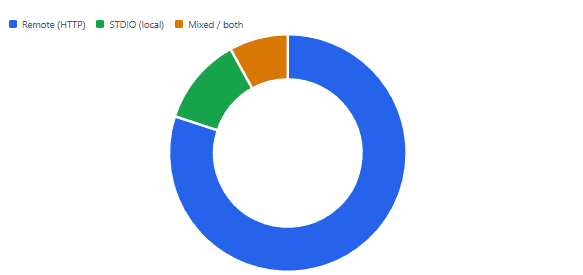
Therefore, even if you start with STDIO for local development, planning your server to support Streamable HTTP from the beginning is a sound investment. The configuration change is trivial; the architectural clarity it provides is not.
Four Pitfalls to Avoid
1. Vague tool descriptions
As mentioned earlier, the LLM relies entirely on descriptions to route calls. A description like “handles product requests” will result in the model ignoring your tool or calling it at the wrong time. Be specific: “Looks up a product by its SKU and returns the current price and stock level.”
2. Using the deprecated SSE transport
Spring AI 1.0.x projects default to SSE transport, which is deprecated as of MCP spec 2025-03-26. If you are on 1.0.x, explicitly check your configuration. For new projects on 1.1+, set spring.ai.mcp.server.protocol=STREAMABLE to future-proof your deployment.
3. Silently unregistered tools on older annotation versions
The @McpTool and @McpToolParam annotations from the MCP annotations module are only stable from Spring AI 1.1+. If you use them in a 1.0.x project without the correct dependency version, your tools will silently not register. Stick to @Tool from spring-ai-core for broadest compatibility.
4. One massive “do everything” tool
Tools should do one thing well. A broad manageProducts tool that handles lookup, creation, update, and deletion in a single method gives the LLM far less precision than four focused tools. More tools is almost always better than fewer, broader ones.
What We Have Learned
In this article, we walked through the Model Context Protocol from the ground up — what it is, why it matters, and how to put it to work as a Java developer. We covered the client-server architecture and the three core primitives: Tools, Resources, and Prompts. We then built a working MCP server using Spring Boot and a single @Tool annotation, with no manual wiring required. Along the way, we looked at transport options, understood why tool descriptions matter more than most developers expect, and learned how to test the whole thing locally using the MCP Inspector. MCP is already the standard — and as this guide shows, getting your first server running takes less time than you might think.






