
In the world of REST APIs, HATEOAS (Hypermedia as the Engine of Application State) remains one of the more ambitious ideals. And for those embracing HAL (Hypertext Application Language), it often feels like a pragmatic bridge between simplicity and hypermedia maturity. But once you dive deeper—especially when HAL evolves into HAL-Forms, things can get… sluggish.
One key culprit? The _templates element. It’s meant to enrich your APIs with form metadata, helping clients understand how to interact with your service. But in practice, it often introduces noticeable response delays, bloated payloads, and confusing runtime costs.
So why does something built to improve UX for API clients sometimes hinder performance? Let’s unpack it.
1. What HAL-Forms Brings to the Table
HAL-Forms is an extension of HAL that allows APIs to return not just links (_links) but also actionable instructions on how to interact with the resource. That includes what forms the client can submit, what fields they should use, their types, allowed values, defaults, etc.
Example:
{
  "_templates": {
    "default": {
      "method": "POST",
      "properties": [
        {
          "name": "comment",
          "prompt": "Enter your comment",
          "required": true
        }
      ]
    }
  }
}
This is great, right? The client can introspect the API and know what fields to show in a UI. But now imagine your API is dealing with hundreds of templates, each depending on user roles, locales, dynamic constraints, and real-time business logic. You start feeling it.
2. The Performance Problem with _templates
Here’s where things get thorny.
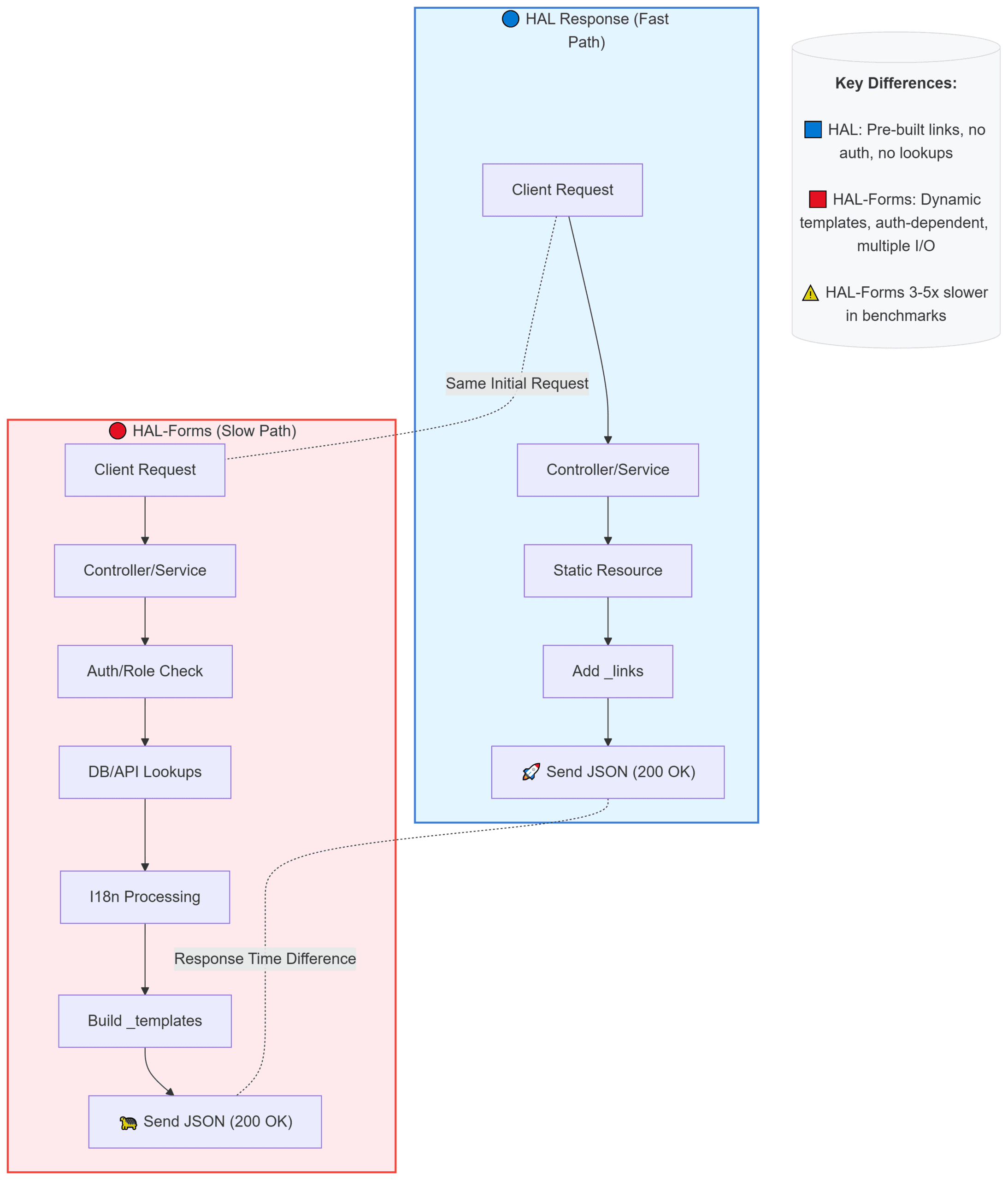
Generating those _templates isn’t free. While _links often come from static configuration or simple mapping, _templates usually require runtime evaluation. That’s because they tend to reflect:
- User-specific permissions
- Context-aware input constraints
- Localized prompts and labels
- Option lists fetched from remote services
- Defaults calculated from current state
And this often means multiple service calls, database hits, and conditional logic per response.
2.1 Case Study Example
A team at a major fintech company tried HAL-Forms to dynamically render UI forms from the backend. Every resource included _templates, customized for each user’s current role and context. On paper, it was elegant.
But in practice?
- Response times jumped from ~30ms to over 150ms
- CPU usage on the backend rose significantly
- API response sizes ballooned by 3–5x
- Caching became ineffective due to personalization
Eventually, they ripped it out and moved to static templates on the frontend with a custom metadata endpoint for more advanced cases.
“It was beautiful and painful at the same time,” one of the engineers wrote in a Reddit post.
3. Breaking Down the Cost
Let’s break down what typically adds latency when _templates are included:
| Cost Factor | Why It Hurts |
|---|---|
| Role-based field visibility | Requires real-time access to auth or policy service |
| Dynamic field options | Needs DB or third-party service fetches |
| Localized prompts | Forces i18n system lookup per request |
| Conditional logic | Often not cacheable; varies per user/context |
| Form-specific logic | Adds additional computation to the controller layer |
It’s a death-by-a-thousand-cuts scenario. Each form field template may feel lightweight, but dozens of these across many resources quickly add up.
3.1 Visualizing the Performance Impact
To better understand why HAL-Forms (_templates) can slow down API responses, let’s compare a typical HAL response with one that includes HAL-Forms metadata. The diagram below highlights the additional processing steps required when generating dynamic form templates, including role checks, database queries, and localization — all of which add latency and reduce cacheability.
4. Alternatives (That Won’t Hurt as Much)
If you love the idea of HAL-Forms but want performance, here’s how teams have pivoted:
1. Serve Templates Separately
Instead of embedding templates in every resource, create a dedicated endpoint like /forms/{resourceType} that returns only the needed form metadata. This keeps your core resource responses lean.
2. Client-Side Form Logic
If the forms are relatively static or tied to known business logic, push that to the frontend. Use strong typings and schema validation libraries (e.g. Yup, Zod) to manage form rules instead.
3. Template Caching
If your _templates can be generalized across users or scenarios, cache them aggressively. Tools like Redis can reduce pressure on your business logic layer.
4. Schema-based APIs
Explore OpenAPI or JSON Schema-based form generation. These formats are more widely supported and easier to cache, lint, and document.
“HAL-Forms has elegance, but in performance-sensitive apps, it’s like trying to carry groceries with a paper bag in the rain.” — @nicolas_frankel
5. When HAL-Forms Might Still Work
To be fair, there are scenarios where HAL-Forms shines:
- Small-scale internal apps where API performance isn’t critical
- Admin interfaces that benefit from self-describing forms
- Hypermedia-driven APIs built from day one with HAL-Forms in mind
But if you’re building for mobile clients, high-load systems, or anything customer-facing at scale, proceed with caution.
6. Final Thoughts
HAL-Forms is a noble idea in the HATEOAS world—one where APIs teach clients how to interact without prior knowledge. But in practice, especially when personalization and runtime logic get involved, _templates often become a silent performance killer.
It’s a classic trade-off: developer elegance vs. runtime cost. And while elegance is great, most users will choose speed over semantic purity every time.





