
The onClickCapture event in React is used to handle click events during the capture phase of event propagation. It is similar to the standard onClick event but triggers earlier in the event lifecycle.
Event Propagation Phases:
- Capture Phase: The event starts from the root and propagates down to the target element.
- Bubbling Phase: The event starts from the target element and propagates up to the root.
Syntax:
<button onClickCapture = {function}/>- element: The JSX element that will trigger the event (e.g., <button>, <div>, etc.).
- onClickCapture: The event handler for the capture phase of the click event.
- handlerFunction: The function that will be called when the event is triggered during the capture phase.
To use onClickCapture, simply attach it to a React element as you would with onClick.
//App.js

import React from "react";

function App() {
	const onClickCaptureHandler = () => {
		console.log("onClickCapture!");
	};
	return (
		<div className="App">
			<h1> Hey Geek!</h1>
			<label>Please click on the button</label>
			<button onClickCapture={onClickCaptureHandler}>
				click Me!
			</button>
		</div>
	);
}

export default App;
Output
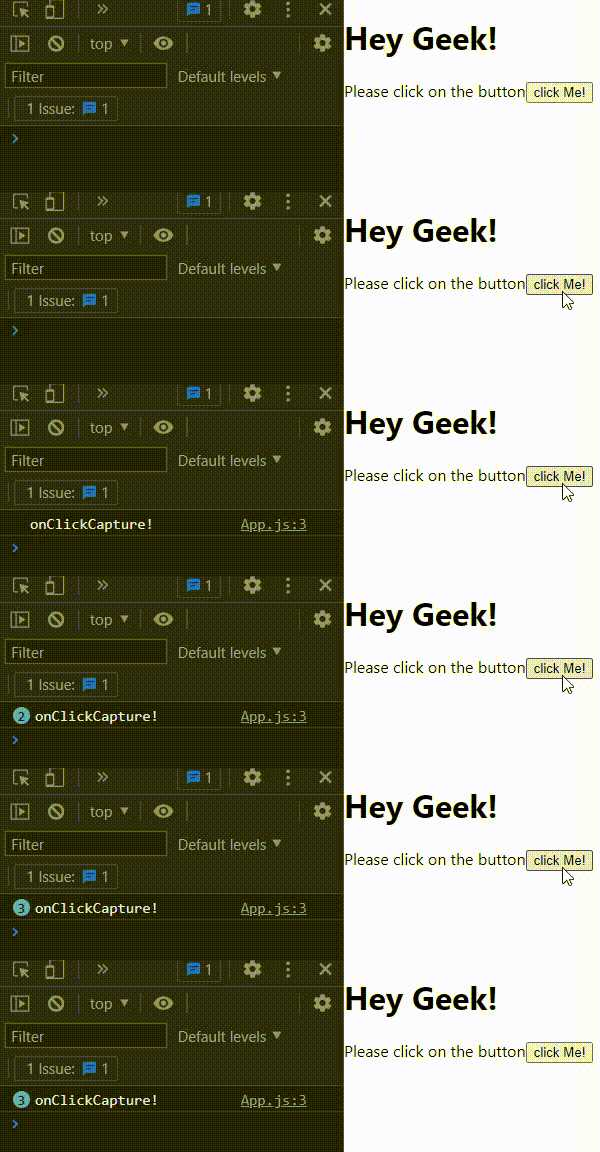
- It uses onClickCapture on the button to demonstrate event capturing.
- Renders a button, label, and header within the App component.
- Exports App as the default component.
Handling Events in the Capture Phase
The onClickCapture event is useful when you need to intercept events before they reach their target element. Some common scenarios where it might be helpful include:
- Logging: You can use onClickCapture to log event details before any other handler processes the event.
- Validation: If you need to validate or check conditions before allowing an event to continue, onClickCapture allows you to stop event propagation early.
- Intercepting events: Intercept events for tasks like analytics or tracking clicks without interfering with the standard flow of the event.
Preventing Default Behavior Using onClickCapture
Just like onClick, you can use event.preventDefault() and event.stopPropagation() in the onClickCapture event handler to stop the event from propagating further.
import React from "react";

class PreventDefaultComponent extends React.Component {
    handleClickCapture = (event) => {
        event.preventDefault();
        event.stopPropagation();
        console.log("Default behavior prevented during the capture phase");
    };

    handleClick = () => {
        console.log("Event triggered during the bubble phase");
    };

    render() {
        return (
            <div onClickCapture={this.handleClickCapture} style={{ padding: "20px" }}>
                <form onSubmit={(e) => e.preventDefault()}>
                    <button
                        type="submit"
                        onClick={this.handleClick}
                        style={{ padding: "10px", backgroundColor: "lightblue" }}
                    >
                        Submit
                    </button>
                </form>
            </div>
        );
    }
}

export default PreventDefaultComponent;
Output

- onClickCapture: Handles events during the capture phase, before they reach the target element.
- handleClickCapture: Prevents the default action (like form submission) and stops propagation using event.preventDefault() and event.stopPropagation().
- handleClick: Would normally trigger in the bubble phase, but the event does not reach it because it was intercepted during the capture phase.
- Effect: Clicking the button does not submit the form, and the message "Default behavior prevented during the capture phase" is logged.
onClickCapture and Event Propagation
Event propagation in the DOM has two phases: capture and bubble. By default, events bubble up from the target, but onClickCapture allows handling before the event reaches the target.
- Capture Phase (onClickCapture): Handles the event before it reaches the target element.
- Bubble Phase (onClick): Handles the event after it reaches the target as it bubbles up.
Breakdown of Event Propagation with onClickCapture
Event propagation in React starts with the capture phase, where onClickCapture handlers fire from parent to target, followed by the bubble phase, where onClick handlers fire from target back up.
- Click Event is Triggered: The user clicks on an element (e.g., a button).
- Capture Phase Starts: The event travels down from the root element to the target element (the button).
- onClickCapture Fires: If there is an onClickCapture handler on any parent element, it fires during the capture phase.
- Bubble Phase Starts: After the event reaches the target, the bubble phase starts, and the event bubbles up.
- onClick Fires: The onClick handler on the target element is triggered during the bubble phase.
import React from "react";

class EventPropagation extends React.Component {

    handleCapture = (event) => {
        console.log("Captured at parent during the capture phase");
    };


    handleParentClick = (event) => {
        console.log("Clicked on parent (Bubble phase)");
    };


    handleChildClick = (event) => {
        console.log("Clicked on child (Bubble phase)");
    };

    render() {
        return (
            <div
                onClickCapture={this.handleCapture}
                onClick={this.handleParentClick}
                style={{ padding: "20px", border: "1px solid black" }}
            >
                <div
                    onClick={this.handleChildClick}
                    style={{ padding: "10px", backgroundColor: "lightblue" }}
                >
                    Click Me (Child)
                </div>
            </div>
        );
    }
}

export default EventPropagation;
Output

- handleCapture: Triggered on the parent during the capture phase before the event reaches the child.
- handleParentClick: Triggered on the parent during the bubble phase after the event bubbles up from the child.
- handleChildClick: Triggered on the child during the bubble phase when the event reaches the child and starts bubbling.
Difference between onClick and onClickCapture
Here are the some differences discussed below:
| onClick (Bubble Phase) | onClickCapture (Capture Phase) |
|---|---|
| Fires after the event reaches the target and starts bubbling up. | Fires before the event reaches the target while traveling down. |
| Part of the bubble phase (child to parent). | Part of the capture phase (parent to child). |
| Used for regular event handling like clicks or form submissions. | Used for intercepting, validation, logging, or pre-processing events. |
| Runs after all capture phase handlers have executed. | Runs before bubble phase handlers, allowing early handling. |
| Think: “React after it happens.” | Think: “Catch it early before it reaches the target.” |