
Servlet Events and Listeners are used to monitor and handle important activities occurring inside a web application such as application startup, session creation, request initialization, and attribute modification. They allow developers to execute custom logic automatically whenever a specific event occurs in the servlet container.
- Events represent actions or state changes occurring inside the web application
- Listeners are special classes that automatically respond to these events
- Commonly used for logging, session tracking, database initialization, and resource management
Event Categories
Servlet events refer to different changes or activities occurring inside a web application. Based on the scope of the event, they are mainly divided into two categories.
1. Servlet Context-Level (Application-Level) Events
These events are related to the lifecycle and attributes of the ServletContext object representing the entire web application
Types:
- Context lifecycle events: These events occur when the web application starts or stops.
- Context attribute events: These events occur when attributes are added, removed, or replaced in the ServletContext.
2. Session-Level Events
These events are related to the HttpSession object and represent activities of an individual user session.
Types:
- Session lifecycle events: Occur when a user session is created or destroyed.
- Session attribute events: Occur when attributes are added, removed, or updated in a session.
Working of Servlet Event and Listener
- The client sends a request to the web application.
- The servlet container generates an event such as session creation or request initialization.
- The registered listener detects the event automatically.
- The listener executes the corresponding method.
- The servlet or JSP continues processing the request normally.
For each of the four-event categories, we can define one or more event listener classes. Multiple event categories can be monitored by a single listener class. Implementing an interface or interfaces from the javax.servlet package or javax.servlet.http package is a common way to make an occasion class.
Event Listener Interfaces
Event Listener Interfaces are predefined interfaces in javax.servlet and javax.servlet.http that allow a web application to automatically detect and respond to servlet-related events like application startup, session creation, and request handling.
- They help in executing code automatically when a specific event occurs in the application.
- They are mainly used for monitoring, logging, session tracking, and resource management.
Common Servlet Event Listener Interfaces
| Listener Interface | Description |
|---|---|
ServletContextListener | Handles application startup and shutdown events. |
ServletContextAttributeListener | Handles changes in application (context) attributes. |
ServletRequestListener | Handles request creation and destruction events. |
ServletRequestAttributeListener | Handles changes in request attributes. |
HttpSessionListener | Handles session creation and destruction events. |
HttpSessionAttributeListener | Handles changes in session attributes. |
HttpSessionBindingListener | Notifies when an object is added or removed from a session. |
HttpSessionActivationListener | Handles session passivation and activation events. |
AsyncListener | Handles events related to asynchronous request processing. |
How To Configure Event Listeners in a Servlet Application
If we want to use listeners in a servlet application, we must follow the steps below.
Step 1: Create Listener Class
Create a user-defined class that implements a listener interface.
Syntax:
public class MyListener implements ServletContextListener
{// listener methods
}
Step 2: Configure Listener in web.xml
The listener class must be registered in the deployment descriptor file.
Syntax:
<listener>
<listener-class>
Name of Listener Class
</listener-class>
</listener>
Methods for Event Listeners
1. Methods of ServletContextListener
This listener handles application lifecycle events.
Methods | Description |
|---|---|
| void contextInitialized (ServletContextEvent sce) | Called when the application starts |
| void contextDestroyed (ServletContextEvent sce) | Called before the application stops |
2. Methods of ServletContextAttributeListener
This listener handles changes in application attributes.
| Method | Description |
|---|---|
attributeAdded() | Called when attribute is added |
attributeRemoved() | Called when attribute is removed |
attributeReplaced() | Called when attribute value changes |
3) Methods for HttpSessionListeners
This listener handles session lifecycle events.
| Method | Description |
|---|---|
sessionCreated() | Called when session is created |
sessionDestroyed() | Called when session is destroyed |
4) Methods for HttpSessionAttributeListener
This listener handles session attribute changes.
| Method | Description |
|---|---|
attributeAdded() | Called when attribute is added to session |
attributeRemoved() | Called when attribute is removed from session |
attributeReplaced() | Called when session attribute is replaced |
Example to show Step-by-Step Configuration of Servlet Listener
Step 1: Create Dynamic Web Project
- Open Eclipse IDE
- Create a project: ServletListenersGfg
- Select: Dynamic Web Project
- Click Finish
After completion of above steps the Project created in the Eclipse and the project structures will look like this.
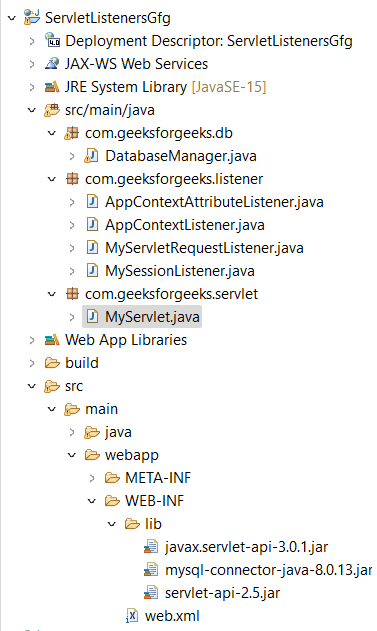
Step 2: Configure web.xml
This file contains context parameters and listener configuration.
<?xml version="1.0" encoding="UTF-8"?>
<web-app>
  <display-name>ServletListenersGfg</display-name>

  <context-param>
    <param-name>DBUSER</param-name>
    <param-value>root</param-value>
  </context-param>
  <context-param>
    <param-name>DBPWD</param-name>
    <param-value>root</param-value>
  </context-param>
  <context-param>
    <param-name>DBURL</param-name>
    <param-value>jdbc:mysql://localhost/mysql_db</param-value>
  </context-param>

  <listener>
    <listener-class>com.geeksforgeeks.listener.AppContextListener</listener-class>
  </listener>
  <listener>
    <listener-class>com.geeksforgeeks.listener.AppContextAttributeListener</listener-class>
  </listener>
  <listener>
    <listener-class>com.geeksforgeeks.listener.MySessionListener</listener-class>
  </listener>
  <listener>
    <listener-class>com.geeksforgeeks.listener.MyServletRequestListener</listener-class>
  </listener>
</web-app>
Step 3: Create DatabaseManager.java
This class is responsible for database handling. It stores DB credentials and manages connection lifecycle. It is created once and shared across the application using ServletContext.
package com.geeksforgeeks.db;

import java.sql.Connection;

public class DatabaseManager {
    private String dbURL;
    private String user;
    private String password;
    private Connection con;

    public DatabaseManager(String url, String u, String p)
    {
        this.dbURL = url;
        this.user = u;
        this.password = p;
        // create db connection now
    }

    public Connection getConnection() { return this.con; }

    public void closeConnection()
    {
        // close DB connection here
    }
}
Step 4: Create AppContextListener.java
This listener tracks changes in ServletContext attributes. Whenever an attribute is added, updated, or removed, it logs the event.
package com.geeksforgeeks.listener;

import javax.servlet.ServletContextAttributeEvent;
import javax.servlet.ServletContextAttributeListener;
import javax.servlet.annotation.WebListener;

@WebListener
public class AppContextAttributeListener
    implements ServletContextAttributeListener {
    public void
    attributeAdded(ServletContextAttributeEvent
                       servletContextAttributeEvent)
    {
        System.out.println(
            "ServletContext attribute added::{"
            + servletContextAttributeEvent.getName() + ","
            + servletContextAttributeEvent.getValue()
            + "}");
    }
    public void
    attributeReplaced(ServletContextAttributeEvent
                          servletContextAttributeEvent)
    {
        System.out.println(
            "ServletContext attribute replaced::{"
            + servletContextAttributeEvent.getName() + ","
            + servletContextAttributeEvent.getValue()
            + "}");
    }
    public void
    attributeRemoved(ServletContextAttributeEvent
                         servletContextAttributeEvent)
    {
        System.out.println(
            "ServletContext attribute removed::{"
            + servletContextAttributeEvent.getName() + ","
            + servletContextAttributeEvent.getValue()
            + "}");
    }
}
Step 5: AppContextListener
This listener handles application lifecycle.
- contextInitialized() ->Runs when application starts and creates DB connection
- contextDestroyed():->Runs when application stops and closes DB connection
package com.geeksforgeeks.listener;

import com.geeksforgeeks.db.*;
import javax.servlet.ServletContext;
import javax.servlet.ServletContextEvent;
import javax.servlet.ServletContextListener;
import javax.servlet.annotation.WebListener;

@WebListener
public class AppContextListener
    implements ServletContextListener {
    public void contextInitialized(
        ServletContextEvent servletContextEvent)
    {
        ServletContext ctx
            = servletContextEvent.getServletContext();

        String url = ctx.getInitParameter("DBURL");
        String u = ctx.getInitParameter("DBUSER");
        String p = ctx.getInitParameter("DBPWD");

        // create database connection
        // from init parameters
        // and set it to context
        DatabaseManager dbManager
            = new DatabaseManager(url, u, p);
        ctx.setAttribute("DBManager", dbManager);
        System.out.println(
            "Database connection initialized for Application.");
    }
    public void contextDestroyed(
        ServletContextEvent servletContextEvent)
    {
        ServletContext ctx
            = servletContextEvent.getServletContext();
        DatabaseManager dbManager
            = (DatabaseManager)ctx.getAttribute(
                "DBManager");
        dbManager.closeConnection();
        System.out.println(
            "Database connection closed for Application.");
    }
}
Step 6: MyServletRequestListener
This listener tracks HTTP request lifecycle. It logs:
- When request starts (IP captured)
- When request ends
package com.geeksforgeeks.listener;

import javax.servlet.ServletRequest;
import javax.servlet.ServletRequestEvent;
import javax.servlet.ServletRequestListener;
import javax.servlet.annotation.WebListener;

@WebListener
public class MyServletRequestListener
    implements ServletRequestListener {
    public void requestDestroyed(
        ServletRequestEvent servletRequestEvent)
    {
        ServletRequest servletRequest
            = servletRequestEvent.getServletRequest();
        System.out.println(
            "ServletRequest destroyed. Remote IP="
            + servletRequest.getRemoteAddr());
    }
    public void requestInitialized(
        ServletRequestEvent servletRequestEvent)
    {
        ServletRequest servletRequest
            = servletRequestEvent.getServletRequest();
        System.out.println(
            "ServletRequest initialized. Remote IP="
            + servletRequest.getRemoteAddr());
    }
}
Step 7: MySessionListener
This listener tracks user session lifecycle. It logs when a session is created and when it is destroyed (invalidated).
package com.geeksforgeeks.listener;

import javax.servlet.annotation.WebListener;
import javax.servlet.http.HttpSessionEvent;
import javax.servlet.http.HttpSessionListener;

@WebListener
public class MySessionListener
    implements HttpSessionListener {
    public void
    sessionCreated(HttpSessionEvent sessionEvent)
    {
        System.out.println(
            "Session Created:: ID="
            + sessionEvent.getSession().getId());
    }
    public void
    sessionDestroyed(HttpSessionEvent sessionEvent)
    {
        System.out.println(
            "Session Destroyed:: ID="
            + sessionEvent.getSession().getId());
    }
}
Step 8: MyServlet
This servlet triggers all listeners by first adding a context attribute which invokes attributeAdded, then reading the attribute, removing it which triggers attributeRemoved, creating a session which triggers sessionCreated, invalidating the session which triggers sessionDestroyed, and finally sending the response back to the browser.
package com.geeksforgeeks.servlet;

import java.io.IOException;
import java.io.PrintWriter;
import javax.servlet.ServletContext;
import javax.servlet.ServletException;
import javax.servlet.annotation.WebServlet;
import javax.servlet.http.HttpServlet;
import javax.servlet.http.HttpServletRequest;
import javax.servlet.http.HttpServletResponse;
import javax.servlet.http.HttpSession;

@WebServlet("/MyServlet")
public class MyServlet extends HttpServlet {
    private static final long serialVersionUID = 1L;

    protected void doGet(HttpServletRequest request,
                         HttpServletResponse response)
        throws ServletException, IOException
    {
        ServletContext ctx = request.getServletContext();
        ctx.setAttribute("User", "GeeksForGeeks");
        String user = (String)ctx.getAttribute("User");
        ctx.removeAttribute("User");

        HttpSession session = request.getSession();
        session.invalidate();

        PrintWriter out = response.getWriter();
        out.write("Hi " + user);
    }
}
Step 9: Run Application
Right click project -> Run As -> Run on Server
Output:
When we deploy our application and access MyServlet, the server log file will include the following logs.

Explanation : These logs demonstrate the working of all implemented event listeners in the application. Each listener prints messages when lifecycle events occur, such as request initialization and destruction, context attribute addition and removal, and session creation and destruction. This confirms that all Servlet event listeners are working correctly in the program.
In the browser, we'll see something like this.

Explanation: The output “Hi GeeksForGeeks” is generated after the servlet executes successfully. During execution, the servlet interacts with ServletContext by adding and removing an attribute, creates and invalidates an HTTP session, and in the end writes the response to the browser using PrintWriter, which displays the final message.