
SMB (Server Message Block) Enumeration is the process of collecting information from a target system via the SMB protocol. It is commonly used in penetration testing and security assessments to identify shared resources, users, system details and potential misconfigurations that may expose vulnerabilities.
- Discovers shared resources, users and system information
- Used in penetration testing and vulnerability assessments
- Misconfigured SMB services may expose sensitive data
- Supports authenticated and unauthenticated (null session) access
- Common tools include Nmap, smbclient, smbmap and enum4linux
SMB Enumeration Stages
1. Hostname Enumeration
Identifies the computer name of the target system.
- Helps in identifying the machine on the network
- Useful for mapping network structure
- Can reveal organization naming patterns
2. List Shares
Displays shared resources available through SMB.
- Shared folders
- Shared printers
- Hidden shares (e.g., C$, ADMIN$)
- Helps identify sensitive data locations
3. Checking Null Session
Checks whether the SMB service allows anonymous login without username and password.
- Null session allows attackers to gather information without authentication
- Can expose users, shares and policies
- Security misconfiguration indicator
4. List Users
Retrieves information about user accounts on the target system.
- Username list
- Group memberships
- Privileged accounts (e.g., administrator)
- Useful for further authentication testing
5. Vulnerability Scanning
Identifies security weaknesses in SMB services.
- Detect outdated SMB versions (e.g., SMBv1)
- Check for known exploits
- Helps determine risk level
6. Overall Scanning
Combines all enumeration results to create a complete picture of the target.
- Identifies attack surface
- Shows available resources
- Highlights misconfigurations
- Helps in penetration testing assessment
SMB Enumeration for Hostname
There are plenty of tools that can enumerate Hostname, here to demonstrate we are using nmblookup and nbtscan. Nmblookup tool makes use of queries of the NetBIOS names and maps them to their related IP addresses in a network.
1. nmblookup
nmblookup is used to query NetBIOS names and resolve them to IP addresses. It helps identify the hostname of a target system via NetBIOS.
Command:
nmblookup -A <Target IP>- -A: Performs a reverse lookup (IP to NetBIOS name)
Output:
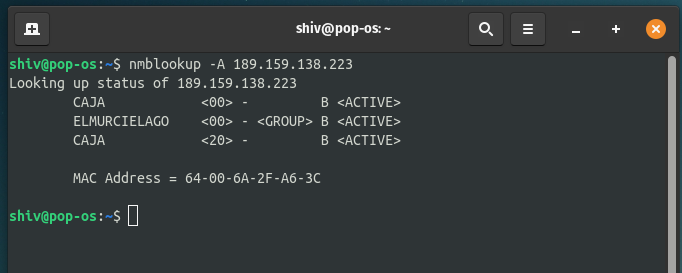
- Here, displays the NetBIOS name table, including the hostname (e.g., CAJA) and associated services.
2. nbtscan
nbtscan scans a target IP or range to retrieve NetBIOS name information, including hostname and MAC address.
Command:
nbtscan <target IP>- <target IP>: Target system to scan
Output:
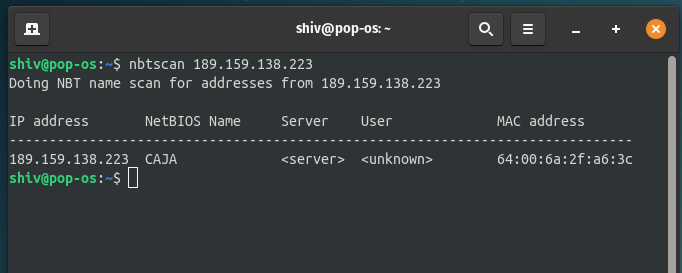
- Here, shows hostname, IP address and sometimes MAC address; confirms NetBIOS name (e.g., CAJA).
SMB Enumeration for Share and Null Session
In this part, we are going to enumerate shares of the host or target system. We can perform this enumeration with many tools, for this article we are going to use smbmap, smbclient, Nmap and Metasploit for different ways of performing this share enumeration.
1. smbmap
smbmap is a tool used to enumerate SMB shares on a target host and display their associated permissions, such as read or write access. It is useful for quickly identifying accessible shares and understanding potential access levels.
Command:
smbmap -H <target IP>- -H: Specifies the target host
Output:

- Here, lists available shares along with permissions (READ, WRITE, NO ACCESS).
Using Credentials:
smbmap can also be used with valid credentials to gain deeper insight into share permissions based on user privileges.
Command:
smbmap -H <target IP> -u <username> -p <password>- -u: Username
- -p: Password
2. smbclient
smbclient is a Samba client tool used to test connectivity to SMB shares on a target system. It is commonly used to list available shared resources and verify access to Windows or Samba shares.
Command:
smbclient -L <target IP>- -L: Lists available shares on the target system
Output:

- Here, Displays a list of shared resources (e.g., IPC$, ADMIN$, shared folders).
3. Nmap (SMB Share Enumeration)
Nmap provides the smb-enum-shares NSE script, which is used to enumerate SMB shares on a target system. It scans SMB ports and attempts to retrieve available share information.
Command:
nmap --script smb-enum-shares -p 139,445 <Target IP>- --script smb-enum-shares: Runs the SMB share enumeration script
- -p 139,445: Specifies SMB-related ports to scan
Output:
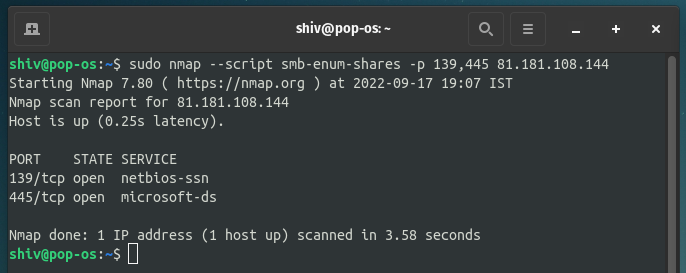
- Here is the result as you can see that we didn't find any SMB share detail.
4. Metasploit (smb_enumshares)
Metasploit includes the smb_enumshares auxiliary module, which is used to enumerate SMB shares on a target system, if present.
Commands:
msf6 > use auxiliary/scanner/smb/smb_enumshares
msf6 auxiliary(scanner/smb/smb_enumshares) > set RHOSTS <target IP>
msf6 auxiliary(scanner/smb/smb_enumshares) > set SMBUser <username>
msf6 auxiliary(scanner/smb/smb_enumshares) > set SMBPass <password>
msf6 auxiliary(scanner/smb/smb_enumshares) > exploit- RHOSTS: Target IP address
- SMBUser: Username for authentication
- SMBPass: Password for authentication
SMB Enumeration for Vulnerability Scanning
In this stage, we use Nmap's script for scanning for vulnerabilities that could possibly be found on the server. We can use various tools for this stage but here we are going to look at Nmap's NSE script.
1. Nmap SMB Vulnerability Scanning
Nmap provides a collection of NSE (Nmap Scripting Engine) scripts that can be used to detect known SMB vulnerabilities. The smb-vuln* family of scripts checks for common issues such as MS08-067, regsvc-dos and other SMB-related exploits.
Command:
sudo nmap --script smb-vuln* -p 139,445 <Target IP>- --script smb-vuln*: Runs all SMB vulnerability detection scripts
- -p 139,445: Scans SMB service ports
- sudo: Required for certain NSE scripts to function properly
Command:
sudo nmap --script smb-vuln* -p 139,445 <Target IP>Output:
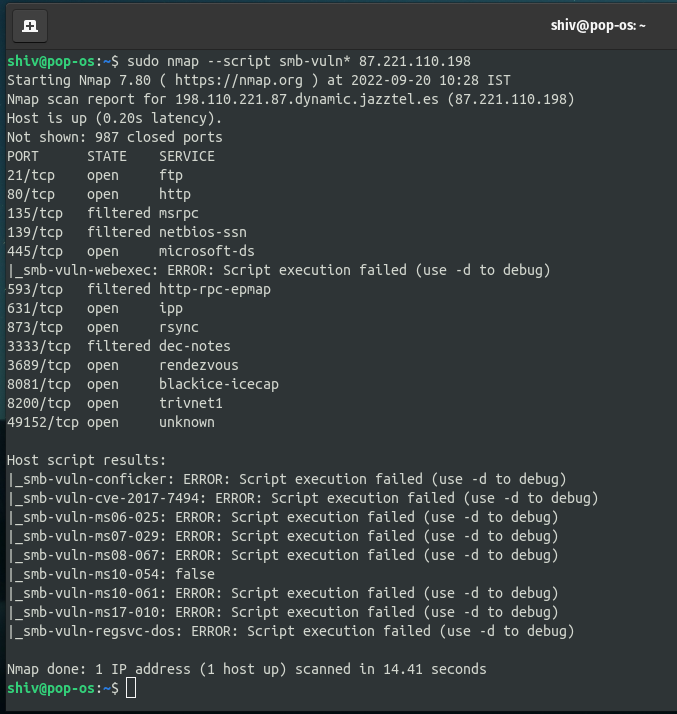
- The scan checks for multiple known SMB vulnerabilities. If no issues are found, the output will indicate that no vulnerabilities were detected on the target system.
2. SMB Enumeration using Enum4linux
Enum4linux is a powerful enumeration tool used to extract information from Windows and Samba systems. It can retrieve user lists, shares, policies and other SMB-related data from a target host.
Command:
enum4linux -U <target IP>- -U: Enumerates user accounts on the target system
Output:

- The tool retrieves and displays user account information present on the target system, if accessible. This helps in understanding valid usernames that may exist on the network.