Tutorial: First Look at Dapr for Microservices Running in Kubernetes

In a previous article, I introduced the architecture and building blocks of Dapr, a portable, event-driven runtime for distributed systems originally developed by Microsoft. To appreciate the platform, let’s zoom into the state management building block of Dapr. This hands-on guide will walk you through all the steps involved in dealing with state management in Dapr.
Background
We are going to deploy two microservices written in Node.js and Python in Kubernetes. The services will use Redis as the persistence layer to store the state. Since we use Dapr, we will swap out Redis with etcd while continuing to run the microservices.
To complete this tutorial, you need a Kubernetes cluster running within Minikube or a managed service such as the Azure Kubernetes Service (AKS).
I am running Minikube on my development machine.

Installing Dapr
Download the Dapr CLI for your OS from the releases page of GitHub repository, rename and add the binary to the path.
Run the below command to install Dapr in your Kubernetes environment.
dapr init --kubernetes

The installer deploys a few Pods in the default Namespace that are a part of Dapr control plane. Like the service mesh, Dapr has a control plane that integrates with Kubernetes and a data plane that runs as a sidecar inside each Pod.

The dapr-operator Pod watches for Pods that have the Dapr Annotations. The dapr-sidecar-injector Pod is responsible for adding the sidecar container to each Pod annotated as “dapr.io/enabled: true”. Finally, the dapr-placement Pod manages the communication across all the sidecar containers injected into the Pods.
Configuring Redis as the Persistence Layer
Since we are dealing with the state store, the next step is to deploy Redis and configuring it as the default state store for the microservices.
Deploy Redis by submitting the below YAML file to Kubernetes. This results in the creation of a Pod and a ClusterIP Service.
apiVersion: v1
kind: Service
metadata:
  name: redis
  labels:
    app: redis
spec:
  ports:
  - port: 6379
    name: redis
    targetPort: 6379
  selector:
    app: redis
---
apiVersion: apps/v1
kind: Deployment
metadata:
  name: redis
spec:
  selector:
    matchLabels:
      app: redis
  replicas: 1
  template:
    metadata:
      labels:
        app: redis
    spec:
      containers:
      - name: redis-server
        image: redis:3.2-alpine
kubectl apply -f redis.yaml
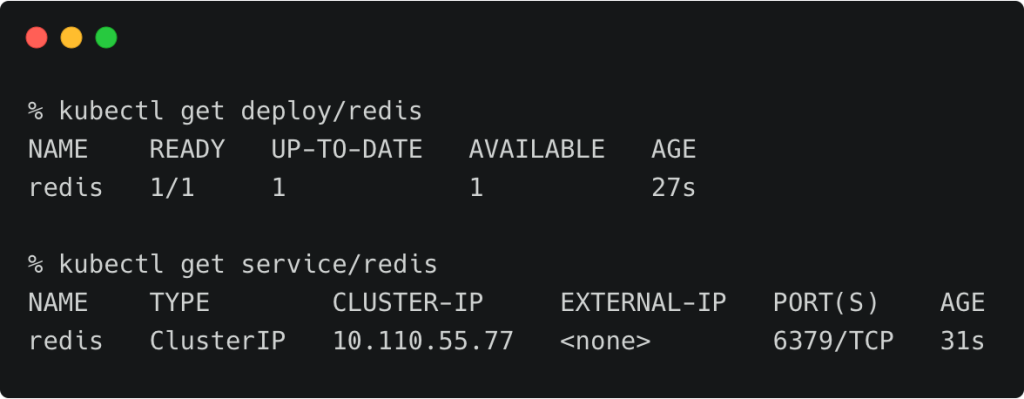
With the Redis Pod up and running, let’s configure it as a Dapr state store. Create a YAML file with the below specification and apply it.
apiVersion: dapr.io/v1alpha1
kind: Component
metadata:
  name: statestore
spec:
  type: state.redis
  metadata:
  - name: redisHost
    value: redis:6379
  - name: redisPassword
    value: ""
kubectl apply -f redis-state.yaml
This creates a Rudr component for Redis. Rudr is a reference implementation of the Open Application Model (OAM) specification jointly created by Microsoft and Alibaba. For more details on OAM and Rudr, refer to this article and the tutorial.

Deploying Microservices That Use Dapr State Store
Let’s start by creating a Pod and Service spec that runs the first microservice written in Node.js. You can take a look at the code for this microservice at Dapr samples repo.
kind: Service
apiVersion: v1
metadata:
  name: nodeapp
  labels:
    app: node
spec:
  selector:
    app: node
  ports:
  - protocol: TCP
    port: 80
    targetPort: 3000
    nodePort: 32000
  type: NodePort

---
apiVersion: apps/v1
kind: Deployment
metadata:
  name: nodeapp
  labels:
    app: node
spec:
  replicas: 1
  selector:
    matchLabels:
      app: node
  template:
    metadata:
      labels:
        app: node
      annotations:
        dapr.io/enabled: "true"
        dapr.io/id: "nodeapp"
        dapr.io/port: "3000"
    spec:
      containers:
      - name: node
        image: dapriosamples/hello-k8s-node
        ports:
        - containerPort: 3000
        imagePullPolicy: Always
Note that the Pod has Annotations for Dapr which act as a hint to inject the sidecar container.
      annotations:
        dapr.io/enabled: "true"
        dapr.io/id: "nodeapp"
        dapr.io/port: "3000"
kubectl apply -f node.yaml
If you analyze the code, you realize that the microservice is not directly referring to the persistent store in the microservice. Instead, it makes a call to the REST endpoint exposed by Dapr runtime. The sidecar container is responsible for enabling this communication between the microservice and the Dapr runtime.
const daprPort = process.env.DAPR_HTTP_PORT || 3500;
const stateStoreName = `statestore`;
const stateUrl = `http://localhost:${daprPort}/v1.0/state/${stateStoreName}`;
Let’s deploy the second microservice written in Python that continuously invokes the API exposed by the first service deployed in the previous step.
apiVersion: apps/v1
kind: Deployment
metadata:
  name: pythonapp
  labels:
    app: python
spec:
  replicas: 1
  selector:
    matchLabels:
      app: python
  template:
    metadata:
      labels:
        app: python
      annotations:
        dapr.io/enabled: "true"
        dapr.io/id: "pythonapp"
    spec:
      containers:
      - name: python
        image: dapriosamples/hello-k8s-python
kubectl apply -f python.yaml
Since both the Pods are annotated for Dapr, the control plane has injected the sidecar into the Pods.

Checking the logs of the Node Pod shows that the state is being persisted.
NODE_POD=$(kubectl get pods -l app=node -o jsonpath='{.items[0].metadata.name}')
kubectl logs -f $NODE_POD -c node

You can also access the same from the NodePort of Minikube.
export NODE_APP=`minikube ip`:32000
curl $NODE_APP/order

You can check the key/value pair by accessing the CLI in the Redis Pod.
REDIS_POD=$(kubectl get pods -l app=redis -o jsonpath='{.items[0].metadata.name}')
kubectl exec -it $REDIS_POD -- redis-cli HGETALL "nodeapp-order"

Replacing Redis State Store with etcd
Dapr also supports etcd as one of the Components for the state store building block service. Let’s now replace the Redis state store with etcd
First, create a etcd cluster. You can use a Helm Chart or the below YAML spec to deploy a 3-node etcd cluster in Kubernetes.
apiVersion: v1
kind: Service
metadata:
  name: etcd-client
spec:
  ports:
  - name: etcd-client-port
    port: 2379
    protocol: TCP
    targetPort: 2379
  selector:
    app: etcd
---
apiVersion: v1
kind: Pod
metadata:
  labels:
    app: etcd
    etcd_node: etcd0
  name: etcd0
spec:
  containers:
  - command:
    - /usr/local/bin/etcd
    - --name
    - etcd0
    - --initial-advertise-peer-urls
    - http://etcd0:2380
    - --listen-peer-urls
    - http://0.0.0.0:2380
    - --listen-client-urls
    - http://0.0.0.0:2379
    - --advertise-client-urls
    - http://etcd0:2379
    - --initial-cluster
    - etcd0=http://etcd0:2380,etcd1=http://etcd1:2380,etcd2=http://etcd2:2380
    - --initial-cluster-state
    - new
    image: quay.io/coreos/etcd:latest
    name: etcd0
    ports:
    - containerPort: 2379
      name: client
      protocol: TCP
    - containerPort: 2380
      name: server
      protocol: TCP
  restartPolicy: Always
---
apiVersion: v1
kind: Service
metadata:
  labels:
    etcd_node: etcd0
  name: etcd0
spec:
  ports:
  - name: client
    port: 2379
    protocol: TCP
    targetPort: 2379
  - name: server
    port: 2380
    protocol: TCP
    targetPort: 2380
  selector:
    etcd_node: etcd0
---
apiVersion: v1
kind: Pod
metadata:
  labels:
    app: etcd
    etcd_node: etcd1
  name: etcd1
spec:
  containers:
  - command:
    - /usr/local/bin/etcd
    - --name
    - etcd1
    - --initial-advertise-peer-urls
    - http://etcd1:2380
    - --listen-peer-urls
    - http://0.0.0.0:2380
    - --listen-client-urls
    - http://0.0.0.0:2379
    - --advertise-client-urls
    - http://etcd1:2379
    - --initial-cluster
    - etcd0=http://etcd0:2380,etcd1=http://etcd1:2380,etcd2=http://etcd2:2380
    - --initial-cluster-state
    - new
    image: quay.io/coreos/etcd:latest
    name: etcd1
    ports:
    - containerPort: 2379
      name: client
      protocol: TCP
    - containerPort: 2380
      name: server
      protocol: TCP
  restartPolicy: Always
---
apiVersion: v1
kind: Service
metadata:
  labels:
    etcd_node: etcd1
  name: etcd1
spec:
  ports:
  - name: client
    port: 2379
    protocol: TCP
    targetPort: 2379
  - name: server
    port: 2380
    protocol: TCP
    targetPort: 2380
  selector:
    etcd_node: etcd1
---
apiVersion: v1
kind: Pod
metadata:
  labels:
    app: etcd
    etcd_node: etcd2
  name: etcd2
spec:
  containers:
  - command:
    - /usr/local/bin/etcd
    - --name
    - etcd2
    - --initial-advertise-peer-urls
    - http://etcd2:2380
    - --listen-peer-urls
    - http://0.0.0.0:2380
    - --listen-client-urls
    - http://0.0.0.0:2379
    - --advertise-client-urls
    - http://etcd2:2379
    - --initial-cluster
    - etcd0=http://etcd0:2380,etcd1=http://etcd1:2380,etcd2=http://etcd2:2380
    - --initial-cluster-state
    - new
    image: quay.io/coreos/etcd:latest
    name: etcd2
    ports:
    - containerPort: 2379
      name: client
      protocol: TCP
    - containerPort: 2380
      name: server
      protocol: TCP
  restartPolicy: Always
---
apiVersion: v1
kind: Service
metadata:
  labels:
    etcd_node: etcd2
  name: etcd2
spec:
  ports:
  - name: client
    port: 2379
    protocol: TCP
    targetPort: 2379
  - name: server
    port: 2380
    protocol: TCP
    targetPort: 2380
  selector:
    etcd_node: etcd2
kubectl apply -f etcd.yaml

The etcd endpoint is exposed as a ClusterIP Service.

Now, we can delete the existing state store Component and recreate it with a pointer to etcd.
The below spec creates an etcd State Store:
apiVersion: dapr.io/v1alpha1
kind: Component
metadata:
  name: statestore
spec:
  type: state.etcd
  metadata:
  - name: endpoints
    value: "etcd-client:2379"
  - name: dialTimeout
    value: "5s"
kubectl delete -f redis-state.yaml
kubectl apply -f etcd-state.yaml
Delete the Node.js Pod to force Kubernetes to launch a new Pod.
NODE_POD=$(kubectl get pods -l app=node -o jsonpath='{.items[0].metadata.name}')
kubectl delete pod/$NODE_POD
Wait for the Node.js Pod to become ready before checking if everything is intact by invoking the NodePort endpoint of the first microservice.
export NODE_APP=`minikube ip`:32000
curl $NODE_APP/order

You can also use etcdctl, the client, from one of the etcd Pods to check the key/value pair maintaining the state.
kubectl exec -it etcd0 /bin/sh
export ETCDCTL_API=3
etcdctl get nodeapp-order

This tutorial demonstrated how to use Dapr state service with Kubernetes. In one of the future tutorials, we will explore the resource binding building block of Dapr.
Janakiram MSV’s Webinar series, “Machine Intelligence and Modern Infrastructure (MI2)” offers informative and insightful sessions covering cutting-edge technologies. Sign up for the upcoming MI2 webinar at http://mi2.live.
