Introduction to MoonBit, a New Language Toolchain for Wasm
We check out MoonBit, a modern language plus workflow designed to create efficient WebAssembly projects (it can also target JavaScript).
Jul 13th, 2024 6:00am by

Photo by John Ruddock on Unsplash.
How to Run Wasm via MoonBit
But what do we mean by “running Wasm”? This is important because your OS doesn’t treat it as a free-running application sitting in your file system quite yet. Before we look closer at MoonBit, let’s make sure we understand how we run Wasm. In most cases, we need a JavaScript framework to load and hold it. To use WebAssembly in JavaScript, you first need to pull your module into memory before compilation/instantiation:
WebAssembly.instantiateStreaming(fetch("simple.wasm"), importObject).then(
  (results) => {
  // Do something with the results!
  },
);
WebAssembly.instantiateStreaming(
  fetch("target/wasm/release/build/main/main.wasm"),
  importObject
  ).then((obj) => {
    obj.instance.exports._start();
    assign = obj.instance.exports["sudoku/main::ij_assign"]
    initValues = obj.instance.exports["sudoku/main::initValues"]
    readValues = obj.instance.exports["sudoku/main::ij_read"]
    solve = obj.instance.exports["sudoku/main::solveValues"]
  });
WebAssemby.instantiateStreaming method waits for a Response object (as a promise) for the Wasm file to load. The obj instance member is then accessed, and the contained exported functions are invoked. The exports clearly describe a module/method to call within the Wasm code.
OK, so this gives us a feel for what we need to do via MoonBit; prepare a Wasm file with the necessary exported functions. While we can play with the MoonBit language freely in this online visual code site, in this post I look at constructing the Wasm itself.
More About MoonBit and its CLI
Here are a few explanations:- Moon is the build system for the MoonBit language.
- You can build third-party packages with mooncakes.io, so it is a putative package management system.
- As I’ve mentioned, there is a Visual Studio code plug-in for MoonBit.
- The term module is synonymous with a project.
- To create the exports we saw evidence of, we need the Foreign Function Interface, which we’ll check out at the end of this post.
 But we’ll focus on the CLI tools to manage projects. That is because I want to cement in my mind the connection between Wasm code and exposing it in the browser.
Opening Warp, I downloaded the CLI tools:
But we’ll focus on the CLI tools to manage projects. That is because I want to cement in my mind the connection between Wasm code and exposing it in the browser.
Opening Warp, I downloaded the CLI tools:
> curl -fsSL https://cli.moonbitlang.com/install/unix.sh | bash
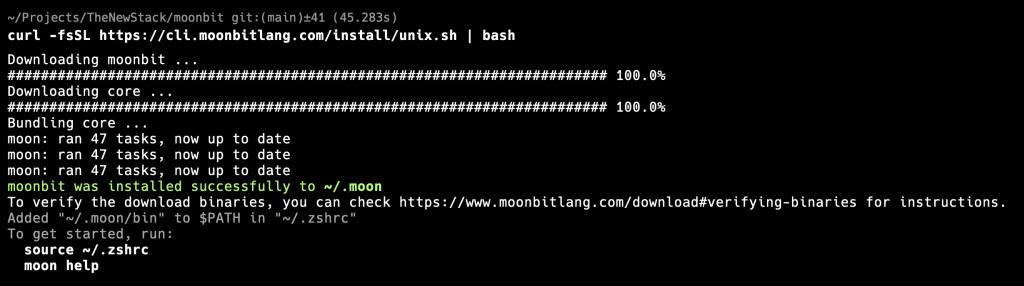 I then created a nice default ‘hello’ module with the
 moon new command:
 The project’s setup on disk shows the relationship between the library and the main package:
 The JSON packaging manifest provides cues for the builder for each package. The mod file describes the module as a whole. The first line declares that this module is called “eastmad/hello”.
The hello.mbt file contains our familiar language introduction:
The JSON packaging manifest provides cues for the builder for each package. The mod file describes the module as a whole. The first line declares that this module is called “eastmad/hello”.
The hello.mbt file contains our familiar language introduction:
pub fn hello() -> String {
  "Hello, world!"
}
fn main {
 println(@lib.hello())
}
@lib.hello() is clearly an internal call to the lib package that was resolved within the package description.
Running this through the CLI is simple enough:
 Wonderful. But I’d like to know what that produced. There is a whole new target directory, so let’s take a look at that:
 (You can see references to wasm-gc, which is the garbage-collected version of Wasm. All this means, essentially, is who and how responsibility for “cleaning up after itself” works out.)
So we got the promised .wasm file — it is 285 bytes long bit of binary, with the greeting words visible, as well as the token “_start”, referenced in the example javascript call at the beginning — as well as other supporting objects. I don’t see evidence of any “exports” like in the JavaScript framework at the top yet; all we did was print to the console internally.
(You can see references to wasm-gc, which is the garbage-collected version of Wasm. All this means, essentially, is who and how responsibility for “cleaning up after itself” works out.)
So we got the promised .wasm file — it is 285 bytes long bit of binary, with the greeting words visible, as well as the token “_start”, referenced in the example javascript call at the beginning — as well as other supporting objects. I don’t see evidence of any “exports” like in the JavaScript framework at the top yet; all we did was print to the console internally.
Interacting With the Hosting Runtime
To interact with the hosting runtime when embedded inside the browser, MoonBit refers to Foreign Function Interface (FFI). Let’s finish off our introduction by having a quick look at this. To declare a foreign function within MoonBit, you can do this:
fn cos(d : Double) -> Double = "Math" "cos"
{
  "link": {
    "wasm-gc": {
      "exports": [
        "add",
        "fib:test"
      ]
    },
    "js": {
      "exports": [
        "add",
        "fib:test"
      ],
      "format": "esm"
    }
  }
}add and fib are exported, and the function fib will be exported with the name of test.
Finally, for our maths example, the JavaScript calling framework would look something like this:
WebAssembly.instantiateStreaming(fetch("xxx.wasm"), {
 Math: {
  cos: (d) => Math.cos(d),
 },
});
YOUTUBE.COM/THENEWSTACK
Tech moves fast, don't miss an episode. Subscribe to our YouTube
channel to stream all our podcasts, interviews, demos, and more.
