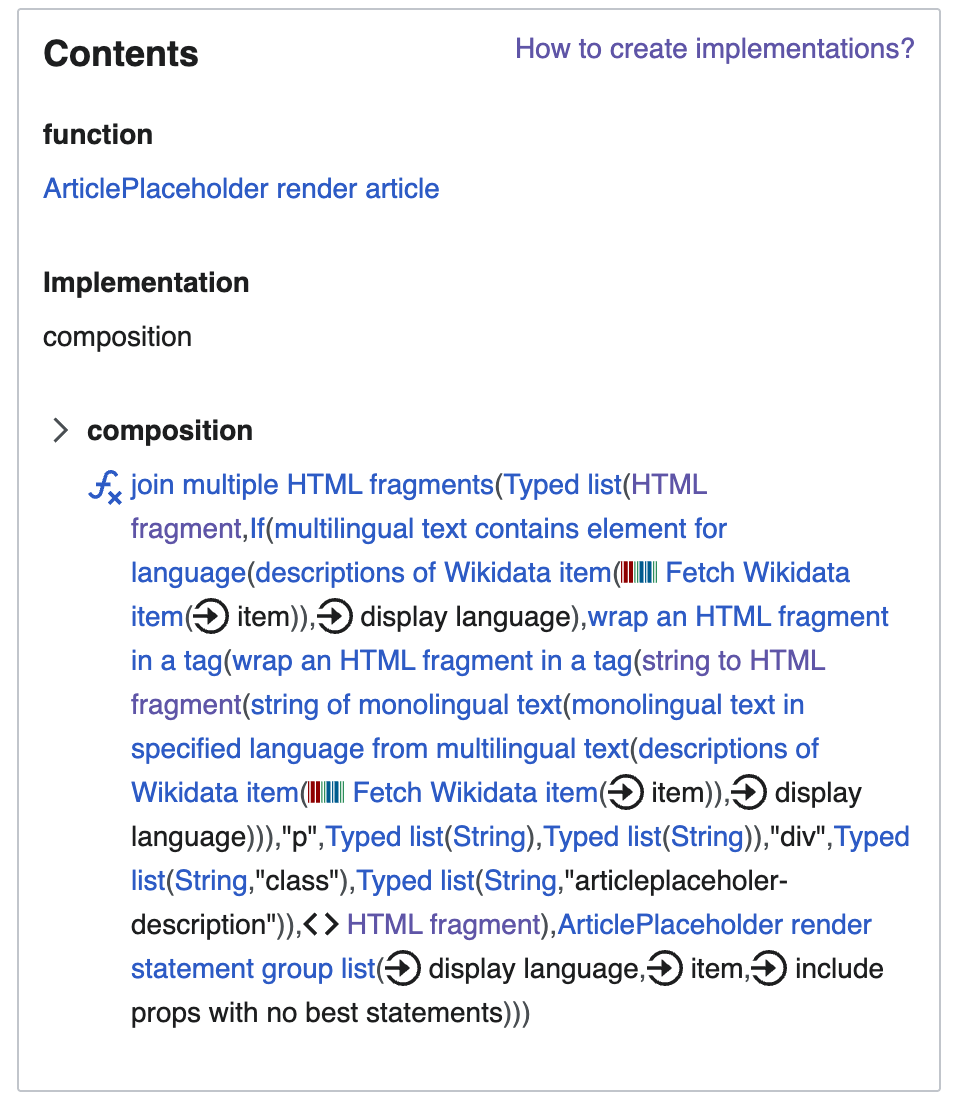
Words are often broken in the middle in Wikifunctions composition view. See the following screenshots from https://www.wikifunctions.org/view/en/Z32836 , for an example:
Desktop Firefox:

Same page on the same computer in desktop Chrome:

Not the word "demonym": it appears differently, but is broken in both.
I also tried it with Arabic on the same page:

The reason I tried Arabic is that its script is cursive and particularly sensitive to wrong word breaks. The line breaking was in rather unexpected places:
- A new line begins between the words ويكي (wiki) and بيانات (bayanat [data]), even though there is a lot of space after ويكي. (To clarify, in Arabic, there is supposed to be a space between "wiki" and "data". What's wrong about this is that I'd expect the line to be broken much later, in the middle of the next function name. This probably happens because these are the last two words in the name of this function, and the browser treats the whole name of the next functon as a string that shouldn't be broken, or something along these lines.)
- The word لغة (lu3a [language]) in the end of the composition is broken in the middle, which is not supposed to happen at all.
It's hard to give totally predictable instructions to reproduce, because it probably depends a lot on the browser, the OS, the installed fonts, the customizations, the zoom level, the window size, etc. But I see it on a lot of pages.
Just a wild guess: This may be happening because the function names are not, as I would expect, in <span>s with actual space characters between them, but in a mix of <div>s and <span>s with spacing (probably) added by CSS and not by whitespace characters.