
Our First Remote Attempt! We Conducted an Online Disaster Drill [Reid Inc.]

Hello! This is Yamaguchi from the PR department at Reid Inc.
Suddenly, do you know how many earthquakes occurred between January and June of this year?
It turns out that there were 1,093 earthquakes with a seismic intensity of 1 or higher, and 10 with a seismic intensity of 5 or higher.
On March 16, 2022, there was also a major earthquake with a magnitude of 7.4 (maximum seismic intensity of 6+) centered off the coast of Fukushima Prefecture.
I was communicating with team members for work that day as well, and the earthquake information became a topic of conversation on Reid's Slack the next day. At that time, our CEO suggested,“It might be necessary for us to schedule a time and try doing an evacuation drill together from our respective homes.”That was the voice that was raised.

Since Reid has been fully remote since its founding, our members are scattered across Tokyo, Saitama, and Fukushima. Even so, with the desire to“be prepared to respond whenever a disaster occurs,”we decided to conduct an online disaster drill! (I've never heard the term 'online disaster drill' before, so I'd be happy if we were the first company to try it...)
What we prepared for the online disaster drill
First, we decided on a date and proceeded with preparations so that we could carry it out with peace of mind on the day. This topic came up in March, but because there were major internal changes such as a second PR person joining in April and a renewal of our corporate philosophy in May, we actually started preparing for the online disaster drill around July.
Looking at our annual PR plan, we arrived at September 1st, 'Disaster Prevention Day'.
I felt such destiny with Disaster Prevention Day that it made me think, 'Isn't an online disaster drill meant for this day!?', and we created a structure to welcome the disaster drill with peace of mind by that day.
There are 4 steps in total.
STEP 1. Creation of an online disaster drill manual (In charge: PR)
STEP 2. Self-check of the disaster goods checklist (In charge: Everyone)
STEP 3. Check of indoor safety, evacuation sites, and communication methods (In charge: Everyone)
STEP 4. Determination of the flow for contacting the company for safety confirmation (Everyone)
STEP 1. Creation of an online disaster drill manual (In charge: PR)

Disaster drills have a stiff image, so I made the manual pop-themed so that we wouldn't feel tense on the day.
STEP 2. Self-check of the disaster goods checklist (In charge: Everyone)

Referring to the Prime Minister's Office's“Preparedness” checklist,we created a checklist for emergency supplies.
We performed self-checks and entered anything missing into a disaster goods table created in a spreadsheet. We submitted a request to the CEO and created a state where all disaster goods were ready by August.
I also found a tweet sharing disaster preparedness for women on the day of the disaster drill, so please let me share it here.
女性向けの災害への備えまとめです。#防災の日 pic.twitter.com/EiteXBYPJM
— 荒木健太郎 (@arakencloud) August 31, 2022
STEP 3. Check of indoor safety, evacuation sites, and communication methods (In charge: Everyone)


For some reason, an empty Switch box was placed on top of my cupboard at home. It wasn't a heavy object, but it made me shudder a little to think that I wouldn't have noticed that there were things on top if it weren't for the disaster drill, but it was a day where one new lesson was born from the perspective of disaster prevention awareness.
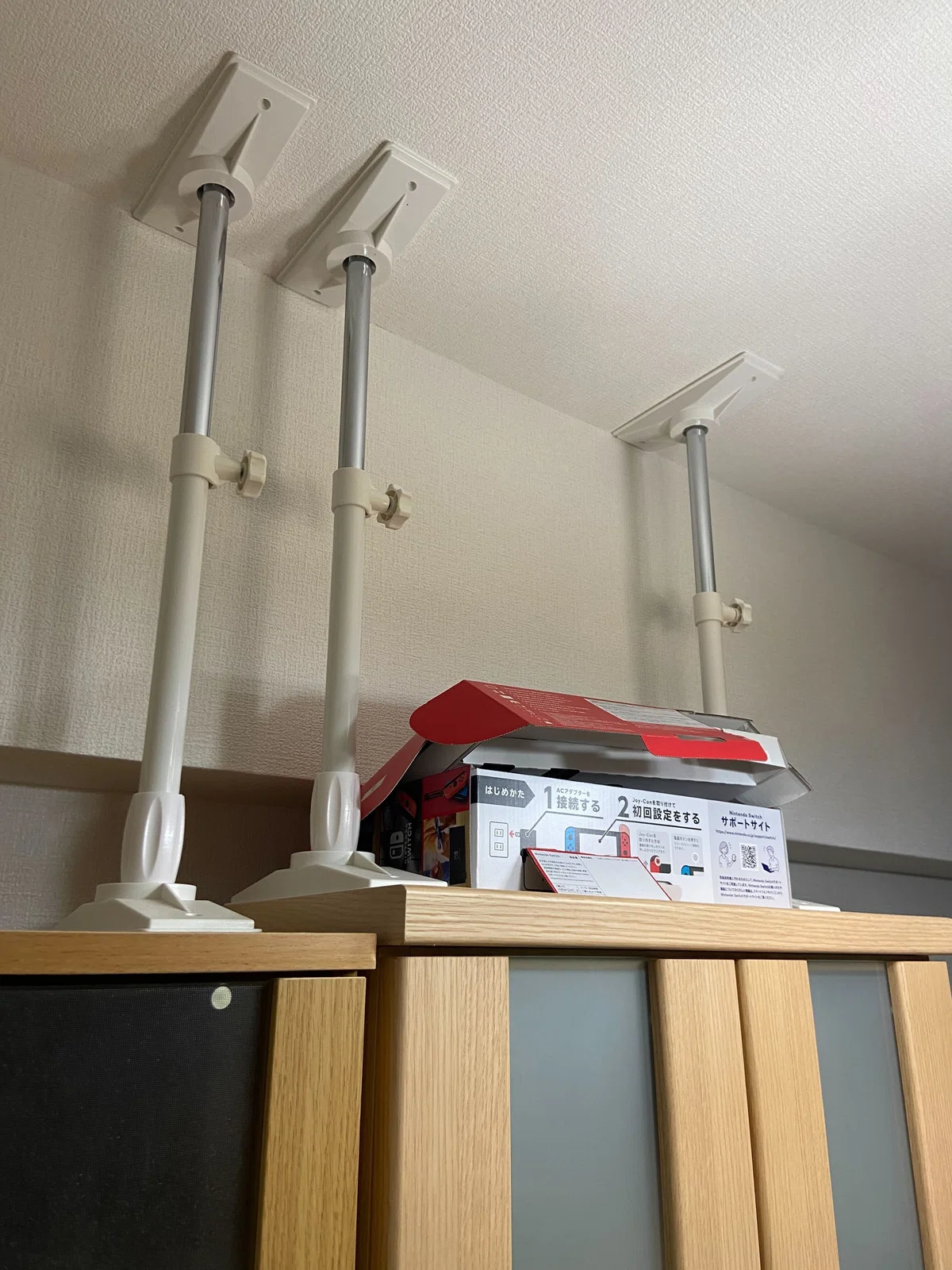
Also, there were members who did disaster checks with their whole families, which led to an opportunity to spread disaster prevention awareness to others.
STEP 4. Determine the flow for contacting the company to confirm safety
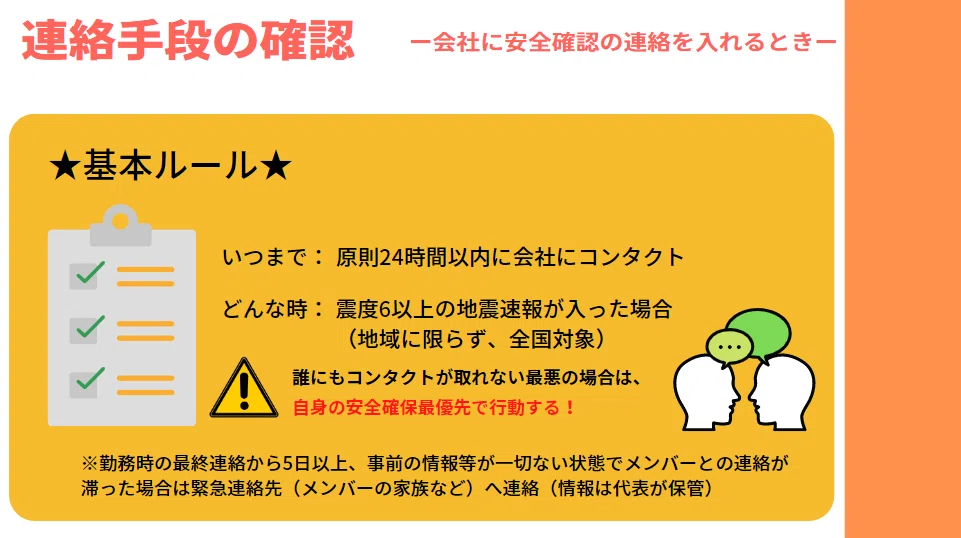
We discussed with all members not only how to contact family in an emergency, but also the appropriate flow for contacting the company, and decided on a procedure.
The scene on the day of the online disaster drill
While we usually open Zoom on our computers to join meetings, this time we conducted the evacuation drill by opening Zoom on our mobile phones since it involved moving to an evacuation site.

We told the members in advance, “We will ask a few questions about problems during a disaster, so please read through the manual,” and we also set aside time on the day to check their level of understanding.
Can you answer the following questions?
Q1. What did you check when confirming indoor safety?
Q2. What is the dial number to use when using the disaster emergency message dial?
The answers will be announced at the end♪
After checking our emergency kits and evacuation sites in advance, the disaster drill began!

<Disaster situation during the evacuation drill>
While everyone was working online, an earthquake with a seismic intensity of over 6 occurred.
[Flow of the disaster drill]
1. Play an emergency alert sound to notify that strong shaking from an earthquake is about to arrive.
You can find various alarm sounds by searching on YouTube.
2. Listen to the alarm sound and take action to ensure personal safety.
We took action according to the manual in the image below, "Response when an earthquake occurs." Because it was an online disaster drill, we assigned a person in charge to give instructions for each time frame (such as responses from 1 to 3 minutes) on what actions to take when an earthquake occurs, and proceeded while confirming evacuation actions with everyone.

3. Move to the evacuation site
Since video calls while out and about are dangerous, we had everyone turn on their video calls after arriving at the evacuation site, put on their helmets, and we all confirmed the evacuation site and checked that everyone was wearing their helmets.

Our representative participated from home because they had become a close contact of someone with COVID-19 a few days prior. While they would not have been able to participate if it were offline, I felt that being able to do it from home precisely because it was online is a unique advantage of online disaster drills.
4. Confirm the contact flow to the company during a disaster
We created a report form on Slack, where we communicate daily. On the day of the disaster drill, we challenged ourselves from the representative sending the disaster report form on Slack to the members actually using the report form to reply! (The report form was pinned to the Slack channel, ensuring it could be used immediately even in a disaster.)


On this day, member Ms. Mizukawa was working staggered hours and was participating in the Miracosta wedding venue reservation in the morning to secure a date for her own wedding. However, due to the shock of not being able to book her desired date, she even shared her emotions on the report form (Ms. Mizukawa has a strong love for Disney).
Click here for the sad reality tweet
おそようございます。来年の9月に私の大好きな場所(自明)で結婚式を挙げる為、先程まで電話予約戦争に参戦しており時差出勤させていただきました。結果は惨敗。やっと電話が繋がった頃には希望日時のは全て埋まっておりました🥹平日の挙式になってしまったから皆んなに申し訳ない🥹うう、切り替えよ🥹 pic.twitter.com/GCIeCtJ5YO
— えるこ🐭@rayd (@elco_chan) September 1, 2022
Although there were some digressions along the way, when we actually used the reporting form, questions like “What are the criteria for being unable to come to work?” arose, and by discussing and establishing these criteria together, it became a step forward in our disaster prevention measures.
While some issues were solved immediately with a “Let’s go with this method!” approach, others, such as sharing emergency contact information, raised future challenges like “How should we manage this as the number of employees increases?” Therefore, we would like to conduct this online disaster prevention drill every year and update it each time.
Now, some of you may have forgotten, but were you able to solve these questions?
Q1. What did you check during the indoor safety confirmation?
Q2. What is the dial number to use for the Disaster Emergency Message Dial?
The answer to Q1 was already in the article, but here it is!
Q1. What did you check during the indoor safety confirmation?
A. All of the following items are correct.

Q2. What is the dial number to use for the Disaster Emergency Message Dial?
A. “171”
The Disaster Emergency Message Dial is a “voice message board” that allows you to confirm safety information via voice during a disaster.
It is useful to remember in case of a disaster, so if you didn't know or got it wrong, I hope this article helps you remember it.

When working online, you have to protect yourself. Even so, if each person has disaster prevention awareness, we can be prepared for disasters when they occur.
I think there is still room for improvement in the flow of our online disaster prevention drill, but I would be happy if our efforts could serve as a reference for other companies.
We are sharing a portion of the manual we created, so if you are considering an online disaster prevention drill or are thinking about creating a disaster prevention drill manual, please download it.
If you download it, we would be happy if you could share this article on Twitter or other platforms♪
Thank you for reading until the end!