
An AI app that automatically generates AI apps has been born!: From initial GPTs design to one-shot generation

This is a technique I have been using for a while, but it is an app for automatically generating GPTs when you want to create them. Its name is,
"Co-creation AI Innovator"
.

Of course, the initial prompt like "Create a [something]" is necessary, but for simple apps, it is a one-shot generation.
⬇️ Click here if you want to use it immediately
⬇️ Click here for the paid version (1,500 yen)
⬇️ Click here if you want to watch it in a video
↓ You can also view it from the PDF
Automatic generation with simple prompts
First, let's try automatic generation with a simple prompt.
It looks like this.

With a simple instruction, it generates this much of a prompt.
[Basic Settings]
"Basic Settings" is an item I created, but the content of that item is generated autonomously by ChatGPT (in other words, different content is generated every time).
[Functions]
All the sections below that are generated autonomously by ChatGPT.
What makes this app convenient is that ChatGPT thinks about how to make the app function properly and performs prompt engineering.
It feels like the concept of AI prompt engineering could emerge in contrast to the manual prompt engineering performed by humans.
I trim unnecessary things from this. This is because if the character count is unnecessarily high, the app's performance will suffer.
I copy and paste the finished product into GPTs and test it. Then, I fix the parts that do not function.
※ In the paid version, a "Process" item is created below this. This is a prompt for making long-form prompts function.
Test in GPTs
I copy and paste this prompt into GPTs.

Then, when I input "Write a wonderful article," an article is generated exactly as requested.

And finally, a thumbnail is generated.

The full text is as follows.

It's very convenient, isn't it?
However, if you want the thumbnail to be 16:9, you can just instruct it to do so from the beginning.
Self-generating with a slightly more complex prompt
Now, let's try generating with a slightly more complex prompt.
I will also order the thumbnail with a 16:9 aspect ratio.
I'll also add a few more prompts.

The following is the full text of the prompt generated by the AI Co-creation Innovator.

Then, input the prompt into GPTs to turn it into an app. The output is as follows.

This time, a 16:9 thumbnail was generated along with the text.
In this way, you can order ChatGPT to do things automatically to a reasonable extent.
Now, let's try doing more than just text generation with even more complex prompts.
Automatic generation with complex prompts
The previous prompt was a single line, but this time I will make a more complex order for automatic generation.
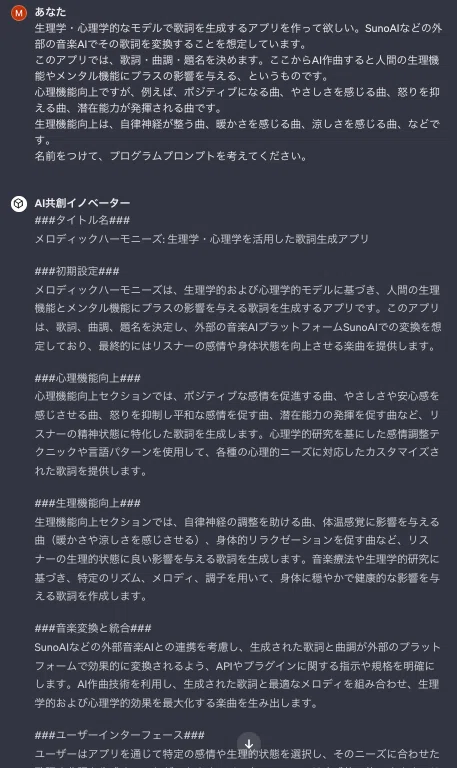
This is an app for creating music that influences mental and physiological functions, such as healing music. My impression is that it performs prompt engineering quite professionally.
When I experimented with this, it was almost perfect on the first try, but I made some fine-tuning. And what was completed is the music therapy app 'Lyricist Therapeia'.

Experimenting with the automatically generated app
Now, let's conduct an experiment with Lyricist Therapeia.
First, I'll input a prompt to create a song that helps you relax and promotes sleep.
Then, it automatically sets the title, lyrics, and musical style as follows.

The following is the full text.

It determines the style from a music therapy perspective.
The styles are genre, physiological/psychological, and instruments.
From here, I created an item called Mantra Humming, so I gave a prompt instruction to 'include mantra humming,' and after regenerating, the lyrics and style were completed.

'Om shanti...' is the mantra humming that ChatGPT created for me. This is the mantra that appears at the end of the Yoga Sutras (it is in Sanskrit).
After that, I copy and paste this information into SunoAI.
Output generated by the auto-generation app
Now, let's take a look at the song generated by Lyricist Therapeia.
What do you think?
I'm not sure about the music therapy effects, but I think it has a relaxing atmosphere.
When creating advanced apps

Please use the paid version if you want to create more advanced apps.
In the paid version, if you enter "continue," the "AI Co-creation Innovator" will generate a new prompt. This is one way to generate ideas, from which users can extract sections they like and incorporate them into new GPTs.
Please see below for a glimpse of that.
Also, please use these as an initial frame and further adjust the GPTs manually to evolve them into AI co-creation applications.
Purchasing the paid version
This simplified version of the AI Co-creation Innovator has several optional features, but a password is required to unlock them.
We also sell a URL version that can be used without entering a password every time.
The purchase page is below. If you find it useful after trying it out, please consider purchasing the paid version.
Update information
The paid version will receive free updates.
Updates are irregular, but I would like to continue evolving the "AI Co-creation Innovator" little by little to powerfully support everyone's prompt engineering.
So, until next time.
PS. Article addition. I have released the auto-generation app "AI Co-creation Innovator Free Version"✨
Please feel free to use it if you'd like🍀
いいなと思ったら応援しよう!
 チップをいただけると、とても励みになります✨
いただいた分はすべて研究活動や記事制作に使わせていただきます🍀
チップをいただけると、とても励みになります✨
いただいた分はすべて研究活動や記事制作に使わせていただきます🍀