
I Created a GPTs for Blog Title Illustrations: The "Blog Art Generator"

The new GPTs, "Blog Art Generator," is an image generation tool specialized for creating title illustrations to be placed at the beginning of blog or note articles.
Since we can now have ChatGPT and Copilot draw pictures for us, procuring banner-like images for articles has become dramatically easier.
However, humans are sinful creatures who quickly get used to luxury. Now, it has become a hassle to repeatedly instruct the prompt with things like "make it a landscape image" every single time.
That is why I created this GPTs: to streamline prompt input by fixing settings that can be fixed, specifically for top banner images for blogs (including note).
How to Use
It is simple to use.
Type your "theme".
Select an image style.
Wait for the image to be created.
I have set the instructions so that it understands without you having to write "please create an illustration" or "make it landscape for a banner" every time. Additionally, I have defined nine preset styles that can be called up just by their number. This allows for extreme simplification of prompts.

Setting the Theme (What you want to draw about)
Once you launch the Blog Art Generator, please start by typing what you want to draw about as a prompt.
You don't need any extra explanation. Simple phrases like "an old man fishing" are perfectly fine.
Also, if you want to set a complicated theme, you can write the content in a text file and upload it.
Setting the Image Style (There are 9 preset image styles)
The instructions for this GPTs state that after confirming the theme, it should confirm the "image style." Following this, once the theme confirmation is finished, a list of image style options should appear in either English or Japanese, prompting you to select your preferred option. It may be in Japanese or English depending on the case, but the content remains the same.
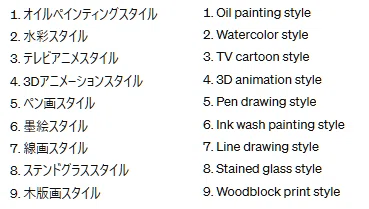
Here, you just need to answer with the number. For example, if you answer "1," it will be understood that you have selected the oil painting style.
This will start the creation process. Note that I have set the instructions to output landscape (wide) images by default so that they are easy to use as blog title images.
Examples
Are you curious about what kind of images are created for each style? I have compiled them on a separate page so you can compare illustrations created with the same theme but different output styles at a glance.
Let's create and share more illustrations
I have frequently given AI random themes to draw illustrations for fun, and since I thought I might as well, I shared them in the "Minna no Photo Gallery" (Everyone's Photo Gallery), and they have been used quite a bit. As of the time of writing this article, there are over 100 cases of them being adopted. I believe people have judged that even if the quality is subtle for viewing as a standalone piece, it is sufficient for use as an article title.
When I write articles, I try to use images that others have published in the photo gallery as much as possible. I am happy to use images that I think interestingly symbolize the theme of the article.
An "ordinary" illustration that I made "on a whim" can become a valuable illustration that fits perfectly for someone else.
Conclusion
I believe everyone should feel free to create and share fun and interesting illustrations using AI. Depending on the theme, you might find that the options are surprisingly limited. There is still plenty of room for more images to be created.
I would love for you to use this GPT for your image creation in that direction.