
A "Version History" feature has been added to note! You can now easily restore your text.

Have you ever had an experience like this while writing on note: "I was writing a long piece, but I accidentally deleted it halfway through," or "I published an article, but I want to revert to a previous structure"?
To ensure you can write your articles with peace of mind, we have added a version history feature to the editor.
By using version history, you can now choose for yourself which point in time to resume editing from, making your creative process even easier.
* Version history is only supported in the new editor.
How to use
・Select the "three-dot leader" in the top right of the editor screen, then select "Check version history."

・"Version history" will be displayed on the right side of the editor screen. After selecting the tab for the version you want to revert to, select "Restore this version" on the right side of the "Version history" panel.

* If you are checking version history from a smartphone, it will be displayed at the bottom of the editor screen.
・The following pop-up will appear; select "Restore."
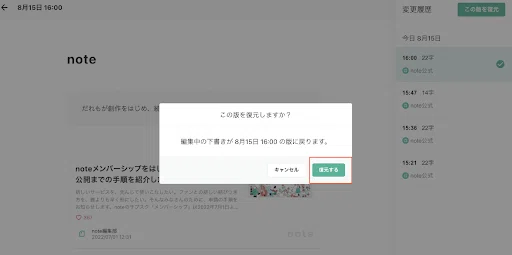
・The text from the selected version will be restored.

* Version history is automatically saved at regular intervals, even if you do not press the save draft button. The interval is approximately every 10 minutes. This specification may change in the future. * Version history is valid for 30 days. Please note that after 30 days, the history will be automatically deleted. * Up to 100 versions can be stored for a single article. Once you exceed 100 versions, the oldest history will be automatically deleted in order.
Comments from the team that created this feature
We often saw posts on social media saying things like, "I was writing an article on note and accidentally deleted it halfway through. I'm so sad." We thought about what we could do for these people, and that is why we added version history to the editor this time. While this is a reactive measure, we will continue to make improvements, including proactive prevention, so that you can create more comfortably and safely. Thank you for your continued support.
With the addition of version history, we have created a more secure environment for those who start writing text directly in the note editor and for those who write long-form articles.
Also, for those using note pro who have owner privileges, you can check who edited the article and when from the version history when multiple people are editing an article. * Even if you are not an owner, if you have editing privileges for the article, you can restore your own version history and the article.
An "article" on note is an important "work" for a creator. We aim to continue making this a more convenient editor for everyone who creates.
We consider improvement items based on the feedback and requests of our creators. We will continue to work on creating an environment where it is easier to engage in creative activities, so please let us know your thoughts.
A list of improvements made so far is summarized in this article.
The latest information on improvements is also announced on our official Twitter.

For improvements and requests regarding features, please visit note feedback. For other inquiries, please use the
request submission form.
* note is constantly being improved, and page designs may change due to future updates. Therefore, for the latest version of the new feature announced here, please check the help page.