
Introducing the "SNS Promotion Feature": Sell paid note articles at a discount to those who share them on Twitter!

We have released a new feature, the "SNS Promotion Feature," which makes it easier for creators' paid notes to reach more people!
Creators can now sell paid articles for free or at a discount to readers who help spread the word about their articles on Twitter.
Benefits for creators and readers
By using the "SNS Promotion Feature," creators can make their announcement tweets more likely to be shared, helping their articles reach a wider audience. Additionally, because the articles can be offered at a special price, they become easier for readers to pick up than usual.
Readers can read paid articles for free or at a discounted price simply by retweeting (RT) the target tweet.
Usage examples
Announce a newly created paid article in a tweet, and allow readers who RT that tweet to purchase the article at a discount of XX yen.
Promote a previously created article again in a tweet, and allow readers who RT that tweet to read the article for free.
How to use
For creators selling paid articles
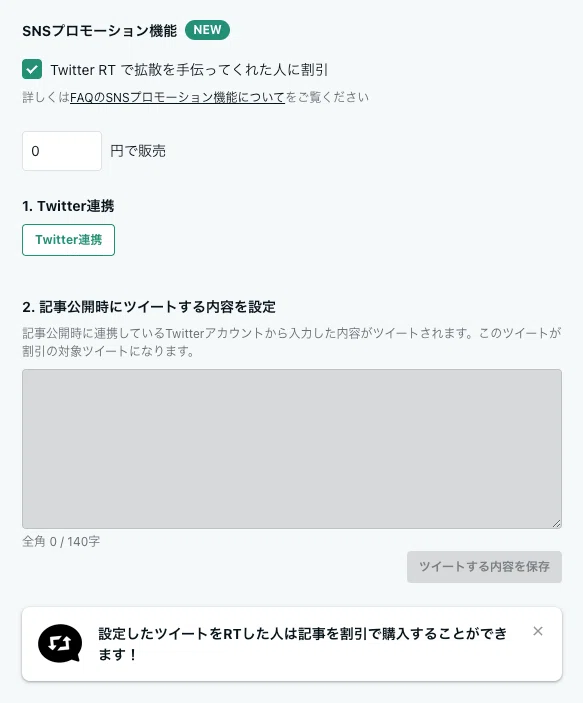
Check the [SNS Promotion Feature] box on the article publication settings screen.
Enter the discounted price (0 yen or 100 yen or more).
Link your Twitter account.
Enter and save the content to be automatically tweeted when the article is published (this tweet will be the target tweet for the discount).
Publish the article.
For readers
Articles with a "Discount available" label next to the price are those to which the "SNS Promotion Feature" has been applied. By sharing the tweet, readers can purchase the article at a great value.
Open the article you want to purchase and select [Read for free by sharing] or [Purchase by sharing] (a note ID is required for purchase).
*Depending on the article settings, either [Read for free by sharing] or [Purchase by sharing] will be displayed.

2. If you have not linked your Twitter account, perform the [Twitter Link] process.
3. After linking, when you return to the note screen, select [ View target tweet ] and RT

4. After completing the RT, when you return to the note screen, check [ I have RTed the target tweet with my linked account ] and press [ Read for free ] or [ Purchase for ⚪︎ yen ]
* Depending on the article settings, either [ Read for free ] or [ Purchase for ⚪︎ yen ] will be displayed.
For detailed usage and frequently asked questions, please see the help page.
If you are a creator currently selling paid articles, please try using this feature.
For those who haven't created a paid article yet, why not take this opportunity to try it out?
At note, we will continue to create an environment where creators' works reach more people and it becomes easier to continue creating.
Reference article
*
We will announce new note features and useful tips on the official note account and official Twitter, so please follow us and stay tuned!
🆕目次の位置を自由に動かせるようになりました!
— note (@note_PR) July 10, 2023
Before:最初の見出しの上に表示されていた
After:ドラッグ&ドロップで、好きな場所に移動できるように!
より自由な文章構成ができるようになります。#カイゼン pic.twitter.com/Ftl8LrrUUN
If you have any opinions or requests, please let us know via note feedback. For other inquiries, please use the request submission form.