
The note iOS app now supports 'Dark Mode'! The screen is easier to see in dark environments and reduces eye strain

The latest version of the iOS app (6.0.0)now supports Dark Mode, which changes the screen color scheme to a black-based theme! Even in dark surroundings, the screen won't be too bright, making it easier to focus on reading and writing articles.
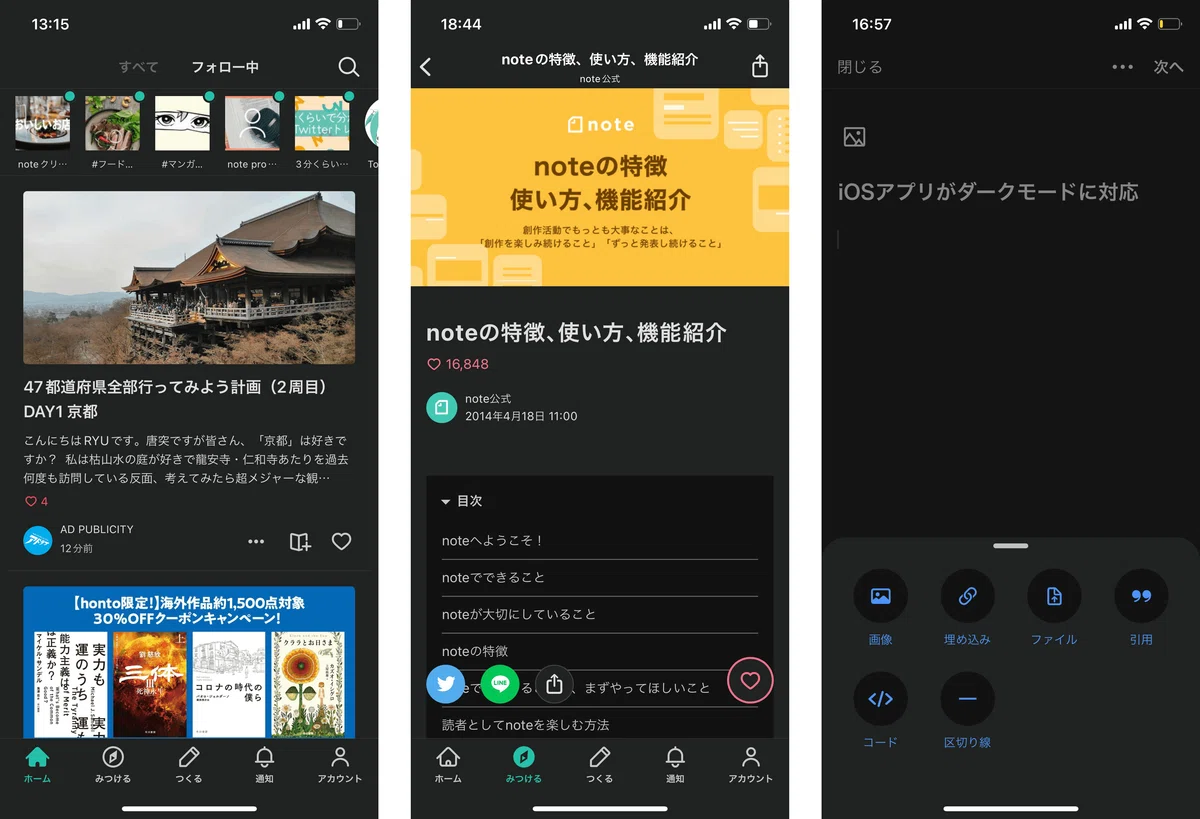
With this update, various screens such as the editor, home screen, and article screen will be displayed in Dark Mode.
We received numerous note feedback comments like "the screen is too bright and hurts my eyes" and "I often read articles before going to bed," which led to this improvement. Please update and try it out for yourself!
How to set up Dark Mode
To set it up, simply go to Apple's "Settings" app, tap "Display & Brightness," and select "Dark." When you change the appearance mode of your device, the app will also automatically display in Dark Mode.
For more details, please see the Apple support page below.
※ There is no option to switch to Dark Mode within the app itself
Regarding Dark Mode support
Since iOS 13, when Apple introduced Dark Mode, the number of apps supporting it has increased, and we have received over 50 requests via note feedback and over 100 requests on Twitter.
Due to my physical condition, I cannot look at a white screen for long periods, so I am eager for Dark Mode support. I have been writing in a separate app until now, but as the number of situations where I must use the dedicated editor increases, it is becoming difficult.
In recent years, Dark Mode has become more common, and I use various apps in Dark Mode. However, it is a burden on my eyes when I have to switch back and forth to apps that only have a normal light mode. I especially read note leisurely at night, so I would be happy if Dark Mode were available.
It took some time until the release, but we finally made it happen. Thank you so much to everyone who sent in their feedback!
Incidentally, we have actually been considering Dark Mode development since 2019.
Since its release, note has been a service with a strong "white" impression, reminiscent of paper and notebooks. If we support Dark Mode and allow users to switch, this atmosphere will change significantly.
Also, in terms of design, there were many things to consider for visibility and readability, such as not just changing white to black, but also how to express the note green color (#41C9B4) and the red color of the "Like" button (#EA3F60) in Dark Mode.
We asked Mr. Ueoka, who was in charge of implementing the Dark Mode feature for the iOS app, and Ms. Sawanobori, who was in charge of the design.
Ueoka: Over the past year, we have received quite a few requests regarding Dark Mode, so we started development in earnest. We began by organizing the existing note colors and proceeded to support Dark Mode one color at a time. After that, we made fine adjustments until the release, such as individual handling of illustrations and note logos used within the app, and excluding screens that do not support Dark Mode. I think Dark Mode is a perfect feature for the first release of the new year and the timing of the app's major update (6.0.0). Please try it out!
Sawanobori: Thank you to all the creators who raised
requests. Thanks to the many requests, we were able to raise the priority of this initiative and successfully reach the release. Since the note app incorporates some web displays, we were able to prepare the mechanism with the cooperation of the web engineers. That said, this is a quick release state, so we will continue to make it easier to use based on your feedback, so please keep sending us your opinions.
Dark Mode support for the web browser version and Android app is undecided.
Currently, only the iOS app (version 6.0.0 or later) supports Dark Mode.
While we are continuing to consider it, support for Dark Mode on the web browser version (PC/smartphone) and the Android app is currently undecided.
We consider improvements based on the feedback and requests from our creators. We will continue to work on creating an environment where it is easier to continue your creative activities. Please let us know your thoughts.
For improvements and requests regarding features, please visit note feedback.
For other inquiries, please use the request submission form.
A list of previous improvements is summarized in this article.