
[Advertisement] Amazon Exclusive Catalog "Auto-Targeting Ads"

If it's not seen, it won't be bought
The flow of selling products on Amazon follows the sequence: "Seen ⇒ Clicked ⇒ Purchased." In other words, no matter how good a catalog you create, it will not sell without the initial step of being "
seen." In particular, newly created catalogs do not have active keywords and are in a state of
low impressions (number of displays).Ads are what resolve this issue.If you are unsure about Amazon ads or don't know where to start, this is the one:
Amazon Auto-Targeting Ads.By using Amazon's "
Auto-Targeting Ads," Amazon automatically sets up the ads, making it easy to increase impressions (number of displays).
Setup procedure for Auto-Targeting Ads

Seller Central Menu ⇒ Advertising ⇒ Campaign Manager
Click "Create Campaign"
Click "Continue" for "Sponsored Products." Enter the following items.
[Ad Group Name]

Enter any name, such as the advertised product name.
(If not entered, the already populated name will be reflected)
[Product]

Select the product you want to advertise and click "Add."
(You can search by product name)
[Targeting]

Select "Auto-targeting"
[Auto-targeting]

Set "Default bid" to "20-40" (the image above shows the default value of 40)
* When setting up ads for the first time as a trial, around 20 yen is reasonable based on experience.
[Negative Keyword/Product Targeting]

Do not set
[Campaign Bidding Strategy]

Set to "Dynamic bids - up and down" (default value).
* This is a mechanism where Amazon automatically increases the bid if it determines the ad effect is high,
and automatically decreases the bid if it determines the effect is low.
* If you are setting this up as a trial, it is recommended to set it to "Down only." This prevents advertising costs from ballooning. (Use "Up and down" if you want to be aggressive.)
[Settings]
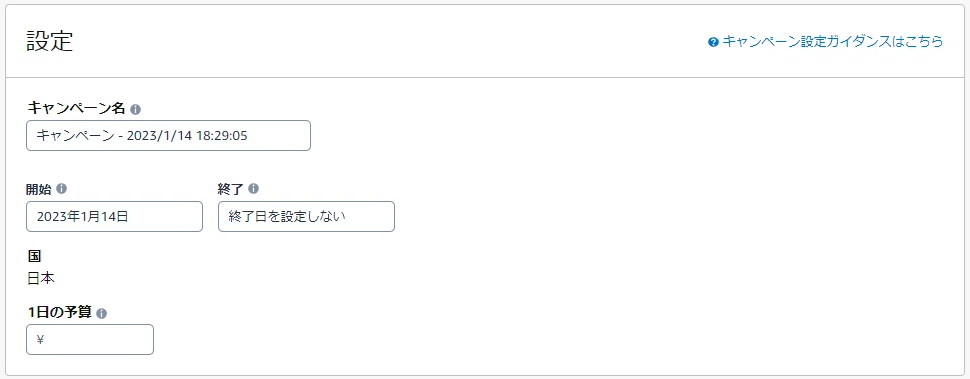
[Campaign Name]
Set an arbitrary campaign name (e.g., XXXX Sales Promotion)
[Start] [End]
Set the start date to today and leave the end date unset
[Daily Budget]
Set an arbitrary limit (Amazon recommended value is 1,000 yen or more)

Once you have finished all settings, please click "Launch Campaign".
Ad operations will begin in a few hours.
You can check the status of your ads again in the "Advertising Campaign Manager".
Notes
・If product names or catalog keywords are not set properly, auto-targeting may not function effectively.
・For products without reviews, the conversion rate may be low and advertising costs may increase, but for new catalogs, increasing exposure is the priority.
・Additionally, as the number of reviews increases, cost-effectiveness will improve. Furthermore, sales generated through ads will boost the catalog's rating, which can also lead to an increase in sales from general (organic) searches, so you can expect an increase in sales beyond just the ads.
・The content may change due to Amazon specification updates.
Please refer to Amazon Seller University for the latest information.
Amazon Seller University "Sponsored Products Ads"
(Please log in to Seller Central to view)
https://sellercentral.amazon.co.jp/learn/courses?moduleId=0171c972-c50e-4437-a7a5-9f0254a042bd&courseId=5326d9a0-6588-41b2-a5a5-0b414fc99b05&refTag=su_course_accordion&modLanguage=Japanese&videoPlayer=airy