
A New Era of Text Editing and Conversion from Polite to Plain Style: Introducing the 'Editing GPT' Tool Using AI and GAS

In this article, I provide a tool that allows AI to edit your text and convert it from polite style (desu/masu) to plain style (da/dearu). You are free to use the tool itself for personal use, but please avoid distributing it directly to third parties; instead, please share the URL of this article. If any bugs are found, I plan to fix them as needed and post them on this page. Also, please refrain from reprinting the file itself on other sites without permission. Additionally, since usage may change and it may suddenly become unavailable, please use the tool and API at your ownrisk.
Text Editing Support Tool 'Editing GPT'
Please copy and use it from the link below.
1. Introduction
The concept this time is to realize 'making it easier to edit text and convert it from polite style (desu, masu) to plain style (da, dearu)'.
The use of artificial intelligence is only for the 'editing' function, while the 'conversion from polite to plain style' is processed by executing the following script in Google Apps Script (hereinafter referred to as GAS).
function replaceZyotai(input_text) {
   const replaceTextBox = [    [')', ')'],
      [')', ')'],
    ['(', '('],

    ['見ること.できる', '見られる'],
    ['書くこと.できる', '書ける'],
    ['読むこと.できる', '読める'],
    ['食べること.できる', '食べられる'],
    ['行うこと.できる', '行える'],
    ['喋ること.できる', '喋られる'],
    ['挙げること.できる', '挙げられる'],
    ['知ること.できる', '知れる'],
    ['起こすこと.できる', '起こせる'],
    ['行うこと.できる', '行える'],

    ['すること.できる', 'できる'],
    ['やること.できる', 'やれる'],
    ['すること.できます', 'できる'],
    ['させること.できます', 'できる'],
    ['やること.できます', 'やれる'],
    ['すること.できません', 'できない'],
    ['やること.できません', 'やれない'],
    ['できるようにすること', '可能にすること'],
    ['しているわけではありません', 'していない'],
    ['されているわけではありません', 'されていない'],
    ['できるようになった', '可能になった'],

    ['されることを', 'を'],
    ['されることに', 'に'],
    ['されることは', 'は'],
    ['されることも', 'も'],
    ['することを', 'を'],
    ['することに', 'に'],
    ['することは', 'は'],
    ['することも', 'も'],
    ['でしたら', 'なら'],

    ['というような', ''],
    ['ということ', '」'],
    ['というもの', '」'],
    ['という', ''],

    ['負います', '負う'],
    ['負いません', '負わない'],
    ['着ます', '着る'],
    ['過ぎます', '過ぎる'],
    ['閉じます', '閉じる'],
    ['落ちます', '落ちる'],
    ['煮ます', '煮る'],
    ['浴びます', '浴びる'],
    ['見ます', '見る'],
    ['含みます', '含む'],
    ['用います', '用いる'],
    ['作ります', '作る'],
    ['返します', '返す'],
    ['立ちます', '立つ'],
    ['付きます', '付く'],
    ['づきます', 'づく'],
    ['帰ります', '帰る'],
    ['並びます', '並ぶ'],
    ['並びます', '並ぶ'],
    ['囲みます', '囲う'],
    ['呼びます', '呼ぶ'],
    ['使います', '使う'],
    ['行いません', '行わない'],
    ['行います', '行う'],
    ['おこないました', 'おこなった'],
    ['言います', '言う'],
    ['言いません', '言わない'],
    ['いきます', 'いく'],
    ['いいます', 'いう'],
    ['除きます', '除く'],
    ['分かります', '分かる'],
    ['分かりません', '分からない'],
    ['思います', '思う'],
    ['思いません', '思わない'],
    ['感じます', '感じる'],
    ['出来ます', '出来る'],
    ['できます', 'できる'],
    ['受け取ります', '受け取る'],
    ['従います', '従う'],
    ['知っています', '知っている'],
    ['知りません', '知らない'],
    ['限りません', '限らない'],
    ['限ります', '限る'],
    ['きました', 'きた'],
    ['学びました', '学んだ'],
    ['行いました', '行った'],

    ['見えます', '見える'],
    ['見せます', '見せる'],
    ['捨てます', '捨てる'],
    ['食べます', '食べる'],
    ['入れます', '入れる'],
    ['伝えます', '伝える'],
    ['経ます', '経る'],
    ['尋ます', '尋ねる'],
    ['考えます', '考える'],
    ['考えます', '考える'],


    ['していただく', 'してもらう'],
    ['させていただきます', 'させてもらう'],
    ['ご覧になる', '見る'],
    ['ご覧ください', '見よ'],
    ['ご参照ください', '参照せよ'],
    ['ご注意ください', '注意せよ'],
    ['ご確認ください', '確認せよ'],
    ['お聞かせください', '述べよ'],
    ['ご連絡ください', '連絡せよ'],
    ['ご了承ください', '了承せよ'],
    ['ご説明ください', '説明せよ'],
    ['お帰りください', '帰宅せよ'],
    ['ご依頼ください', '依頼せよ'],
    ['お知らせください', '知らせよ'],
    ['お問い合わせください', '問い合わせよ'],
    ['お願いいたします', '頼む'],
    ['お願いします', '頼む'],
    ['ご利用いただきます', '利用してもらう'],
    ['お読みいただきますよう', '読むよう'],
    ['お読みいただくよう', '読むよう'],
    ['お読みになり', '読み'],
    ['頂きます', '頂く'],
    ['いただきます', 'いただく'],
    ['いただくこと', 'もらうこと'],
    ['場合がございます', '場合がある'],
    ['場合もございます', '場合もある'],

    ['ありませんでした', 'なかった'],
    ['わけではありませんが、', 'わけではない。しかし、'],
    ['わけではありませんが', 'わけではないが'],

    ['につきましては', 'は'],
    ['におかれては', 'は'],
    ['におかれましては', 'は'],
    ['ついては', 'は'],
    ['ですから', 'つまり'],
    ['ですが、', 'だ。しかし、'],
    ['でした', 'だ'],
    ['おきましょう', 'おく'],
    ['あります', 'ある'],
    ['あるでしょう', 'あるだろう'],
    ['するでしょう', 'するだろう'],
    ['しましょう', 'しよう'],
    ['できません', 'できない'],
    ['しますが、', 'する。しかし、'],
    ['しますが', 'するが'],
    ['していきましょう', 'していこう'],
    ['していません', 'していない'],

    ['ようです', 'ようだ'],
    ['ようでしょう', 'ようだろう'],
    ['ようでした', 'ようだった'],
    ['そうです', 'そうだ'],
    ['そうでしょう', 'そうだろう'],
    ['そうでした', 'そうだった'],

    ['しております', 'している'],
    ['させていただいた', 'した'],
    ['構いません', '構わない'],
    ['かまいません', 'かまわない'],


    ['ご住所', '住所'],
    ['ご注文', '注文'],
    ['ご連絡', '連絡'],
    ['ご報告', '報告'],
    ['ご説明', '説明'],
    ['ご利用', '利用'],
    ['ご請求', '請求'],
    ['お客様', '客'],


    ['されませんが、', 'されない。しかし、'],
    ['されませんが', 'されないが'],
    ['されません', 'されない'],
    ['されているのです', 'されている'],

    ['してください', 'せよ'],
    ['しましたが、', 'した。しかし、'],
    ['しましたが', 'したが'],
    ['しました', 'した'],
    ['ました', 'た'],
    ['りました', 'った'],

    ['しまいましたが、', 'しまった。しかし、'],
    ['しまいましたが', 'しまったが'],
    ['しまいました', 'しまった'],

    ['なりましたが', 'なったが'],
    ['ましたが、', 'た。しかし、'],
    ['ましたが', 'したが'],

    ['ますが、', 'る。しかし、'],
    ['ですが', 'だが'],
    ['ますが', 'るが'],

    ['したいです', 'したい'],
    ['たいです', 'たい'],

    ['しれませんが、', 'しれない。しかし、'],
    ['しれませんが', 'しれないが'],
    ['しましたね', 'した'],

    ['やりましたね', 'やった'],
    ['ということです', 'ことだ'],
    ['ことです', 'ことだ'],

    ['ください', 'ほしい'],
    ['ておきます', 'ておく'],
    ['いますか', 'いるだろうか'],
    ['ますか', 'いるのだろうか'],

    ['ありがとうございました', 'ありがとう'],
    ['ありがとうございます', 'ありがとう'],
    ['おはようございます', 'おはよう'],
    ['よろしく', ''],
    ['いたします', 'する'],

    ['います', 'いる'],
    ['いました', 'いた'],
    ['なりません', 'ならない'],
    ['します', 'する'],
    ['させました', 'させた'],

    ['なりました', 'なった'],
    ['ありません', 'ない'],
    ['のです。', 'のだ。'],

    ['てみました', 'てみた'],
    ['でしょうか', 'だろうか'],

    ['いるのです', 'いるのだ'],
    ['いるのでした', 'いるのだった'],

    ['ますよね', 'るだろう'],
    ['ですよね', 'だろう'],
    ['ですね', 'だな'],
    ['でした', 'だった'],

    ['ません', 'ない'],
    ['られます', 'られる'],
    ['られました', 'られた'],
    ['ります', 'る'],
    ['ます。', 'る。'],
    ['です。', 'だ。'],
    ['です', '']
];
  for (let i = 0; i < replaceTextBox.length; i++) {
    const regExp = new RegExp(replaceTextBox[i][0], "g");
    const after = replaceTextBox[i][1];
    input_text = input_text.replace(regExp, after);
  };

  return input_text;
}
I converted a script I made previously, which was published on the internet as an Excel macro, into GAS using ChatGPT, but I couldn't find the original source site...
By the way, if you only want to use the function to convert text from polite to plain style, you do not need to register for the API described next. If you do not use the GPT editing function, it will convert the text in the 'Text to be edited' column to plain style as is.
2. API Usage Fees (Free Period Available)
This tool partially uses the OpenAI API. API stands for Application Programming Interface, which is a set of rules and procedures for software to interact and communicate with each other. By using an API, one application can easily utilize the functions or data of another application. For example, by using the OpenAI API, you can incorporate AI technology developed by OpenAI into your own applications or web services.
Usage Fees
Usage fees vary depending on the model used and the number of tokens. For details, please see the OpenAI pricing page.
Free Period
The OpenAI API can be used for free for 3 months. During this period, you can receive the following benefits.
$5 in credits: Can be used to try out various models.
Access to all models: You can try all AI models provided by OpenAI.
3. Create an Account and Obtain an API Key at OpenAI
The following note explains in detail the process of creating an account to use the API and obtaining an API key.
4. Authorize Script Execution

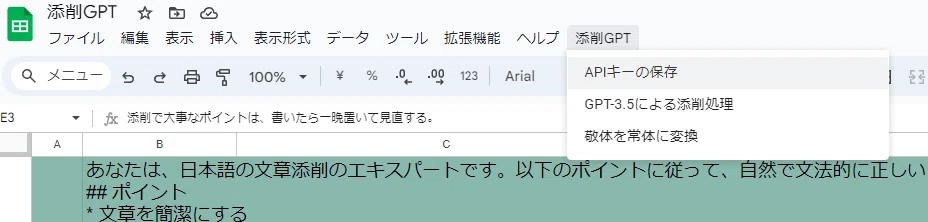
Please click the custom menu and then click 'Save API Key'.

When you use the 'Tenseki GPT' custom menu for the first time, a message will appear saying, 'Authorization is required to run scripts permitted for this document.' Please click 'Continue'.

After clicking 'Continue' and logging into your Google account, a pop-up will appear stating, 'This app is not verified by Google.' Click 'Advanced' in the bottom left, then click 'Go to Tenseki GPT (unsafe)' to proceed.


A pop-up will appear stating, 'Tenseki GPT wants to access your Google Account.' Please click 'Allow' at the bottom.

5. Save the API key to the spreadsheet
Once you have clicked 'Allow', click the custom menu again and click 'Save API Key'.
An 'API Key' pop-up dialog will appear. Paste the API key you obtained earlier into the 'Value' field and click 'Save'. Also, please ensure that your API key is not shared with any third parties.

6. Enter text into the 'Text to be edited' column.

The green section at the top contains detailed editing instructions for GPT-3.5 as a prompt. It will work fine as is, but please feel free to modify the prompt if necessary.
Column B contains a column labeled 'Name or Item'. The text entered in this column is not used for editing, so please use it as needed.
Column C contains the 'Text to be edited' column. Enter the text you want the AI to edit here, or copy and paste it from another document. I have already entered some sample text for your reference. Please delete the sample text when you are ready to use it for your own work.
7. Edit text using GPT
How to use
Click 'Edit with GPT-3.5' from the custom menu to start the process. When the script runs, a pop-up will appear asking, 'Do you want to process the next row as well?'


Select 'OK'... to continue processing from the next row.
Select 'No'... to process only the current row and terminate the script.

Sometimes the original text before correction may also be generated as shown below; in that case, please delete the unnecessary parts.
If you want to grow your website, leave it to a web marketer who knows everything about the web.
After correction: If you want to grow your website, leave it to a web marketer who is well-versed in everything about the web.

Evaluation of Editing Performance
In the editing process, it works well for the basic parts of sentences. In particular, good results are seen regarding checks for subject-predicate agreement. This means it appropriately matches the content described by the sentence with its main components. It also seems to correctly adjust the placement of adverbs such as 'rapidly'.
However, there are some challenges in the text editing process. For example, the distinction between active and passive forms, such as 'shiteiru' (doing) and 'sareteiru' (being done), is sometimes not corrected well. This is thought to be because it is difficult to judge who is performing the action indicated by the sentence (active form) and who it is being performed upon (passive form). Also, corrections regarding variations in notation (inconsistency in writing) are not stable.
Overall, while this editing process is excellent for basic grammar checks, there is room for improvement regarding more complex stylistic adjustments and consistency in notation.
8. Converting Polite Style to Plain Style
Clicking 'Convert Polite to Plain' from the custom menu starts the process. If you do not register an API and do not use the AI-based editing function, it will convert using the text in 'Text to be edited'.

It is hard to see, but from the left, it is 'Text to be edited', 'Editing by GPT-3.5', and 'Convert Polite to Plain'. Subject-predicate mismatches, sentence length, and structure are corrected, and it is further converted into plain style.

9. Conclusion
This time, I created a tool to have AI edit text. I hope that by having AI perform basic text editing, we can prevent human error as much as possible. In creating this, I referred to the following sites for API usage and application to GAS.
Also, in creating the script, I naturally used GPT-4.
For the editing process, I took an approach that uses OpenAI's GPT model to understand context and grammar and correct them into more natural Japanese expressions. While the GPT model can show a deep understanding of sentence content and grammar, challenges still remain regarding specific writing styles and delicate expressions.
For the conversion from polite to plain style, I used the powerful string processing functions of Google Apps Script. This makes it possible to perform text conversion processing quickly and efficiently. This script focuses on converting commonly used polite expressions into casual expressions.
Moving forward, the goal is to further improve these functions to achieve more accurate and natural Japanese expressions. I also intend to actively incorporate user feedback to improve the features.