
IC-Light on ComfyUI

On June 16, 2025, I made changes to the Upscaler setup.
I have created a node in ComfyUI that implements lighting effects using IC-Light functionality.

Currently, since the IC-Light model itself only supports SD1.5, the workflow inevitably becomes quite roundabout, requiring the base image to be created in SDXL before moving into the SD1.5 process. However, being able to specify the position and shape for applying lighting effects is something that simply cannot be done in Forge.
(Furthermore, at this point, isn't the IC-Light extension for Forge full of bugs and essentially non-functional anyway?)
I believe the true value of ComfyUI lies in the ability to build nodes like this.
As has become standard for the nodes I build, I have included high-speed processing using PCM 16Steps this time as well. I have incorporated PCM LoRA for both SDXL and SD1.5, achieving high-speed processing at 16 steps for both. Additionally, the design allows for LoRA to be applied to the base image generation as well.
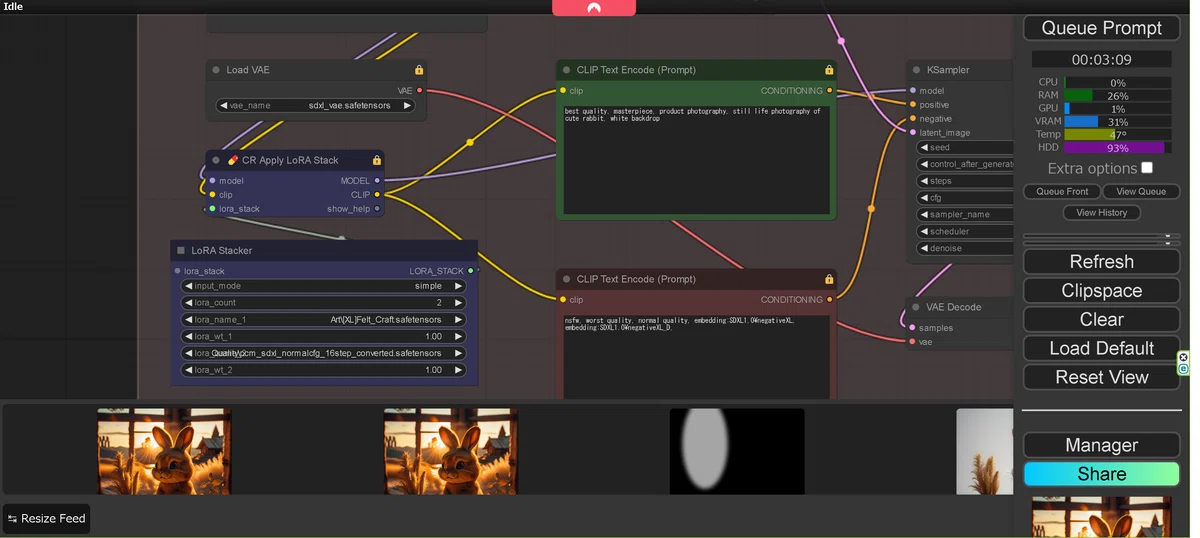
I will explain the flow below, but first, as shown in the diagram below, we generate the image at the base image stage using the SDXL base. As mentioned earlier, since we are using the 16-step PCM LoRA, the KSampler is optimized for it.

Please refer to the following for information regarding PCM LoRA.
Since IC-Light can only process in SD1.5, the image generated in SDXL is first downscaled to 768x768 pixels for processing in SD1.5. Here, the 16-step PCM LoRA for SD1.5 is applied again.
Please download the model for SD1.5 IC-Light from below.
The diagram below shows the core of this node, where you can specify the shape and XY coordinates for applying the lighting effects.

The background is imported via IP-Adapter. Naturally, this is also based on SD1.5, so the model used is for SD1.5.

Please download the model from below.
The model.safetensors file for Clip can be downloaded from the link below.
For upscaling, I am using the familiar CCSR.

Please download the model for CCSR from below.