


这里写自定义目录标题
有人肯定会说,这么简单的事情为什么不直接用phpstudy或者WampServer
我只想问你:
集成环境有意思吗?
你知道怎么配置吗?
你了解他运行的逻辑吗?
一个优秀的开发者,都应该是拿源码自己动手玩的。
你可能还会说人家都用Linux你这还捣鼓Windows,太OUT了!抱歉,今天的主题就是WNMP安装,莫要扯远。
MariaDB安装与配置
为什么不是用Mysql这个问题您自己去品,细细的品!
我是真的不想吐槽网上的各种安装方法了,一个教程有问题其它博客也就只知道转载,错的也不纠正。
任何东西都要自己实践之后作出正确的记录才对其它人有帮助。
下载数据库


安装数据库
在你的任意盘创建一个WNMP目录,将下载下来的MariaDB解压COPY到此目录

添加环境变量

#初始化
mysql_install_db --datadir=D:\WNMP\mariadb-10.5.3-winx64\data --service=MariaDB --password=123456

找到系统服务设置一下

编辑配置文件
D:\WNMP\mariadb-10.5.3-winx64\data\my.ini

[mysqld]
datadir=D:/WNMP/mariadb-10.5.3-winx64/data
collation-server=utf8mb4_general_ci
init-connect='SET NAMES utf8mb4'
character-set-server=utf8mb4
[client]
plugin-dir=D:/WNMP/mariadb-10.5.3-winx64/lib/plugin
default-character-set=utf8mb4
启动服务
net start MariaDB

PHP安装与配置
如果需要装MVC++各种组件自行去微软下载安装,建议找一个集成包安装(微软常用运行库合集_64位_2018.10.28)
下载PHP

安装PHP
将下载下来的PHP解压COPY到此D盘WNMP目录

添加环境变量

php -v

编辑配置文件
#将D:\WNMP\php-7.4.6-nts-Win32-vc15-x64\php.ini-production 复制一份改名为php.ini修改以下配置项
date.timezone = Asia/Shanghai
expose_php = off
max_execution_time = 0
memory_limit = 4096M
display_errors = On
cgi.fix_pathinfo=0
extension_dir = "D:\WNMP\php-7.4.6-nts-Win32-vc15-x64\ext"

#扩展
extension=mbstring
extension=mysqli
extension=bz2
extension=curl
extension=gd2
extension=pdo_mysql
extension=openssl
extension=pgsql

#增加两个扩展,自行到网上下载
extension=php_apcu.dll
extension=php_xdebug-2.9.5-7.4-vc15-nts-x86_64.dll
Nginx安装与配置
下载Nginx

安装Nginx
将下载下来的Nginx解压COPY到此D盘WNMP目录

编辑配置文件
#user Allen;
worker_processes  4;
events {
    worker_connections  1024;
}
http {
    include       mime.types;
    default_type  application/octet-stream;
    sendfile      on;
    keepalive_timeout  65;
    log_format main '$remote_addr || $remote_user || $time_local || $request || $status || $body_bytes_sent || $http_referer || $http_user_agent || $http_x_forwarded_for';
}
编辑启动脚本
RunHiddenConsole.exe 此文件为隐藏CMD窗口,请自行到网上下载后放到C:\Windows\System32目录下。
D:\WNMP\start.bat
@echo off
echo Stopping nginx...
taskkill /F /IM nginx.exe > nul
echo Stopping PHP FastCGI...
taskkill /F /IM php-cgi.exe > nul
echo Stopping MariaDB...
net stop MariaDB
echo Starting MariaDB...
net start MariaDB
REM Windows 下无效
REM set PHP_FCGI_CHILDREN=5
REM 每个进程处理的最大请求数,或设置为 Windows 环境变量
set PHP_FCGI_MAX_REQUESTS = 1000
echo Starting PHP FastCGI...
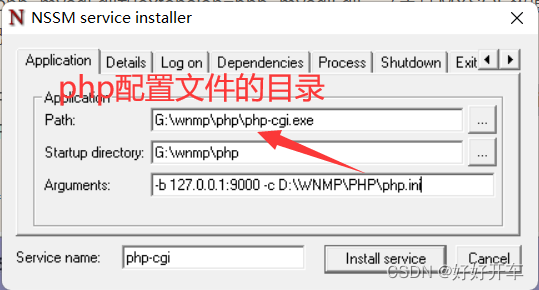
rem 下面这里的分别替换成你的php-cgi.exe和php.ini的路径 ,后面的-b,-c等参数必须保留且注意前后空格
RunHiddenConsole D:\WNMP\php-7.4.6-nts-Win32-vc15-x64\php-cgi.exe -b 127.0.0.1:9000 -c D:\WNMP\php-8.1.7-nts-Win32-vs16-x64\php.ini
echo Starting nginx...
rem 注意替换成你的nginx目录
RunHiddenConsole D:\WNMP\nginx-1.18.0\nginx.exe -p D:\WNMP\nginx-1.18.0
tasklist /fi "imagename eq nginx.exe"
tasklist /fi "imagename eq php-cgi.exe"
pause
跑一个phpMyadmin试试
新建一个www目录,下载一个phpMyadmin解压到www目录
配置主机配置文件
D:\WNMP\www\phpMyAdmin-5.0.1-all-languages\http.conf

server {
    charset               utf-8;
    client_max_body_size  128M;
    listen                81; ## listen for ipv4
    server_name           db.zctech.tech;
    root                  D:\WNMP\www\phpMyAdmin-5.0.1-all-languages;
    index                 index.php;
    access_log            D:\WNMP\logs\db.zctech.tech.access.log;
    error_log   		  D:\WNMP\logs\db.zctech.tech.error.log;
    location ~ \.php$ {
        include fastcgi_params;
        fastcgi_param SCRIPT_FILENAME $document_root$fastcgi_script_name;
        fastcgi_pass 127.0.0.1:9000;
        try_files $uri =404;
    }
    location ~* /\. {
        deny all;
    }
}

#在Nginx配置文件http中引入D:\WNMP\www\phpMyAdmin-5.0.1-all-languages\http.conf
include D:\WNMP\www\phpMyAdmin-5.0.1-all-languages\http.conf;
跑起来
#启动start.bat


OK!完成。


 扫一扫
扫一扫


 967
967

 被折叠的 条评论
为什么被折叠?
被折叠的 条评论
为什么被折叠?
 到【灌水乐园】发言


