


 文章介绍了如何使用Cesium库在JavaScript中创建可定制的LabelPlot组件,该组件用于在地图上显示弹窗,支持不同类型和位置调整,并能处理事件和关闭操作。还展示了与地图视图的集成以及弹出对话框的功能。
//封装js
class LabelPlot {
  constructor(info) {
    let _this = this;

    _this.viewer = info.viewer; //弹窗创建的viewer
    _this.geometry = info.position; //弹窗挂载的位置
    _this.type = info.properties.type; //label-0 || dialog -1 || longer-2
    if (!info || !info.viewer || !info.position) {
      throw new Error("缺少构造参数!");
    }

    let contentID = "pointDialog" + info.properties.id;
    _this.id = contentID;

    _this.ctn = $("<div class='LabelPlot' id =  '" + _this.id + "'>");
    $(_this.viewer.container).append(_this.ctn);

    _this.ctn.append(info.properties.dom);
    try {
      _this._render(_this.geometry);
      _this.eventListener = _this.viewer.clock.onTick.addEventListener(function (clock) {
        _this._render(_this.geometry);
      })
    } catch (e) {}


  }

  _render(geometry) {
    let _this = this;
    let position = Cesium.SceneTransforms.wgs84ToWindowCoordinates(_this.viewer.scene, geometry);
    if (position) {
      if(_this.type == 0){
        _this.ctn.css("left", position.x );
        _this.ctn.css("top", position.y);
      }else if(_this.type == 1){
        _this.ctn.css("left", position.x + 30);
        _this.ctn.css("top", position.y - (_this.ctn.get(0).offsetHeight) / 2);
      }else if(_this.type == 2){
        _this.ctn.css("left", position.x + (_this.ctn.get(0).offsetWidth));
        _this.ctn.css("top", position.y - (_this.ctn.get(0).offsetHeight) / 2);
      }

    }
  }

  // 关闭当前标签
  close() {
    let _this = this;
    _this.ctn.remove();
    _this.viewer.clock.onTick.removeEventListener(_this.eventListener);
  }
}

export default LabelPlot
cesium公共js, main.js引入
import labelBeautifulHelper from './labelBeautifulHelper';

let mapView = {
	labelPlotList:{}	//集合


	// 坐标弹出框
  showPoint(dom,point,h,type){
    let height = h ||  0;
    var position = Cesium.Cartesian3.fromDegrees(Number(point.longitude), Number(point.latitude), Number(height));
    mapView.labelPlotList[point.name] = new labelBeautifulHelper({
      viewer: cViewer,
      position: position,
      properties: {
        id: point.id,
        dom,
        type:type || '0'
      },
      showBillboardPoint: true
    })

  },
// 删除全部
  closePoint(){
    if(Object.getOwnPropertyNames(mapView.labelPlotList).length != 0){
      for (let i in mapView.labelPlotList) {
        mapView.labelPlotList[i]?.close()
      }
      mapView.labelPlotList = {}
    }

  },

  // 删除单个
  closePointAlone(name){
    if (mapView.labelPlotList[name]) {
      mapView.labelPlotList[name]?.close();
      mapView.labelPlotList[name] = null;
      delete mapView.labelPlotList[name]
    }
  },
}
export default mapView
页面调用
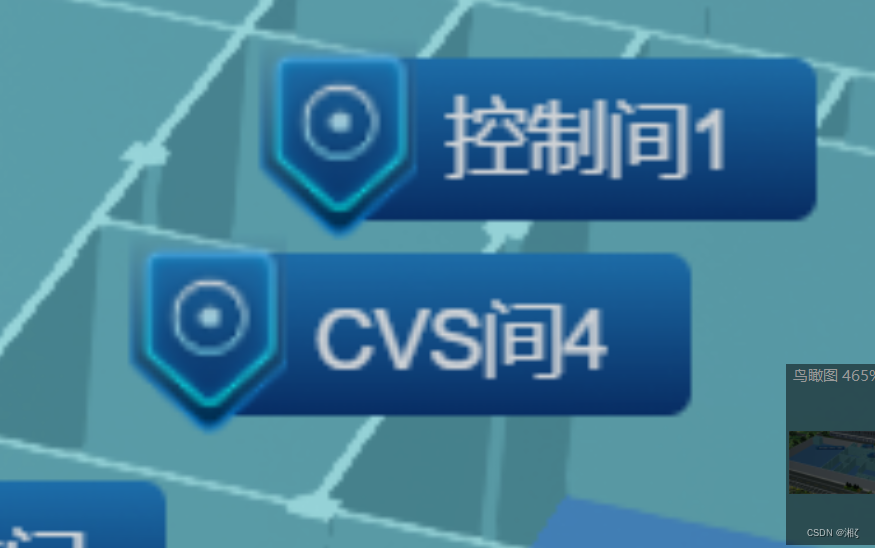
<!-- label-->
<div class="testpoints" v-if="points">
     <div v-for="item in roomInfoList" :key="item.id">
        <p class="flex flex-align pointLabel-sys pointLabel point"  @click="getRoom(item)" v-if="item.experimentName || item.experimentName !==''">
          <img src="~@/assets/images/icon/label-1.png" alt="">
          <span class="font-14 pl-11 fw-5">{{ item.showName }}</span>
        </p>

		<p class="flex flex-align pointLabel-gzj pointLabel" v-else >
            <img src="~@/assets/images/icon/label-2.png" alt="">
            <span class="font-14 pl-11 fw-5">{{ item.showName }}</span>
          </p>
     </div>
</div>


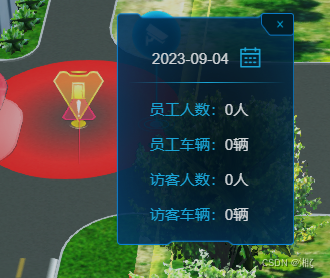
<!-- dialog -->
    <div class="LabelPlot-door" style="width: 200px;" v-if="labShow" ref="labPoint">
      <img src="@/assets/images/homePage/fire/close.png" class="close" @click="labClose">
      <p class="head flex flex-align flex-center">
        <span class="color-white pr-8 font-12">试验状态</span>
      </p>

      <ul class="listInfo mt-13">
        <template>
          <li>
          <span class="color-lan">实验名称:</span>
          <span class="color-white">{{ laboratoryInfo.experimentName }}</span>
        </li>

        <li>
          <span class="color-lan">客户名称:</span>
          <span class="color-white">{{ laboratoryInfo.customName }}</span>
        </li>
        <li>
          <span class="color-lan">主检人:</span>
          <span class="color-white">{{ laboratoryInfo.mainInspection }}</span>
        </li>
        </template>

      </ul>
    </div>
data(){
    return{
		points:false,
		roomInfoList:[]
	}
},

methods:{
//label
	addPoints(height){
		this.points = true;
		this.$nextTick(()=>{
        	let element = document.querySelectorAll(".pointLabel");
        	for (let i = 0; i < element.length; i++) {
          		this.$mapView.showPoint(element[i],this.roomInfoList[i],height)
        	}
      })
	},

//dialog  和lable一样
getRoom(v){
      this.labShow = true;
      this.laboratoryInfo = v;
      let obj = {
        name:'实验室',
        id:v.id,
        longitude:v.longitude,
        latitude:v.latitude,
      }


      this.$nextTick(()=>{
        this.$map.showPoint(this.$refs.labPoint,obj,this.height,2)
      })

    },
}
//css要添加到全局
.LabelPlot {
position: absolute;
z-index: 1;
pointer-events: auto;
left: 50px;
//label
.pointLabel {
height: 28px;
padding-left: 11px;
padding-right: 14px;
border-radius: 4px;
position: relative;
img {
width: 28px;
height: 36px;
position: absolute;
left: -11px;
}
&-sys {
background: linear-gradient(180deg, #5DBDFF 0%, #00FFFF 100%);
font-weight: 500;
color: #0B3777;
}
&-gzj {
background: #0F4585 linear-gradient(180deg, #2381C6 0%, #093372 100%);
color: #fff;
}
}
&-door {
position: relative;
width: 142px;
padding: 27px 7px 17px 10px;
background: url("~@/assets/images/homePage/fire/bg.png") no-repeat;
background-size: 100% 100%;
.close {
position: absolute;
top: 0;
right: 0;
width: 26px;
height: 18px;
}
.head {
width: 100%;
padding-bottom: 10px;
border-bottom: 1px solid;
border-image: linear-gradient(90deg, rgba(31, 199, 255, 0), rgba(31, 199, 255, 1), rgba(31, 199, 255, 0)) 1 1;
}
.listInfo {
width: 100%;
li {
width: 100%;
margin-top: 12px;
font-size: 12px;
padding-left: 17px;
}
}
.dateShow {
position: absolute;
right: -220px;
top: 0;
}
}
}
[原作者链接](https://blog.csdn.net/lc_2014c/article/details/111992912)


 扫一扫
扫一扫


 3398
3398

 被折叠的 条评论
为什么被折叠?
被折叠的 条评论
为什么被折叠?
 到【灌水乐园】发言


