


 本文总结了在iOS开发中如何使用UICollectionViewCell,包括基础使用方法和通过纯代码、XIB进行自定义的步骤,重点介绍了Cell的注册与重用策略,以及在XIB中添加组件和绑定的操作。
1 、使用UICollectionViewCell
.h文件
   #import <UIKit/UIKit.h>

@interface ViewController01 : UIViewController

@end

.m文件

#import "ViewController01.h"

@interface ViewController01 ()<UICollectionViewDataSource, UICollectionViewDelegate,UICollectionViewDelegateFlowLayout>


@end

@implementation ViewController01

- (void)viewDidLoad {
    [super viewDidLoad];
    //集合视图
    //UICollectionViewFlowLayout
UICollectionViewFlowLayout *flowLayout = [[UICollectionViewFlowLayout alloc] init];

    //flowLayout属性 自定义flowLayout
    //1.cell的大小
    flowLayout.itemSize = CGSizeMake(50,20);

    //2.行与行之间的最小间距
    flowLayout.minimumLineSpacing = 50;

    //3.同一行之间每个item之间的最小间距
    flowLayout.minimumInteritemSpacing = 30;

    //4.滚动方向(垂直和水平)
    flowLayout.scrollDirection = UICollectionViewScrollDirectionHorizontal;

    //创建collectionView
    UICollectionView *collectionView = [[UICollectionView alloc] initWithFrame:self.view.bounds collectionViewLayout:flowLayout];

    collectionView.delegate = self;
    collectionView.dataSource = self;

    //注册
    [collectionView registerClass:[UICollectionViewCell class] forCellWithReuseIdentifier:@"cellID"];

    [self.view addSubview:collectionView];
}

#pragma  mark - UICollectionView dataSource
//每组单元格(items)的个数
- (NSInteger)collectionView:(UICollectionView *)collectionView numberOfItemsInSection:(NSInteger)section {
    return 50;
}

//具体的单元格
- (UICollectionViewCell *)collectionView:(UICollectionView *)collectionView cellForItemAtIndexPath:(NSIndexPath *)indexPath{


    UICollectionViewCell *cell = [collectionView dequeueReusableCellWithReuseIdentifier:@"cellID" forIndexPath:indexPath];

    cell.backgroundColor = [UIColor redColor];

    UIView *view1 = [[UIView alloc]initWithFrame:CGRectMake(0, 0, 100, 100)];
    view1.backgroundColor = [UIColor orangeColor];

    //选中的背景视图
    cell.selectedBackgroundView = view1;

    return cell;

 }

#pragma mark - UICollectionViewDelegateFlowLayout
//每个单元格的size尺寸
-(CGSize)collectionView:(UICollectionView *)collectionView layout:(UICollectionViewLayout *)collectionViewLayout sizeForItemAtIndexPath:(NSIndexPath *)indexPath{

    CGFloat width = arc4random()%10*10+5;
CGFloat height = arc4random()%10*10+5;

    return CGSizeMake(width, height);
}

@end
2 自定义CollectionViewCell(纯代码 xib)
a)注册(TopCell Class) 重用
首先创建一个UICollectionViewCell
 .h文件

  #import <UIKit/UIKit.h>

@interface CollectionViewCell02 : UICollectionViewCell {

  UIImageView *imageView;
}

@end

.m文件

#import "CollectionViewCell02.h"

@implementation CollectionViewCell02

- (instancetype) initWithFrame:(CGRect)frame {

    self = [super initWithFrame:frame];

    if (self) {

        [self _createSubView];
    }
    return self;
}

- (void) _createSubView {

    CGRect frame = CGRectMake(0, 0, self.frame.size.width, self.frame.size.height);
    imageView = [[UIImageView alloc] initWithFrame:frame];
    imageView.backgroundColor = [UIColor redColor];
    imageView.center = self.contentView.center;

    [self.contentView addSubview:imageView];
}

@end

在ViewController中
.h文件
#import <UIKit/UIKit.h>

@interface ViewController02 : UIViewController

@end

.m文件

#import "ViewController02.h"
#import "CollectionViewCell02.h"

@interface ViewController02 ()<UICollectionViewDelegateFlowLayout, UICollectionViewDelegate, UICollectionViewDataSource>

@end

@implementation ViewController02

- (void)viewDidLoad {
    [super viewDidLoad];

    UICollectionViewFlowLayout *flowLayout = [[UICollectionViewFlowLayout alloc] init];
    flowLayout.itemSize = CGSizeMake(60, 60);
    flowLayout.minimumLineSpacing = 30;
    flowLayout.minimumInteritemSpacing = 10;
    flowLayout.scrollDirection = UICollectionViewScrollDirectionVertical;

    UICollectionView *collectionView = [[UICollectionView alloc] initWithFrame:self.view.frame collectionViewLayout:flowLayout];

    collectionView.dataSource = self;
    collectionView.delegate = self;

    //注册
    [collectionView registerClass:[CollectionViewCell02 class] forCellWithReuseIdentifier:@"cell"];

    [self.view addSubview:collectionView];

}


#pragma mark - 代理方法的实现
- (NSInteger) collectionView:(UICollectionView *)collectionView numberOfItemsInSection:(NSInteger)section {
    return 50;
}

- (UICollectionViewCell *) collectionView:(UICollectionView *)collectionView cellForItemAtIndexPath:(NSIndexPath *)indexPath {

    CollectionViewCell02 *cell = [collectionView dequeueReusableCellWithReuseIdentifier:@"cell" forIndexPath:indexPath];
//    cell.backgroundColor = [UIColor redColor];

    return cell;
}

@end
b)注册(Nib ) 重用
先创建一个UICollectionViewCell文件,同是创建它的Xib文件。这里在里面添加了一个imageView,并进行了关联。

接下来使用cell:
.h文件
#import <UIKit/UIKit.h>
@interface ViewController03 : UIViewController
@end
.m文件
#import "ViewController03.h"
#import "CollectionViewCell03.h"
@interface ViewController03 ()<UICollectionViewDelegateFlowLayout, UICollectionViewDelegate, UICollectionViewDataSource>
@end
@implementation ViewController03
- (void)viewDidLoad {
[super viewDidLoad];
//集合视图
//UICollectionViewFlowLayout
UICollectionViewFlowLayout *flowLayout = [[UICollectionViewFlowLayout alloc] init];
//flowLayout属性 自定义flowLayout
//1.cell的大小
flowLayout.itemSize = CGSizeMake(120,80);
//2.行与行之间的最小间距
flowLayout.minimumLineSpacing = 30;
//3.同一行之间每个item之间的最小间距
flowLayout.minimumInteritemSpacing = 30;
//4.滚动方向(垂直和水平)
flowLayout.scrollDirection = UICollectionViewScrollDirectionHorizontal;
//创建collectionView
UICollectionView *collectionView = [[UICollectionView alloc] initWithFrame:self.view.bounds collectionViewLayout:flowLayout];
collectionView.delegate = self;
collectionView.dataSource = self;
//nib注册方法
UINib *CollectionViewCell = [UINib nibWithNibName:@"CollectionViewCell03" bundle:nil];
//注册
[collectionView registerNib:CollectionViewCell forCellWithReuseIdentifier:@"cell"];
[self.view addSubview:collectionView];
}
//代理
- (NSInteger) collectionView:(UICollectionView *)collectionView numberOfItemsInSection:(NSInteger)section {
return 50;
}
- (UICollectionViewCell *) collectionView:(UICollectionView *)collectionView cellForItemAtIndexPath:(NSIndexPath *)indexPath {
CollectionViewCell03 *cell = [collectionView dequeueReusableCellWithReuseIdentifier:@"cell" forIndexPath:indexPath];
return cell;
}
@end
**3 使用StoryBoard
重用(Identifier)**
使用StoryBoard不需要注册,直接用就行
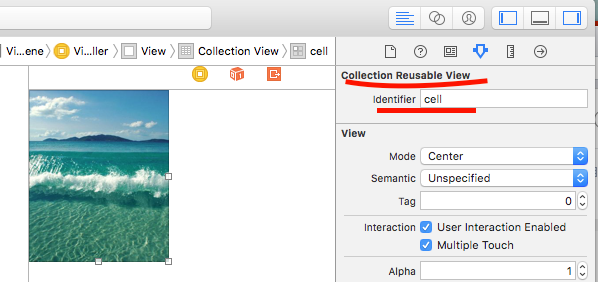
往StoryBoard中拖一个CollectionView,这个集合视图自带cell,为cell添加一个imageView,填充好图片,然后设好重用ID,如图:
使用如下:
.h文件:
#import <UIKit/UIKit.h>
@interface ViewController : UIViewController
@end
.m文件
#import "ViewController.h"
@interface ViewController ()<UICollectionViewDataSource, UICollectionViewDelegate,UICollectionViewDelegateFlowLayout>
@end
@implementation ViewController
- (void)viewDidLoad {
[super viewDidLoad];
}
#pragma mark - UICollectionView dataSource
//每组单元格(items)的个数
- (NSInteger)collectionView:(UICollectionView *)collectionView numberOfItemsInSection:(NSInteger)section {
return 50;
}
//具体的单元格
- (UICollectionViewCell *)collectionView:(UICollectionView *)collectionView cellForItemAtIndexPath:(NSIndexPath *)indexPath{
UICollectionViewCell *cell = [collectionView dequeueReusableCellWithReuseIdentifier:@"cell" forIndexPath:indexPath];
return cell;
}
@end


 扫一扫
扫一扫


 2146
2146

 被折叠的 条评论
为什么被折叠?
被折叠的 条评论
为什么被折叠?
 到【灌水乐园】发言


