


 本文介绍如何利用Groovy脚本和JMX技术,通过RuntimeMXBean获取关键的JVM信息,如类路径、系统属性、运行时间等。这些脚本可快速获取信息,适用于多种场景。
从J2SE 5开始 , Platform MBeans可以通过JMX监视和(甚至在某些情况下进行管理)有关JVM的某些关键特性。 此外,许多基于JVM的应用程序都添加了自己的启用JMX的功能以进行监视和管理。 在博客文章Groovy,JMX和Attach API中 ,我研究了如何使用Groovy,JMX和Attach API来显示许多平台提供的MBean。 在本文中,我将介绍一些更具体的脚本,这些脚本访问了RuntimeMXBean中可用的这些平台暴露的值的狭窄集中的子集。
我的前一篇文章展示了使用Groovy和JMX查看各种JVM详细信息的能力。 在大多数情况下,我不需要一次全部获取所有这些细节,而只是
需要一个或两个项目。 尽管我可以使用JConsole , VisualVM或什至是现代Java IDE之类的工具来查看这些详细信息,但有时我还是希望运行一个简单的脚本来提供所需的确切结果,而不是使用我所使用的通用JMX客户端需要启动并导航到该信息。 这是诸如本文中所示的简单脚本特别方便的地方。
本文中所有我的示例均假定运行要监视/管理的Java进程的人是运行脚本的同一人(相同的用户名),并且它们被用来监视在同一本地计算机上运行的Java进程。 此假设允许使用Attach API。 如果运行脚本的用户与运行Java进程的用户不同,或者如果脚本要在远程Java进程上运行,则将使用远程JMX的技术。 因为在这些示例中将使用Attach API,所以我将每个示例使用的代码放在每个示例调用的Groovy脚本文件中。 我所有脚本要使用的文件称为JmxServer.groovy然后显示。
JmxServer.groovy
/**
 * JmxServer.groovy
 *
 * Functions meant to be called by other scripts or tools that need to use
 * the Attach API to access an MBeanServerConnection to use to manage and
 * monitor a particular JVM (and possibly the application hosted in that JVM)
 * identified by the provided Process ID (pid)
 */

import javax.management.MBeanServerConnection
import javax.management.ObjectName
import javax.management.remote.JMXConnector
import javax.management.remote.JMXConnectorFactory
import javax.management.remote.JMXServiceURL

import com.sun.tools.attach.VirtualMachine

/**
 * Provide an MBeanServerConnection based on the provided process ID (pid).
 *
 * @param pid Process ID of Java process for which MBeanServerConnection is
 *    desired.
 * @return MBeanServerConnection connecting to Java process identified by pid.
 */
def static MBeanServerConnection retrieveServerConnection(String pid)
{
   def connectorAddressStr = "com.sun.management.jmxremote.localConnectorAddress"
   def jmxUrl = retrieveUrlForPid(pid, connectorAddressStr)
   def jmxConnector = JMXConnectorFactory.connect(jmxUrl)
   return jmxConnector.getMBeanServerConnection()
}

/**
 * Provide JMX URL for attaching to the provided process ID (pid).
 *
 * @param @pid Process ID for which JMX URL is needed to connect.
 * @param @connectorAddressStr String for connecting.
 * @return JMX URL to communicating with Java process identified by pid.
 */
def static JMXServiceURL retrieveUrlForPid(String pid, String connectorAddressStr)
{
   // Attach to the target application's virtual machine
   def vm = VirtualMachine.attach(pid)

   // Obtain Connector Address
   def connectorAddress =
      vm.getAgentProperties().getProperty(connectorAddressStr)

   // Load Agent if no connector address is available
   if (connectorAddress == null)
   {
      def agent = vm.getSystemProperties().getProperty("java.home") +
          File.separator + "lib" + File.separator + "management-agent.jar"
      vm.loadAgent(agent)

      // agent is started, get the connector address
      connectorAddress =
         vm.getAgentProperties().getProperty(connectorAddressStr)
   }

   return new JMXServiceURL(connectorAddress);
} 从脚本客户端的角度来看,在JmxServer.groovy定义的最重要的方法是JmxServer.groovy retrieveServerConnection(String)方法。 该方法除了将pid作为进程标识符之外,还使用该方法和对另一个方法的调用, retrieveUrlForPid(String,String)附加到该pid标识的Java进程,并提供关联的MBeanServerConnection实例。 找到合适的Java pid的最简单方法是使用jps (Java 7之前的Java和Java 7)或jcmd (仅Java 7+),正如我在最近用Groovy在GlassFish 3中启动AMX的文章中简要描述的那样。
基于提供的pid封装了用于获取特定JVM(Java进程) MBeanServerConnection实例的逻辑后,就很容易开始构建简单的Groovy脚本,该脚本使用提供的MBeanServerConnection来提供有关所讨论的JVM(Java进程)的特定所需详细信息。 请注意,所有这些示例脚本都与JmxServer.groovy文件位于同一目录中,因此不需要显式指定包或作用域详细信息。
出于各种原因(包括检测ClassNotFoundException和NoClassDefFoundError的原因),通常想知道特定JVM的类路径上有什么。 特定JVM的类路径由其平台MBean ( RuntimeMXBean的 'ClassPath'属性 ) 公开 ,可以通过下一个Groovy脚本轻松发现:
displayClasspath.groovy
#!/usr/bin/env groovy
def pid = args[0]
def javaRuntime = new javax.management.ObjectName('java.lang:type=Runtime')
def classpath = JmxServer.retrieveServerConnection(pid).getAttribute(javaRuntime, 'ClassPath')
println '\nClasspath for Java pid (${pid}):\n${classpath}\n' 相同的RuntimeMXBean还提供了启动类路径和Java库路径 。 接下来的两个代码清单显示了用于访问这两个代码的Groovy脚本。
displayBootClasspath.groovy
#!/usr/bin/env groovy
def pid = args[0]
def javaRuntime = new javax.management.ObjectName('java.lang:type=Runtime')
def bootClasspath = JmxServer.retrieveServerConnection(pid).getAttribute(javaRuntime, 'BootClassPath')
println '\nBoot Classpath for Java pid (${pid}):\n${bootClasspath}\n'
displayLibraryPath.groovy
#!/usr/bin/env groovy
def pid = args[0]
def javaRuntime = new javax.management.ObjectName('java.lang:type=Runtime')
def libraryPath = JmxServer.retrieveServerConnection(pid).getAttribute(javaRuntime, 'LibraryPath')
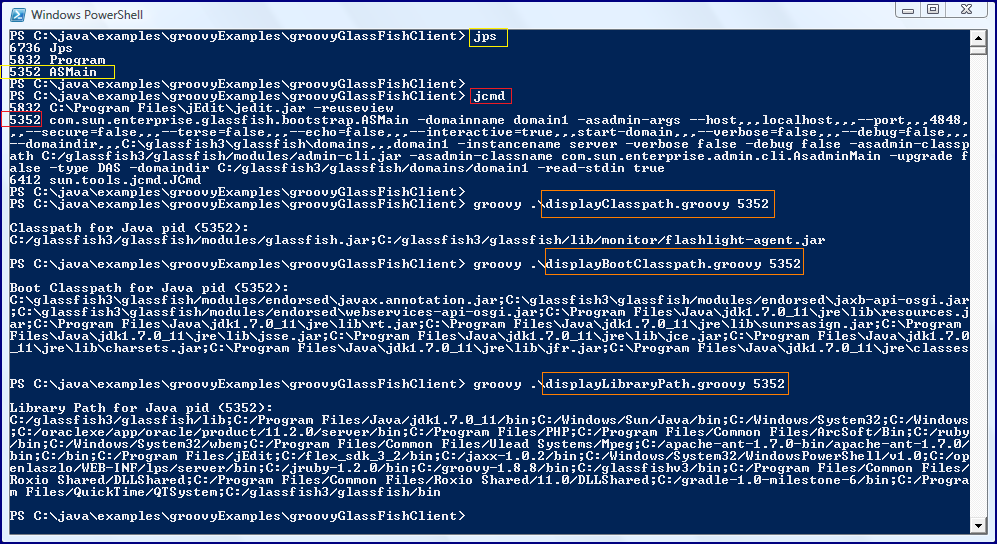
println '\nLibrary Path for Java pid (${pid}):\n${libraryPath}\n' 到目前为止显示的用于显示与查找类相关的详细信息的Groovy脚本(类路径,引导类路径和库路径)基本上都是相同的脚本,但是在每种情况下在RuntimeMXBean上RuntimeMXBean属性都不同。 在以下屏幕快照中,针对正在运行的GlassFish实例执行所有这三个脚本。 快照包括用于jps和jcmd的命令,以确定GlassFish实例的pid(5352)。
RuntimeMXBean不仅提供有关从何处加载类的信息,还可以提供更多的功能。 它还包括与JVM供应商有关的属性,例如名称和版本 ,但是我喜欢让脚本使用的其他三种方法是输入参数 , 系统属性和JVM运行时间 (和启动时间)。 接下来的三个Groovy代码清单显示了三个用于显示这些详细信息的脚本,每个代码段后都有一个屏幕快照,该屏幕快照针对最后一个示例中使用的同一GlassFish实例演示了该脚本的实际操作。
displayInputArguments.groovy
def pid = args[0]
def javaRuntime = new javax.management.ObjectName('java.lang:type=Runtime')
def inputArguments = JmxServer.retrieveServerConnection(pid).getAttribute(javaRuntime, 'InputArguments')
println '\nInput Arguments for Java pid (${pid}):\n${inputArguments}\n' 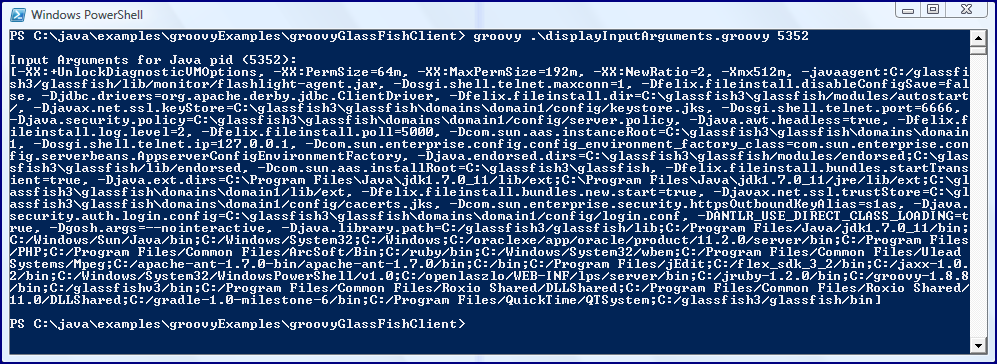
displaySystemProperties.groovy
#!/usr/bin/env groovy
def pid = args[0]
def javaRuntime = new javax.management.ObjectName('java.lang:type=Runtime')
def systemProperties = JmxServer.retrieveServerConnection(pid).getAttribute(javaRuntime, 'SystemProperties')
println '\nSystem Properties for Java pid (${pid}):\n${systemProperties}\n' 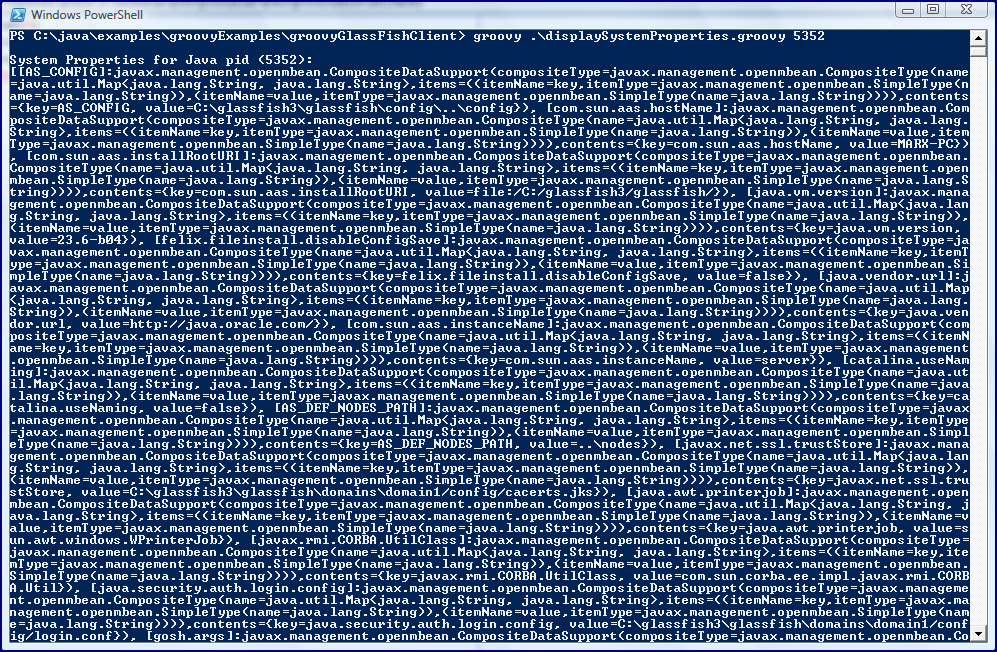
displayJvmUptime.groovy
#!/usr/bin/env groovy
def pid = args[0]
def javaRuntime = new javax.management.ObjectName('java.lang:type=Runtime')
def server = JmxServer.retrieveServerConnection(pid)
def startTime = server.getAttribute(javaRuntime, 'StartTime')
def uptime = server.getAttribute(javaRuntime, 'Uptime')
println '\nJava process pid (${pid}) was started at ${new Date(startTime)} and has been up for ${uptime} ms.\n' 
我已经用此帖子演示了简单的Groovy脚本,这些脚本从JVM的Platform RuntimeMXBean获取信息,例如JVM的启动时间和正常运行时间,JVM进程的系统属性和输入参数,以及路径信息,例如classpath,boot classpath和库。路径。 尽管可以通过JConsole,VisualVM和Java IDE之类的工具获得这些信息(它们都从与这些脚本相同的来源获得信息!),但是这些脚本有时会很有用(运行时可以更快地运行,并且可以包含在其他脚本中,例如)。
参考:在Inspired by Actual Events博客上,由我们的JCG合作伙伴 Dustin Marx 使用Groovy,JMX和RuntimeMXBean监视JVM的关键特性 。


 扫一扫
扫一扫


 5326
5326

 被折叠的 条评论
为什么被折叠?
被折叠的 条评论
为什么被折叠?
 到【灌水乐园】发言


